Redback Technologies
Installation Manual - Redback Smart Hybrid System - v 2.0
45
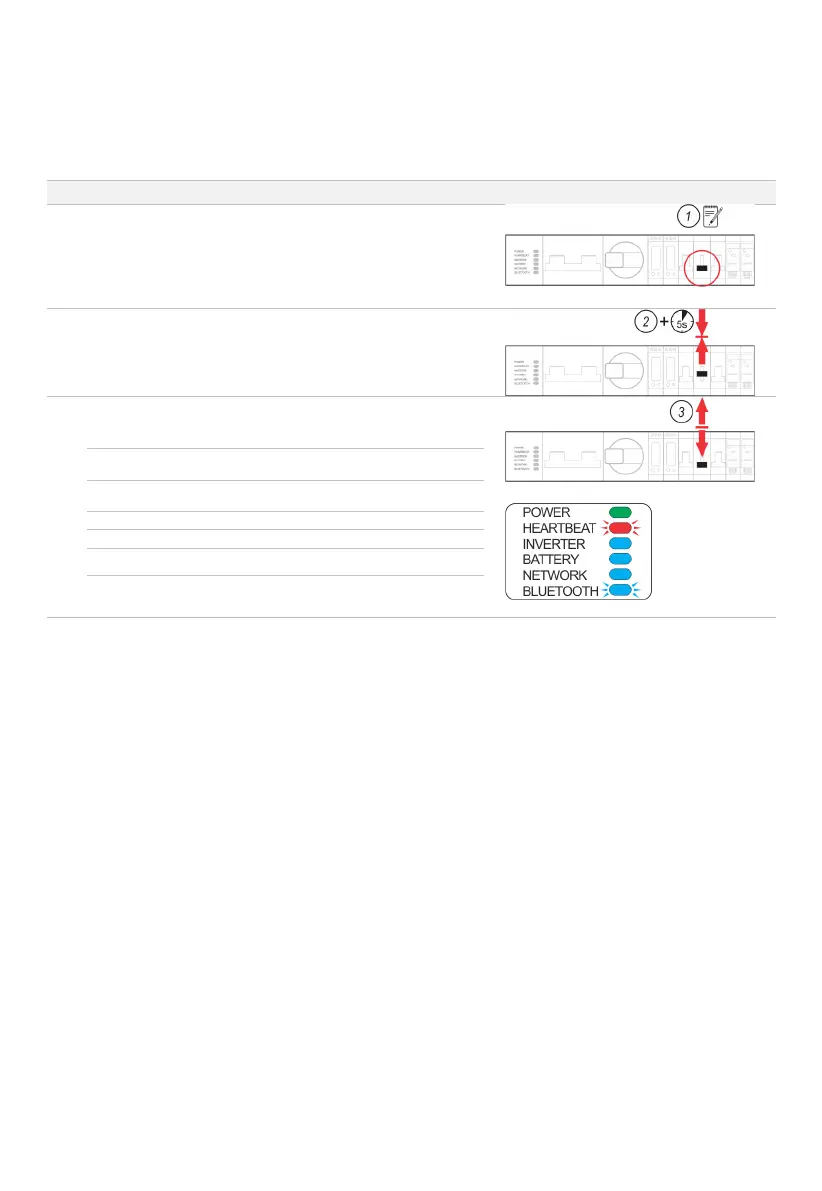
4.3 EMS restart
Occasionally, it may be necessary to restart the EMS software. A restart will reboot the EMS, without needing to restart the
whole inverter, noting that the backup circuit will be briefly interrupted.
STEP PROCEDURE COMMENT/ILLUSTRATION
Open the BoS switchgear hatch.
Identify the three-position Bypass switch. Note the position of the
switch.
☐ Up ☐ Down
Note: The switch is usually returned to the original position during
Set the Bypass switch to the middle position (OFF).
Wait 5 seconds.
Return the Bypass switch to its original position (if noted) otherwise
place in the default DOWN position. The EMS will restart in
approximately 10 minutes, indicated by the EMS LEDs stabilising to:
Blue; ON (if batteries are connected)
Blue; ON (if Network is OK)
Blue; FLASHING (for 30 minutes)



 To Next Page