Troubleshooting
54 Installation Manual - Redback Smart Hybrid System - v2.0
5.4 SM3000 Energy meter diagnostics
5.4.1 SM3000 FEATURES
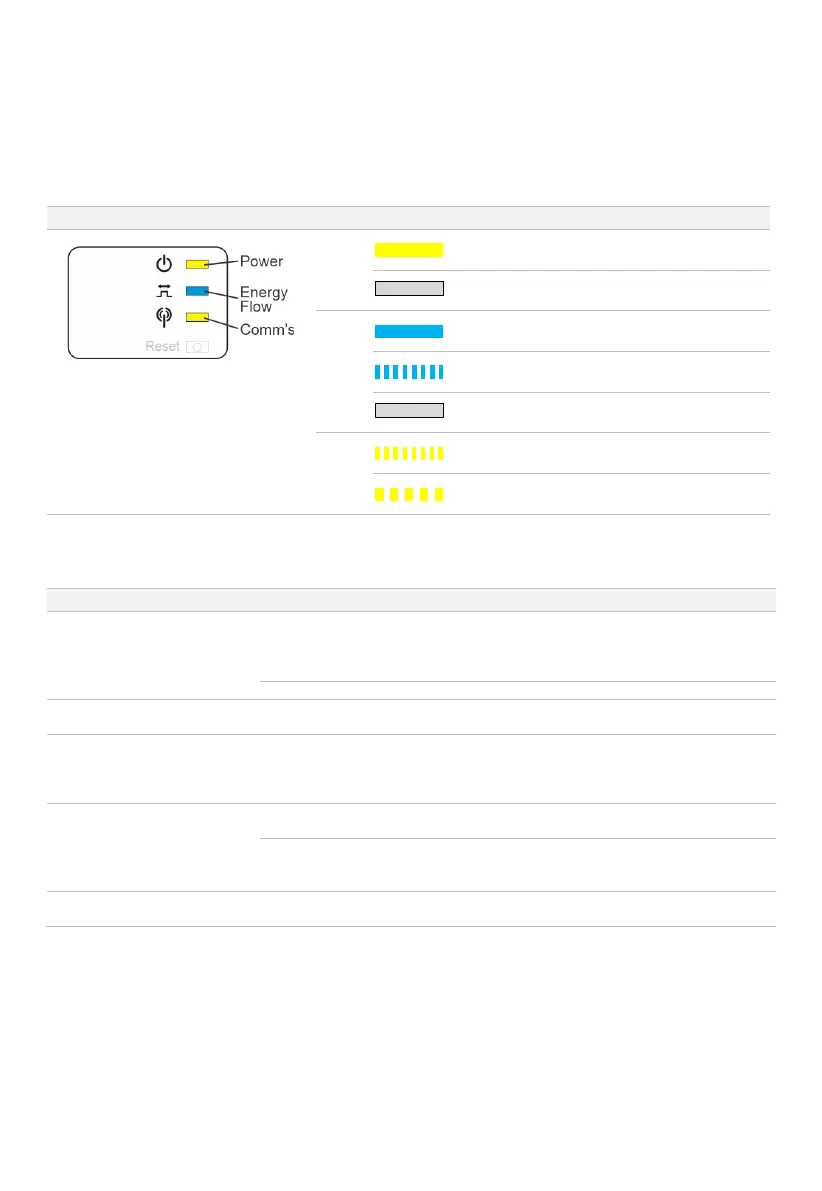
The SM3000 detects the grid energy of up to 3 phases and indicates it the site overall is importing or exporting energy.
Power
ON: Meter has power
OFF: Meter does not have power or has failed
Energy
Flow
ON: Site is consuming energy from the grid
Flashing: Site is exporting energy to the grid
OFF: Energy flow is not detectable
Comm’s
Flashing: Transmitting data
5x Flash: Reset in progress
5.4.2 ENERGY METER/CT TROUBLESHOOTING
illuminated
Check all connections.
Check
switchboard Main Switch is ON
the meter, measure voltage between Neutral and
each phase (Terminals 10, 11, 12, 13)
Power flow direction is not as
expected (any phase)
CT installed incorrectly
(reversed)
Reverse polarity of CT by reversing direction of K->L
relative to cable.
Power readings for two or more
phases are incorrect
CTs have been attached to
the incorrect phase at meter
(L1, L2, L3).
Identify the true phase identity for each cable.
Ensure the attached CTs are connected to the correct
phase on
meter i.e. the voltage measurement and the CT
Batteries charging at night when
inverter is in Auto mode.
CT installed incorrectly
(reversed)
Reverse polarity of CT by reversing direction of K->L
relative to cable
CTs have been attached to
the incorrect phase at the
Identify the true phase identity for each cable. Ensure the
attached CTs are connect to the correct phase at
energy
No data on portal & SM3000
Comm’s LED flashing
Test data cable with data tester and check data
terminations


 To Next Page