Operation
38 Installation Manual - Redback Smart Hybrid System - v2.0
3.4.3 ONBOARDING (CONNECT TO THE LOCAL NETWORK)
RedbackINSTALL will advance to this stage after establishing a Bluetooth connection to
the Inverter.
Note: if a local network is not available it is possible to temporarily connect the Inverter
to a Wi-Fi hotspot, such as your phone. This is useful for configuration but is not an
acceptable long-term solution.
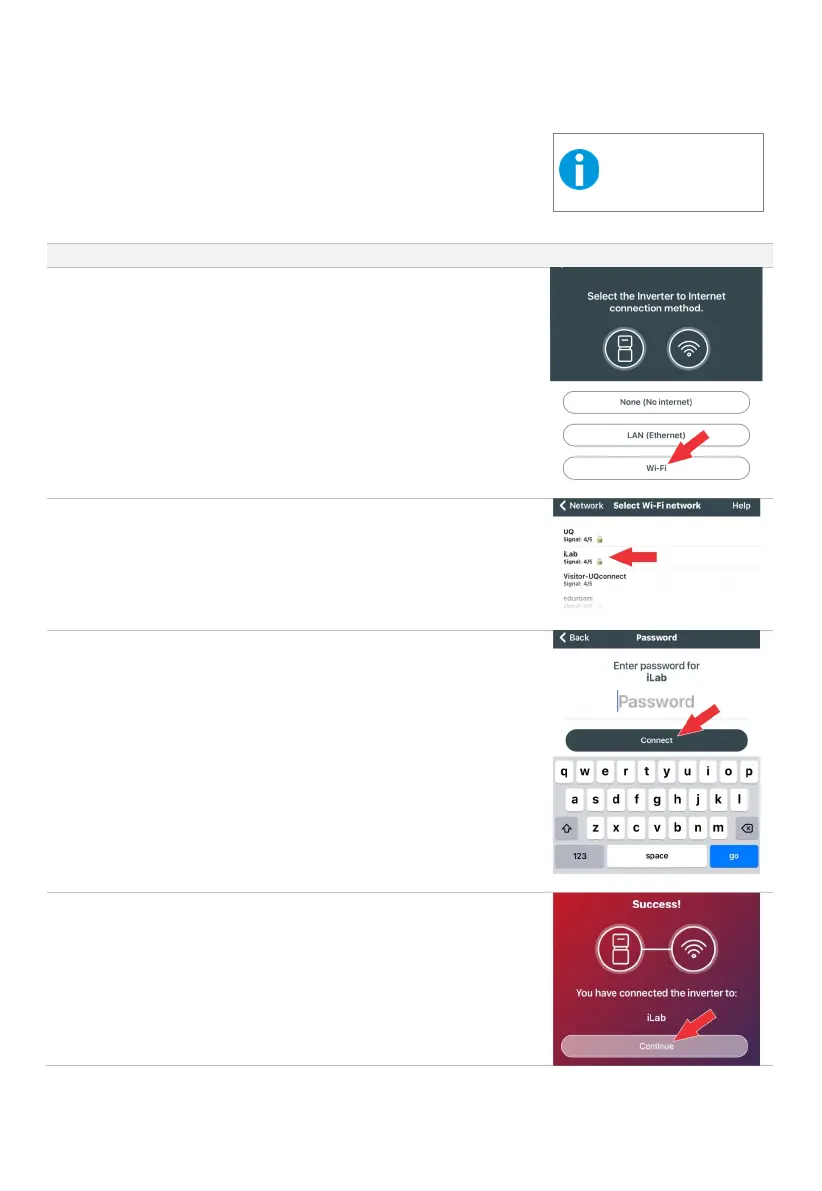
Select the preferred method to connect to the local network and internet.
Options are:
• None
• LAN (must be hardwired, will connect automatically)
• Wi-Fi (usually requires network name and password)
Select the required network or swipe down to refresh the list.
Tap Connect to continue.
A Success message will appear.
Tap Continue to go to the Inverter Configuration page.
This equipment is not
compatible with 5Ghz
Wi
-Fi network or hotspots.



 To Next Page