EasyManua.ls Logo

REDT R&D MAGIC-70 - Add and Edit Picture; Add Picture

REDT R&D MAGIC-70
128 pages
Print Icon
To Next Page IconTo Next Page
To Previous Page IconTo Previous Page
Loading...
111
Add and Edit Picture
1) Add picture
This program provides a function to edit various types of picture files. Supported picture file types are as follows.
BMP
Windows or OS/2’s bitmap graphic file
GIF
CompuServe graphic file
JPG/JPEG
JPEG bitmap graphic file
PNG
Portable Network Graphics bitmap graphic file
PCX
Z Soft PC paintbrush bitmap file
TIF/TIFF
Tag Image File Format bitmap file
WMF
Windows meta file
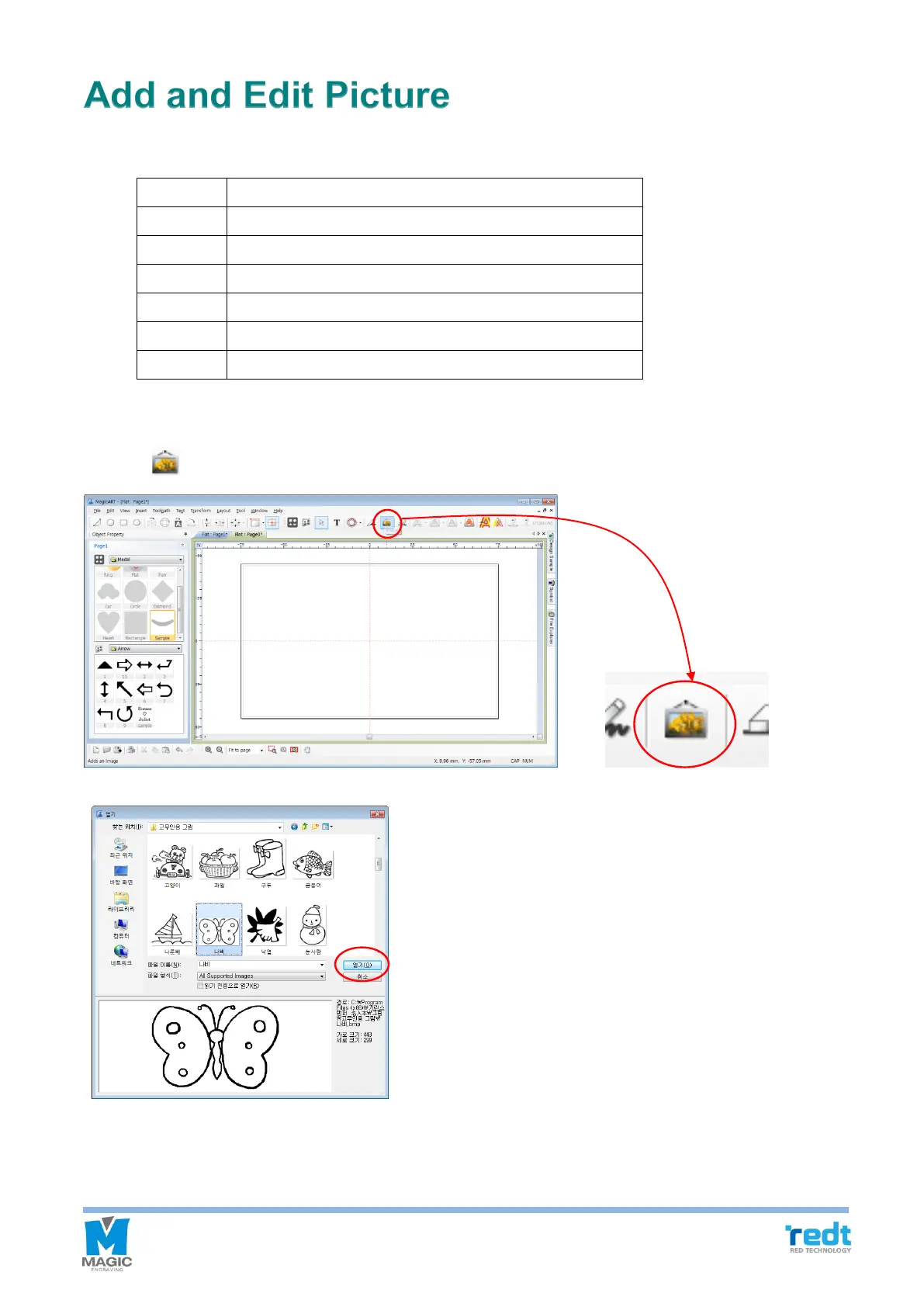
Picture file can be added by following methods.
1. Select [Image] from the toolbar or “Insert → Image…” from the menu.
2. If “Openwindow shows up as the picture below, select the picture to be added, and click “Openbutton.