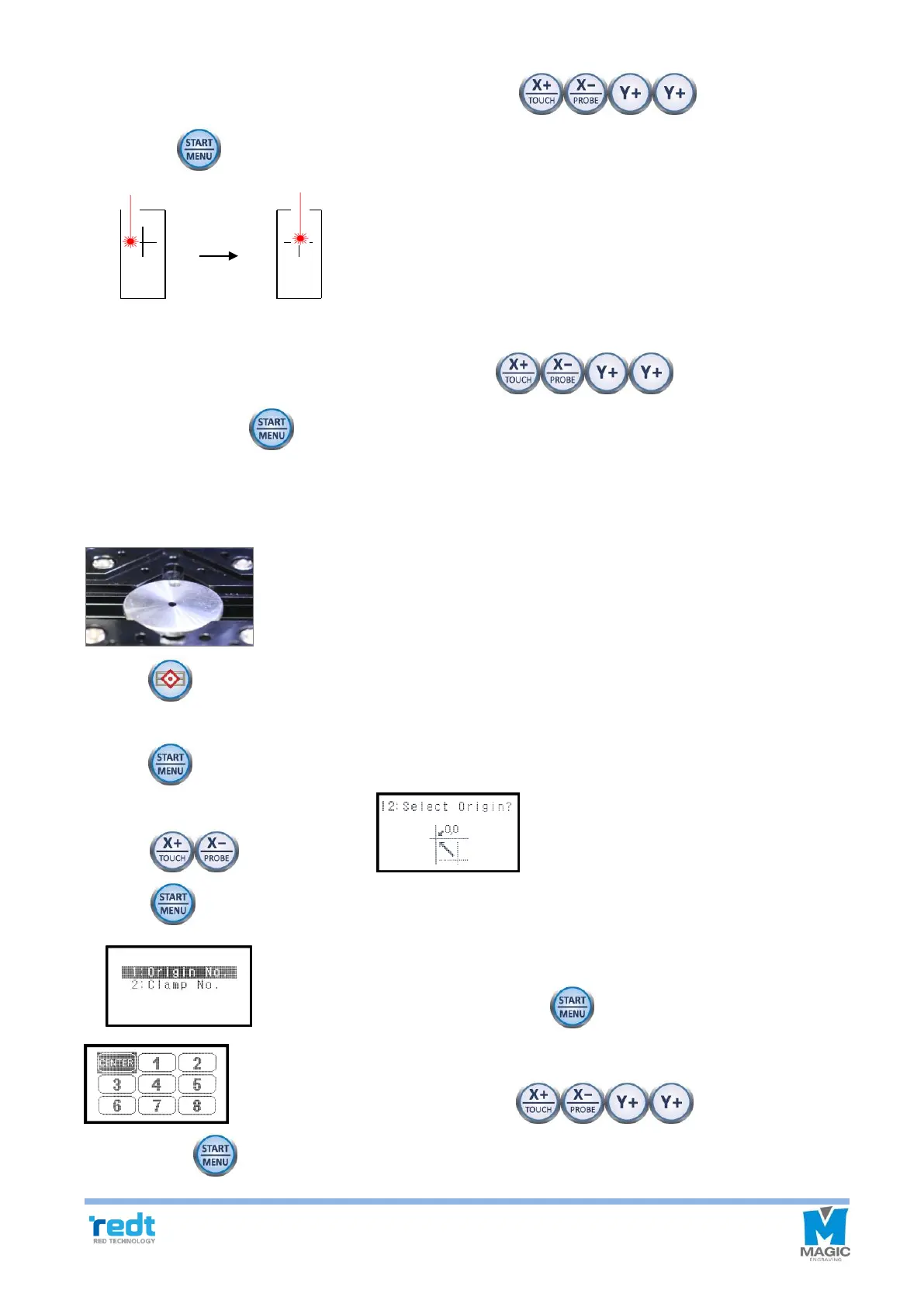
9. Move the laser pointer to the center of the cross by using the direction key, and press
and hold the button until it beeps (more than 3 seconds) to confirm that the setting is saved.
10. Laser pointer moves closer to the material to accurately calibrate the laser pointer’s origin.
Move the laser pointer to the center of the cross by using the direction key on engraver,
and press and hold the button until it beeps (more than 3 seconds) to confirm that the setting is saved.
4) Saving Multi-performance Clamp Origin Position
1. Put a dot on the center of the material with the marker, and fix it at the center of the clamp.
2. Press button to move to flat mode.
※Menu will be changed if you enter ring inner/outer diameter mode menu.
3. Press button and go to the menu mode.
4. Press button, and when menu appears on the LCD window, then press
and hold button until it beeps (more than 3 seconds) to run the menu.
5. Select an “Origin No” and press and hold button to enter the
. And select the “CENTER” by using the direction key, then
press and hold button until it beeps (more than 3 seconds) to move to the origin.



 To Next Page