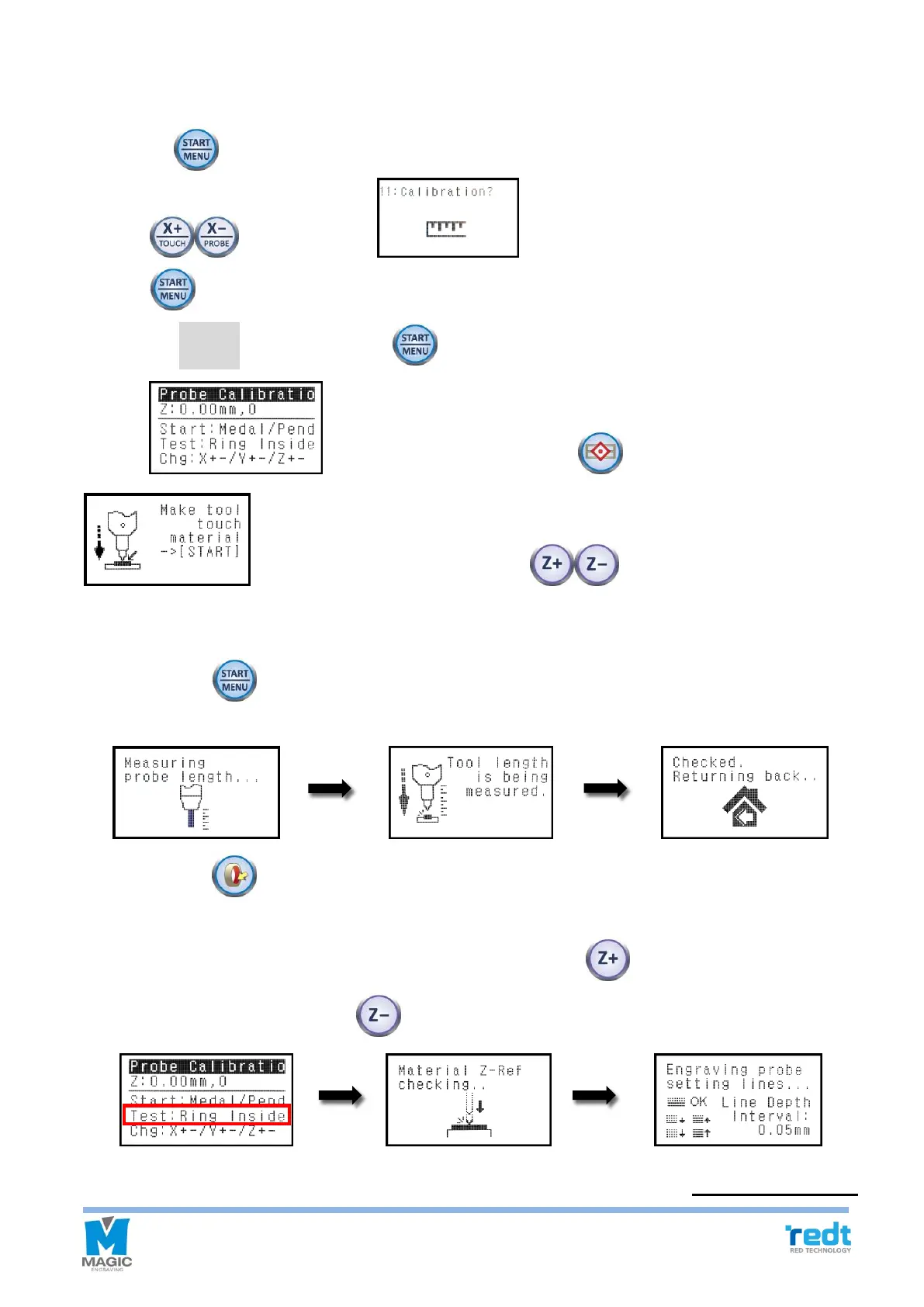
2) Probe Calibration
1. Fix a material of flat surface on the clamp.
2. Press the button and go to the expert menu mode.
3. Press button, and when menu appears on the LCD window, then press
and hold button for more than 3 second until it beeps (more than 3 seconds) to run the menu.
4. Select the “2.Probe” then press and hold button until it beeps (more than 3 seconds) to run the menu.
5. When appears on the LCD window, press button to appear
on the LCD window, then press Z axis button to lower the tool to make it
close to the materials, and release the tool by using a wrench until the tool touches the materials. Then tighten the
tool.
6. Press and hold button until it beeps (more than 3 seconds), then the probe measures the height of the
materials and the length of the tool before the settings is saved.
7. Press and hold button until it beeps (more than 3 seconds) to begin a test run.
At this time, the tool draws four lines on the materials. If two lines out of four lines are seen one the materials,
then it is appropriate. If three lines are seen on the materials, then press button to raise it by 0.05mm,
and one line is seen, then press Z axis button to lower it down by 0.05mm
※
0.05mm per line .



 To Next Page