STAND ALONE PROGRAMMABLE SAFETY CONTROLLER
8541403 • 19/07/2021 • Rev.1 113
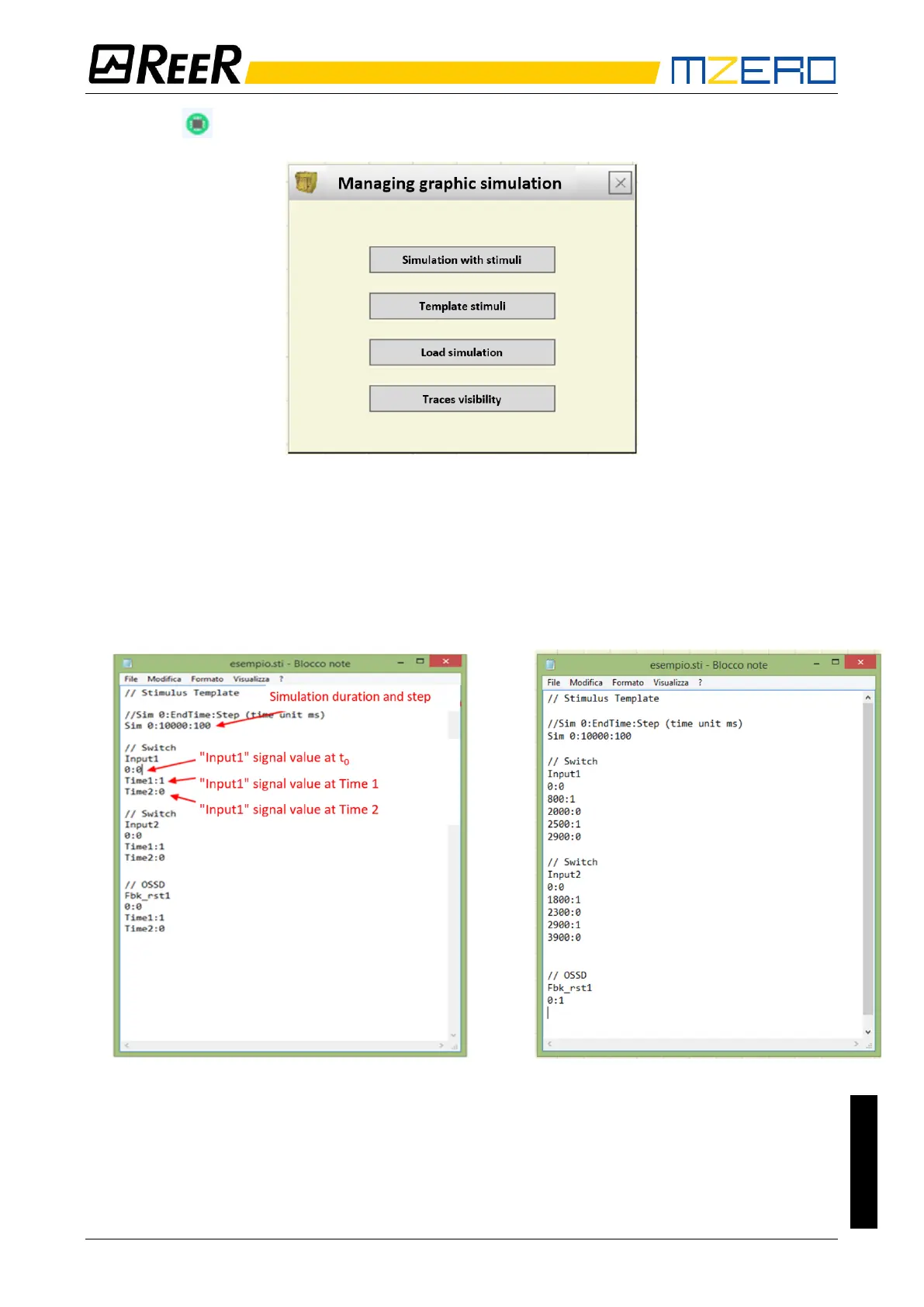
Click on the icon to display the page shown below.
Figure 50 – Menu for selecting the graphic simulation mode
The functions of each key in the menu shown in Figure 50 will now be described:
Template Stimuli: used to save the template file with the desired name and disk location. This file
will contain the names of the signals as shown in Figure 51 and Figure 52. You may use a text
editor to enter the status of the input signals at a certain time as well as the duration of the
simulation and the time step to be used.
Figure 51 – Template file immediately after saving
Figure 52 –Example of complete template file
Simulation with Stimuli: used to load a template file (suitably completed) and, once loaded, to
immediately start the simulation.
At the end of the simulation, a graph is displayed with the resulting signals.
Load simulation: used to load a previously completed simulation provided at least one has been
saved.


 To Next Page