User Manual Bearing System RT-300
Issue: 2017/06/27 [Rev 1.04.c] Page 23 of 79 12-9-1-0013-9-2-0001-3-1-60
Maritime Band (not available in VHF/UHF-Version):
- After pressing key 15 < Channel / Freq. > the „Set Channel“- window will appear on the
display (see Fig. 18).
- Keys 5 < + > and 10 < – > are selecting the channel.
- Key 6 < Ok > confirms the selected frequency / channel. The device is returning into the
bearing mode using the selected frequency / channel.
- Key 9 < Esc > will reject the selection, and the device is returning into the bearing mode,
working on the previous frequency / channel.
5.2.4 Squelch Function: Key 14 < Squelch >
5.2.4.1 Common Remark
Our surrounding atmosphere always contains a certain electric field strength, designated as
“noise”. This noise voltage, which can be received, depends on the frequency and the location
of the receiver.
Interpreting signals reasonably is only possible, if their level is higher than the level of the
surrounding noise. Using the squelch electronic it is possible to adjust a threshold, under which
received signals will not be processed. Usually the squelch threshold is adjusted as close as
possible above the noise level. In that case the bearing system will work only, if a signal is
received. As long as no signal is received, the speaker is remaining mute.
NOTE
The squelch level is to be kept as low as possible in order not to suppress weak signals.
5.2.4.2 Adjusting the Squelch
The squelch level is to be adjusted,
when receiving no signal.
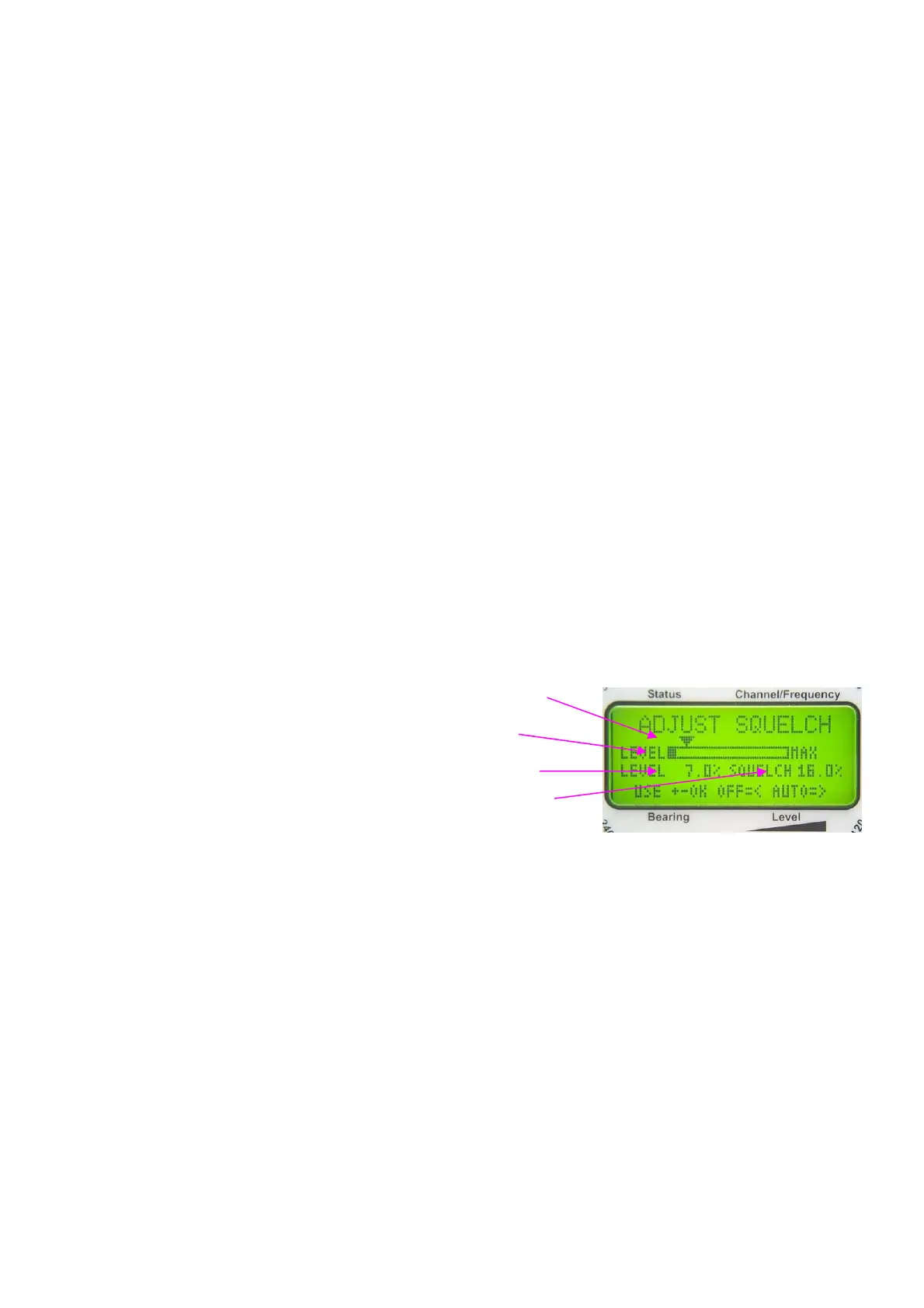
- Pressing key 14 < Squelch > the
„Adjust Squelch“- window will
appear.
- Key 8 < > is starting the automatic squelch setting
procedure. For a duration of about 3 sec the signal level is measured, and then the squelch
level will be set approximately 3 % above the peak value of the measuring period. After that,
the „Adjust Squelch“- window will reappear.
- Using keys 5 < + > respectively 10 < - > the squelch level can be adjusted manually.
- The pointer on the top of the graphic display and the digital display are indicating the present
level of the squelch threshold.
- Pressing key 3 < > disables the squelch function (level will be set to 0%).
- Key 6 < Ok > confirms the input and the device will return into the bearing mode.
- Key 9 < Esc > will reject the selection and the device will return into the bearing mode.
- If no confirmation is done within 25 sec after the last input, using key 6 < Ok >, the device will
return into the bearing mode with the previous adjustment.
The squelch level for the airband and for the maritime band are adjusted and saved separately.
On different frequencies within the range of one band the noise level may be varying
significantly. Coastal areas with industries may show higher noise levels than in offshore areas.
Fig. 19
Pointer squelch level
receiving level
bar graph
digital level display
digital value of squelch
level



 To Next Page