User Manual Bearing System RT-300
Issue: 2017/06/27 [Rev 1.04.c] Page 38 of 79 12-9-1-0013-9-2-0001-3-1-60
6.2.1.4 Menu: SOUNDS
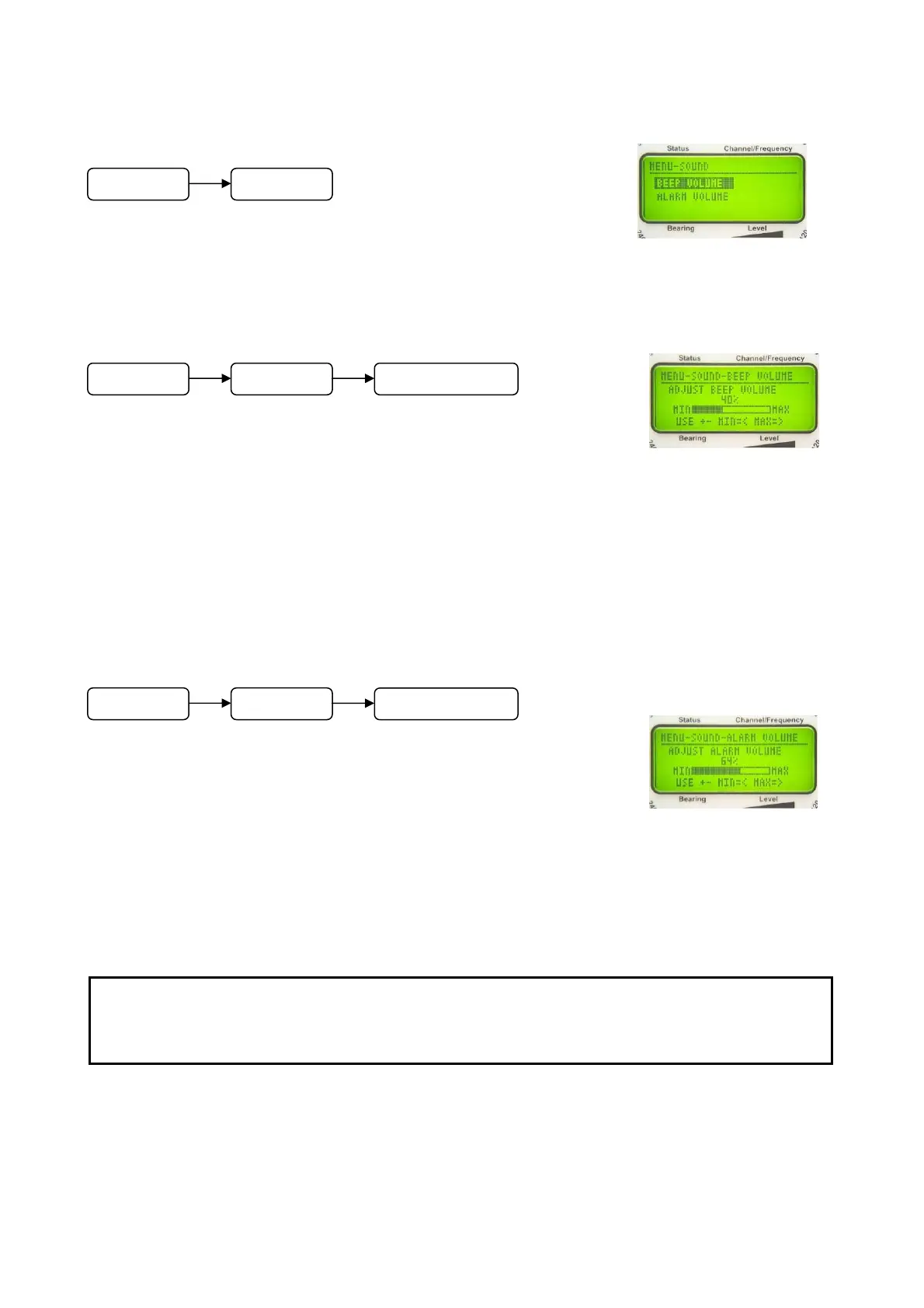
In submenu SOUNDS, the volume of keyboard signals and of
the alarm sound may be adjusted.
6.2.1.4.1 Adjusting Key Volume: Function BEEP VOLUME
In this menu the volume of the short audible tone, if pressing a
key, can be adjusted.
In submenu SOUND select function BEEP VOLUME.
The bar graph as shown in Fig. 47 will appear.
- Using keys 5 < + > and 10 < – > the volume of the key signal can be adjusted.
- Keys 8 < > respectively 3 < > will set the volume to maximum respectively minimum.
- Key 6 < Ok > is confirming the adjustment.
6.2.1.4.2 Adjusting Volume Alarm Signal: Function ALARM VOLUME
If a distress signal is detected, an alarm signal is put out at the
speaker and at the audio exit. The volume is adjustable.
In submenu SOUND select function ALARM VOLUME.
The bar graph appears as shown in Fig. 48.
- Using keys 5 < + > and 10 < – > the volume can be adjusted.
- Keys 8 < > respectively 3 < > will maximize respectively minimize the volume.
- Key 6 < Ok > will confirm the adjustment.
Fig. 46
Fig. 47
Fig. 48
ATTENTION
Too low alarm signals may be not recognized and search and rescue measures
may start too late or not at all.
M
n
SOUNDS
M
n
SOUNDS BEEP VOLUME
M
n
SOUND
LARM VOLUME



 To Next Page