x Clearing Misfeeds
135
4
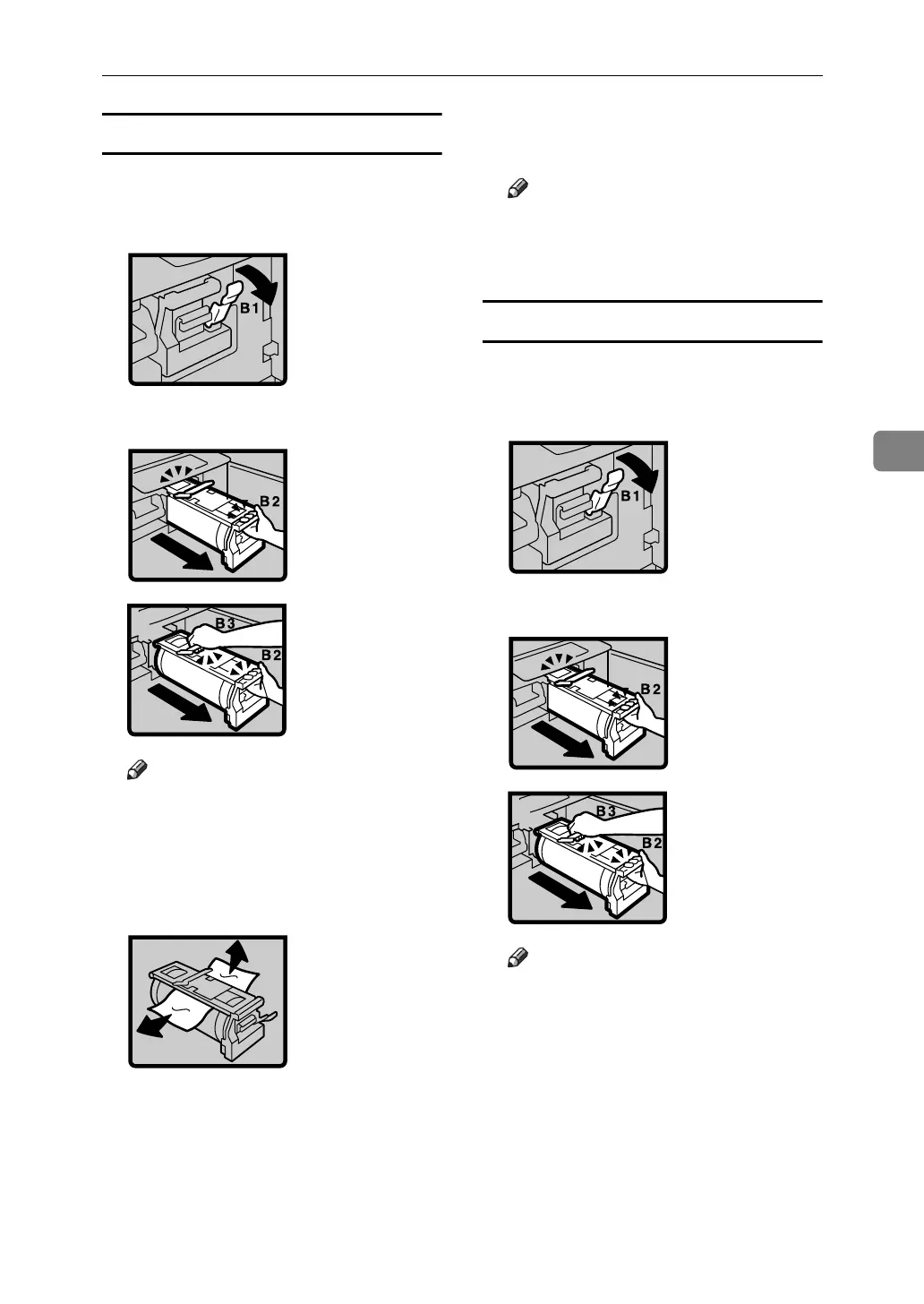
When paper is wrapped around the drum
A Open the front cover.
B Lower drum unit lock lever (B1).
C Take out the drum.
Note
❒ For taking out the drum unit,
see p.112 “Changing the Color
Drum Unit”.
D Remove the misfed paper from
the drum.
E If you cannot find misfed paper
around the drum (as in step D),
check the pressure cylinder. Re-
move any misfed paper.
F Set the drum unit and close the
front door.
Note
❒ For setting the drum unit, see
p.112 “Changing the Color
Drum Unit”.
When paper is misfed inside the machine
A Open the front cover.
B Lower drum unit lock lever (B1).
C Take out the drum.
Note
❒ For taking out the drum unit,
see p.112 “Changing the Color
Drum Unit”.





 To Next Page