Troubleshooting
136
4
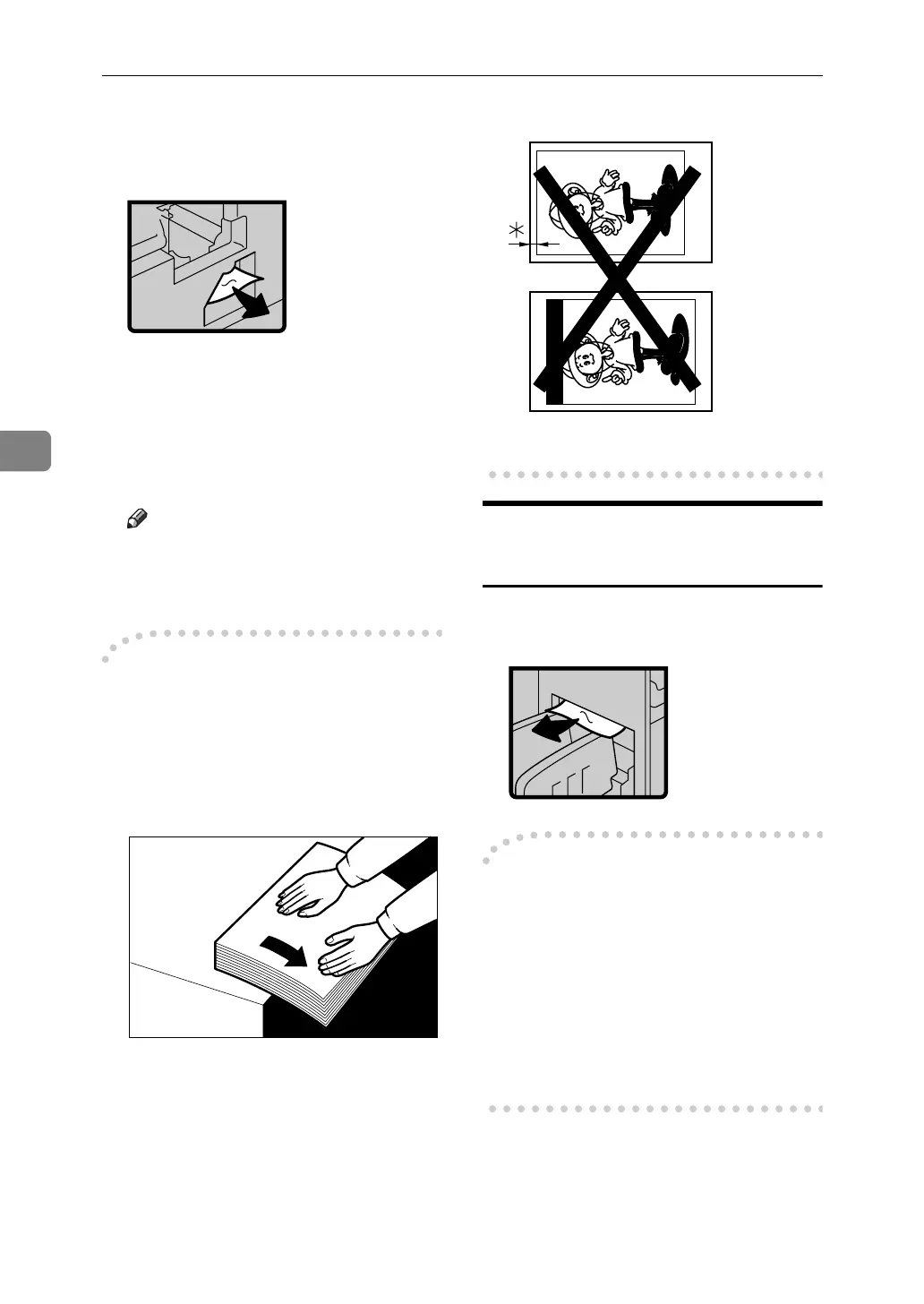
D Remove the misfed paper from
the inside as shown in the illus-
tration.
E If you cannot remove the misfed
paper, remove paper from the
pressure cylinder.
F Set the drum unit and close the
front door.
Note
❒ For setting the drum unit, see
p.112 “Changing the Color
Drum Unit”.
-To prevent paper misfeeds:
If the paper is curled or the original's
leading edge margin is too narrow,
the following action is necessary.
• When you use curled paper, cor-
rect as shown.
• When the leading edge margin of
the original is less than 6 mm, 0.24"
or there is a solid image on the
leading edge, insert the original
with the widest margin first or
make a leading edge margin by
making a print.
*: Less than 6 mm, 0.24"
“x + C” Paper Misfeeds in the
Paper Exit Section
A Slowly, but firmly pull out the
misfed paper.
-To prevent paper misfeeds:
When thin paper misfeeds in the pa-
per exit section, reduce the printing
speed with the {W}{V} of speed set-
ting keys. See p.57 “Changing the
Printing Speed”. If you cannot reduce
the printing speed, close the trailing
edge guides or move the end plate to-
ward the paper delivery tray edge.
GRCURL0E





 To Next Page