Troubleshooting Guide
G160/G161 4-32 SM
4.3 TROUBLESHOOTING GUIDE
Remove the NVRAM from the original engine control board and install it on the
new one when you replace the engine control board.
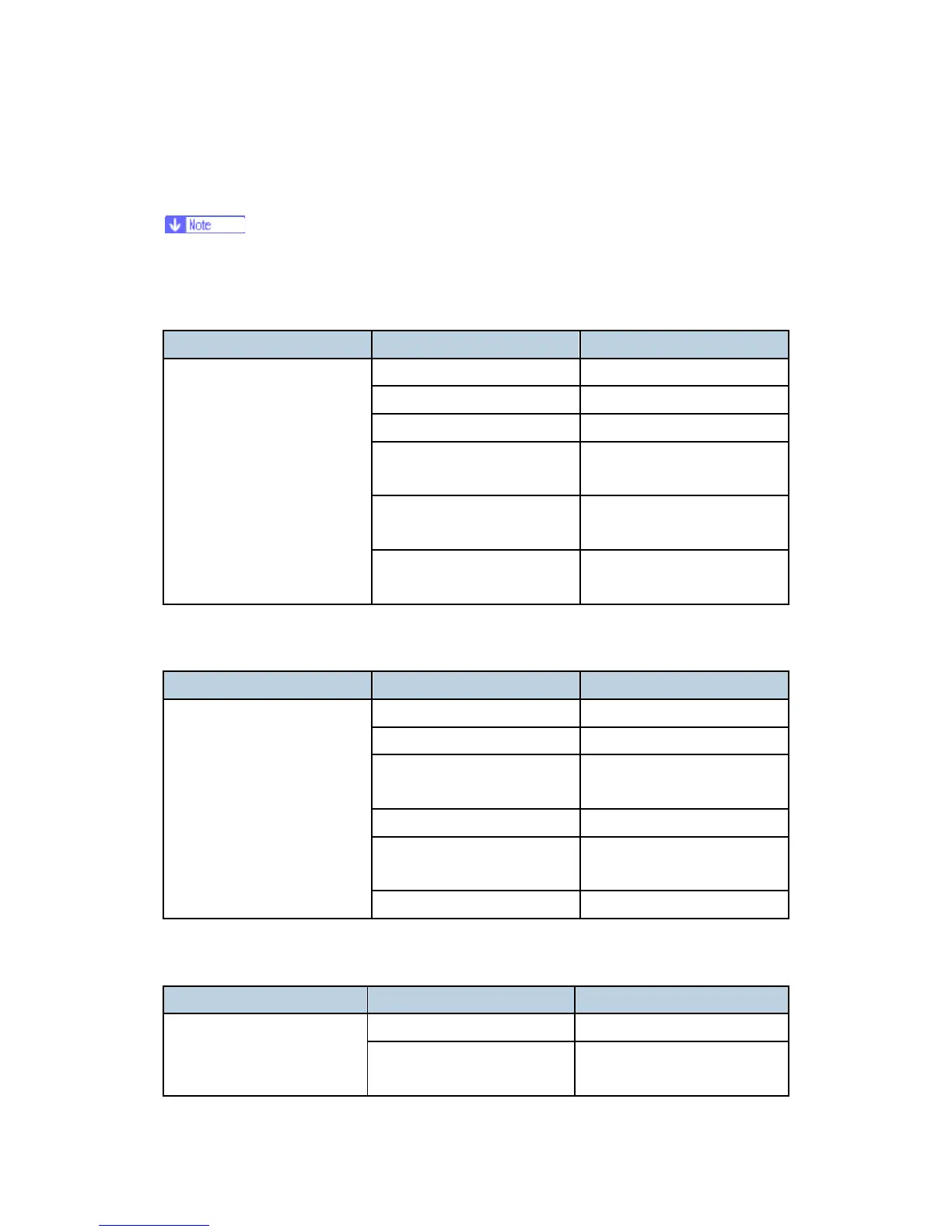
4.3.1 BLANK PRINT
Symptom Possible cause Necessary actions
Defective LDU Replace the LDU.
Defective PCU Replace the PCU.
Defective transfer belt unit Replace the transfer belt unit.
Incorrect action of transfer
roller
Check the guide and the
transfer roller.
Defective high voltage supply
board
Replace high voltage supply
board 1 or 2.
No image is printed.
Defective engine board (EGB)
Replace the engine board
(EGB).
4.3.2 ALL-BLACK PRINT
Symptom Possible cause Necessary actions
Incorrectly installed PCU Install the PCU correctly.
Defective PCU Replace the PCU.
Defective high voltage supply
board
Replace high voltage supply
board 1 or 2.
Defective LDU Replace the LDU.
Defective engine board (EGB)
Replace the engine board
(EGB).
All the paper is black.
Defective main board Replace the main board.
4.3.3 MISSING CMY COLOR
Symptom Possible cause Necessary actions
Defective PCU Replace the PCU. C, M, or Y is missing.
Loose connection between
printer cartridge and engine
Replace the drum positioning
cover. (See ‘Replacement and


 To Next Page