Home
Ricoh
Finishers
SR5050
Page 113 (Top Fence HP Sensor)
Ricoh SR5050 - Top Fence HP Sensor
185 pages
Manual
Save Page as PDF
To Next Page
To Next Page
To Previous Page
To Previous Page
Loading...
2.
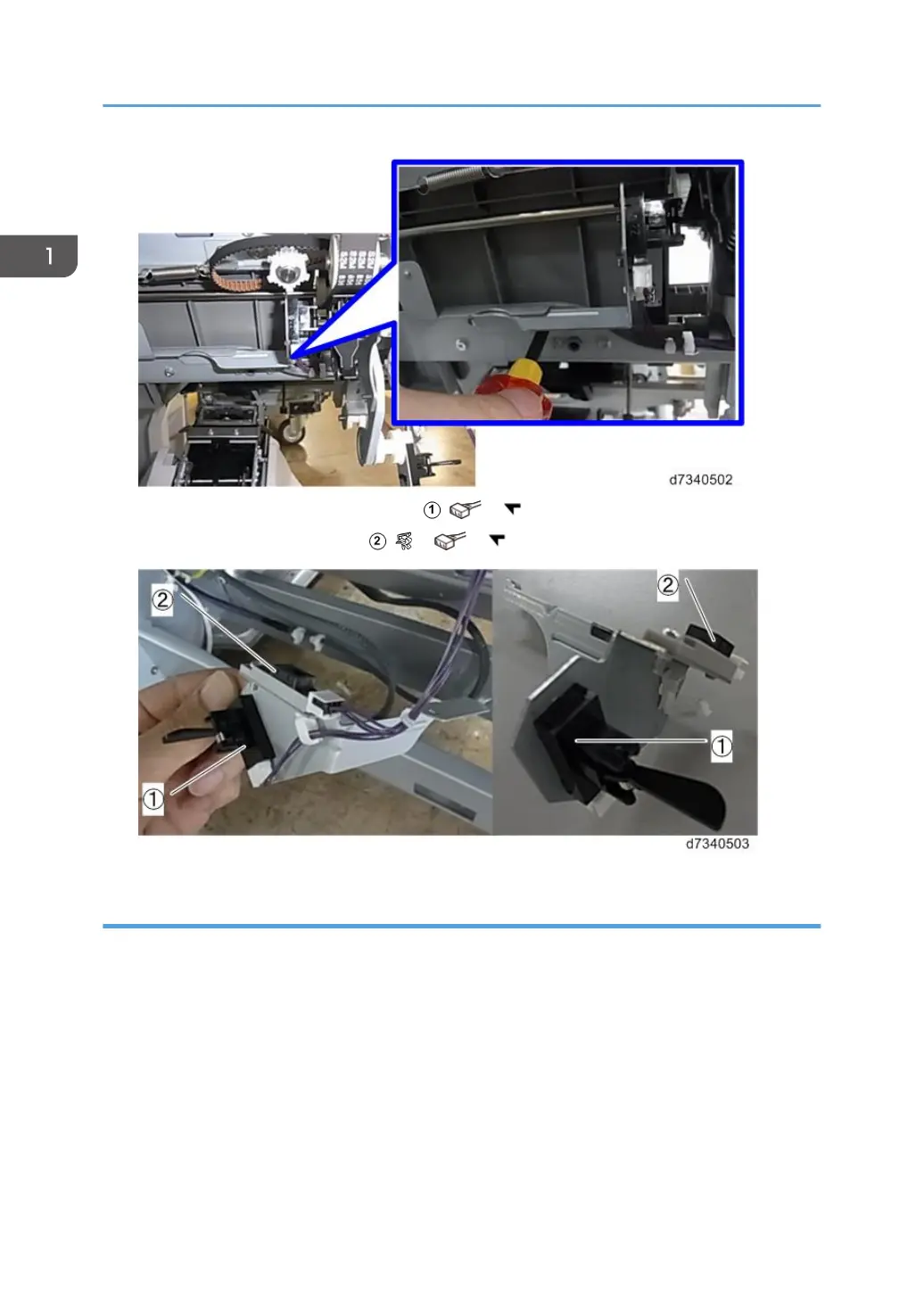
Remove leading edge stopper HP sensor
(
x1,
x5).
3.
Remove staple tray paper sensor
(
x1,
x1,
x5).
Top Fence HP Sensor
Preparation
•
Remove booklet unit (page 29)
1.
This sensor is in the center of the unit.
1. Replacement and Adjustment
112
112
114
Table of Contents
Main Page
Revision History
2
Symbols, Abbreviations and Trademarks
3
Conventions
3
Warnings, Cautions, Notes
5
Finisher SR5050
5
Booklet Finisher SR5060
5
Commonly Used Terms and Abbreviations
6
Trademarks
8
Table of Contents
9
Common Procedures
14
Overview
14
Covers
16
Rear Upper Cover
16
Rear Lower Cover
17
Lower Inner Cover: Rb10, Rb11
18
Center Inner Cover: Rb14, Rb16
19
Upper Inner Cover: Rb2, Rb8
20
Front Door
20
Proof Tray
21
Corner Strip Cover
21
Top Right Cover
22
Top Rear Cover
23
Shift Tray Jogger Unit
23
Left Upper Cover
24
Upper, Lower Right Panels
25
Shift Tray
26
Booklet Tray
27
Booklet Unit
29
Booklet Stapler
29
Booklet Unit Removal
30
Handling and Moving the Booklet Unit
33
End Fence
34
Exit Roller Cover
34
Shift Tray
35
Shift Tray Base
36
Left Lower Cover
39
End Fence
40
Drag Roller Unit
42
Horizontal Paper Feed
46
Entrance
46
Entrance Roller Motor
46
Entrance Sensor
50
Registration
51
Registration Motor
51
Horizontal Transport Motor
53
Proof Tray
55
Proof Tray Motors
55
Proof Tray JG Motor
55
Proof Tray Vertical Transport Motor
56
Proof Tray Exit Motor
58
Proof Tray Sensors
59
Proof Tray JG HP Sensor
59
Proof Tray Exit Sensor, Proof Tray Full Sensor
61
Shift Tray
64
Shift Tray Side-To-Side Movement
64
Shift Motor
64
Shift Tray HP Sensors (Front, Rear)
65
Shift Tray Exit
66
Shift Tray Exit Motor
66
Shift Tray Exit Sensors (Long and Short)
67
Drag Roller Motors, Sensors
71
Preparation
71
Drag Roller Motor
72
Drag Roller Drive Motor
73
Drag Roller HP Sensor
74
Shift Tray Jogger Unit
75
Shift Jogger Motor
75
Shift Tray Jogger Fence HP Sensor
77
Shift Jogger Retraction Motor
77
Shift Jogger Fence Retract HP Sensor
79
Shift Tray Operation
79
Shift Tray Lift Motor
79
Paper Height Sensors 1, 2, 3 (Shift, Staple, Z-Fold)
81
Paper Height Sensor (TE), Shift Tray Upper Limit Switch
82
Shift Tray Full Sensors 1, 2, 3, 4 (500)
86
Pre-Stacker
89
Pre-Stack Motors
89
Pre-Stack Motor
89
Pre-Stack Release Motor, Pre-Stack Roller HP Sensor
92
Corner Stapler Unit
98
Corner Stapler Unit Entrance
98
Stapler JG Motor
98
Stapler JG HP Sensor
99
Stapling Tray Entrance Sensor
100
Stapling Tray Entrance Motor
101
Corner Stapler Side-To-Side Jogging
103
Front Jogger Fence Motor
103
Jogger Fence HP Sensor (Front)
105
Rear Jogger Fence Motor
105
Jogger Fence HP Sensor (Rear)
108
Corner Stapling Bottom, Top Jogging
109
Positioning Roller Rotation Motor
109
Positioning Roller Motor
110
Positioning Roller HP Sensor
111
Leading Edge Stopper HP Sensor, Staple Tray Paper Sensor
112
Top Fence HP Sensor
113
Corner Stapling
115
Corner Stapler
115
Corner Stapler Movement Motor
117
Stapler Rotation Motor
119
Staple Trimmings Hopper Full, Hopper Set Sensor
120
Stapler Movement Sensors
122
Corner Stapled Stack Feed out
125
Stack Transport Motor
125
Stack Transport Unit HP Sensor
126
Stack Feed-Out Belt Motor
127
Stack Feed-Out Belt HP Sensor
129
Stack Junction Gate Motor
130
Stack JG HP Sensor
131
Corner Stapled Stack Exit to Shift Tray
132
Exit Guide Motor
132
Exit Guide HP Sensor
135
Booklet Unit
136
Booklet Stapler
136
Booklet Unit Transport, Entrance
137
Fold Unit Entrance Sensor
137
Booklet Side-To-Side Jogging
137
Booklet Stapler Side Fence Motor
137
Booklet Stapler Side Fence HP Sensor (Front)
139
Booklet Stapler Jogger HP Sensor (Rear)
139
Booklet Bottom, Top Jogging
140
Booklet Stapler Bottom Fence Motor
140
Booklet Stapler Bottom Fence HP Sensor
141
Booklet Stapler Top Fence Motor
143
Booklet Top Fence HP Sensor
144
Booklet Press for Stapling
144
Booklet Stapler Clamp Roller Motor, Booklet Stapler Exit Sensor
144
Booklet Stapler Clamp Roller HP Sensor
152
Booklet Folding
154
Fold Roller Motor
154
Fold Plate Cam HP Sensor
155
Fold Plate HP Sensor
156
Booklet Exit
157
Fold Roller Motor
157
Boards
160
Main Board
160
Punch Unit PCB
162
Shift Tray Jogger Unit PCB
162
Psu
163
Switches
167
Front Door Switch
167
Emergency Shift Tray Stop Switch
168
Rollers and Brushes
169
Rollers
169
Drag Roller
169
Positioning Roller
169
Alignment Brush Roller
170
Discharge Brushes
172
Shift Tray Exit
172
Corner Stapler Entrance
173
Booklet Unit Exit
174
Special Adjustments
175
Horizontal Skew Adjustment
175
[A] Adjustment: Rear Fence Low
176
[B] Adjustment: Front Fence Low
177
Vertical Skew Adjustment
178
Base Fence Replacement
179
Related product manuals
Ricoh SR5060
185 pages
Ricoh SR5090
107 pages
Ricoh SR790
25 pages
Ricoh SR3270
128 pages
Ricoh SR3260
128 pages
Ricoh SR4110
60 pages
Ricoh SR3300
44 pages
Ricoh SR3020
82 pages
Ricoh SR3290
108 pages
Ricoh SR4120
95 pages



 To Next Page