4
Controls and features
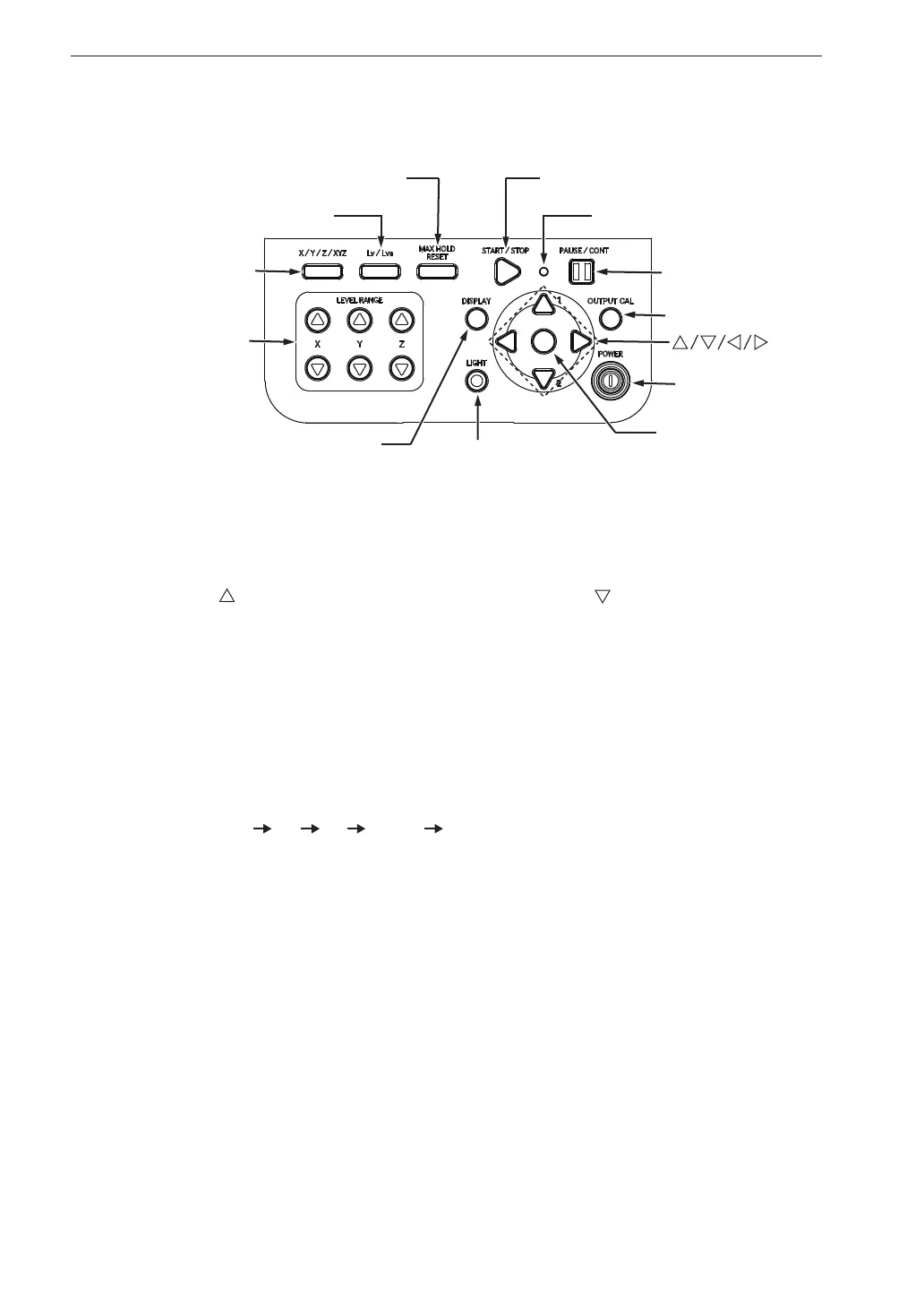
Control section
START/STOP key
PAUSE/CONT key
DISPLAY key
LIGHT key
POWER key
MENU/ENTER key
OUTPUT CAL key
X/Y/Z/XYZ key
LEVEL RANGE key
Lv/Lva key
MAX HOLD RESET key
key
Indicator LED
LEVEL RANGE keys
These keys control the level range for the X, Y, Z axis.
The
key switches the level range up, and the key switches the level
range down.
The following six settings are available: [0 to 70], [10 to 80], [20 to 90],
[30 to 100], [40 to 110], [50 to 120]
X/Y/Z/XYZ key
Switches the vibration axis to be shown on the display.
With each push of the key, the display cycles through the settings in the
order X Y Z XYZ X etc.
Lv/Lva key
Switches between vibration level (L
v
) and vibration acceleration level (L
va
).
MAX HOLD RESET key
Resets the value of the max hold function.
START/STOP key
Serves to start / stop processing for the following functions:
Equivalent continuous level (L
eq
)
Time percentile level (L
5
, L
10
, L
50
, L
90
, L
95
)
Maximum value (L
max
)
Minimum value (L
min
)



 To Next Page