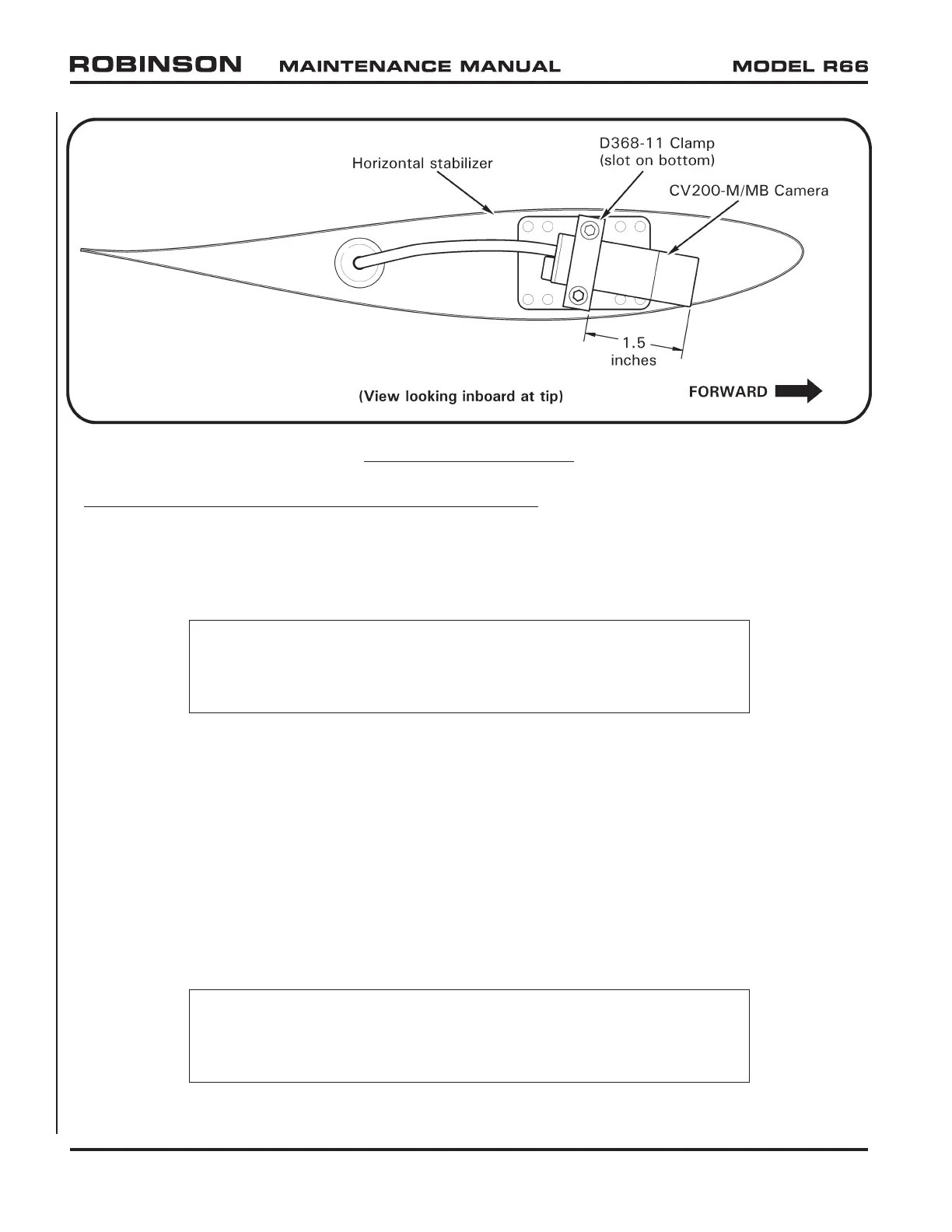
92-53 D097-38 HD Micro Camera Installation (Tail)
A. Removal
1. Refer to Figure 92-1. Turn battery & news equipment switches off, and pull out
MICRO CAMS (2 amp) circuit breaker at panel.
NOTE
Use caution not to overstretch or sharply-bend HD camera’s
cable assembly; cable is soft and susceptible to damage.
2. Remove grommet from inboard side of horizontal stabilizer at tail gearbox. Pull
C023 wires through hole in stabilizer to access connectors; disconnect CV200-M/
MB camera cable from C023 wires at connectors.
3. Supporting camera, remove screws securing D368-11 clamp to stabilizer and remove
camera and clamp. Carefully remove grommet from outboard side of stabilizer and
pull camera cable through hole in stabilizer. Remove grommet and clamp.
B. Installation
1. Refer to Figure 92-1. Turn battery & news equipment switches off, and pull out
MICRO CAMS (2 amp) circuit breaker at panel.
NOTE
Use caution not to overstretch or sharply-bend HD camera’s
cable assembly; cable is soft and susceptible to damage.
Page 92.8 Chapter 92 ENG Version JUL 2020
FIGURE 92-2 ENG VERSION



 To Next Page