Controller functions
RES-445 Page 55
SET temperature = 180°C, cooling value = 60%
Cooling phase ends when ACTUAL
temperature
108°C
3. "Time"
The cooling phase ends after a specified time in
seconds and is independent of the ACTUAL tempe-
rature. This cooling time can be set with step 105 [5]
in the Settings menu.
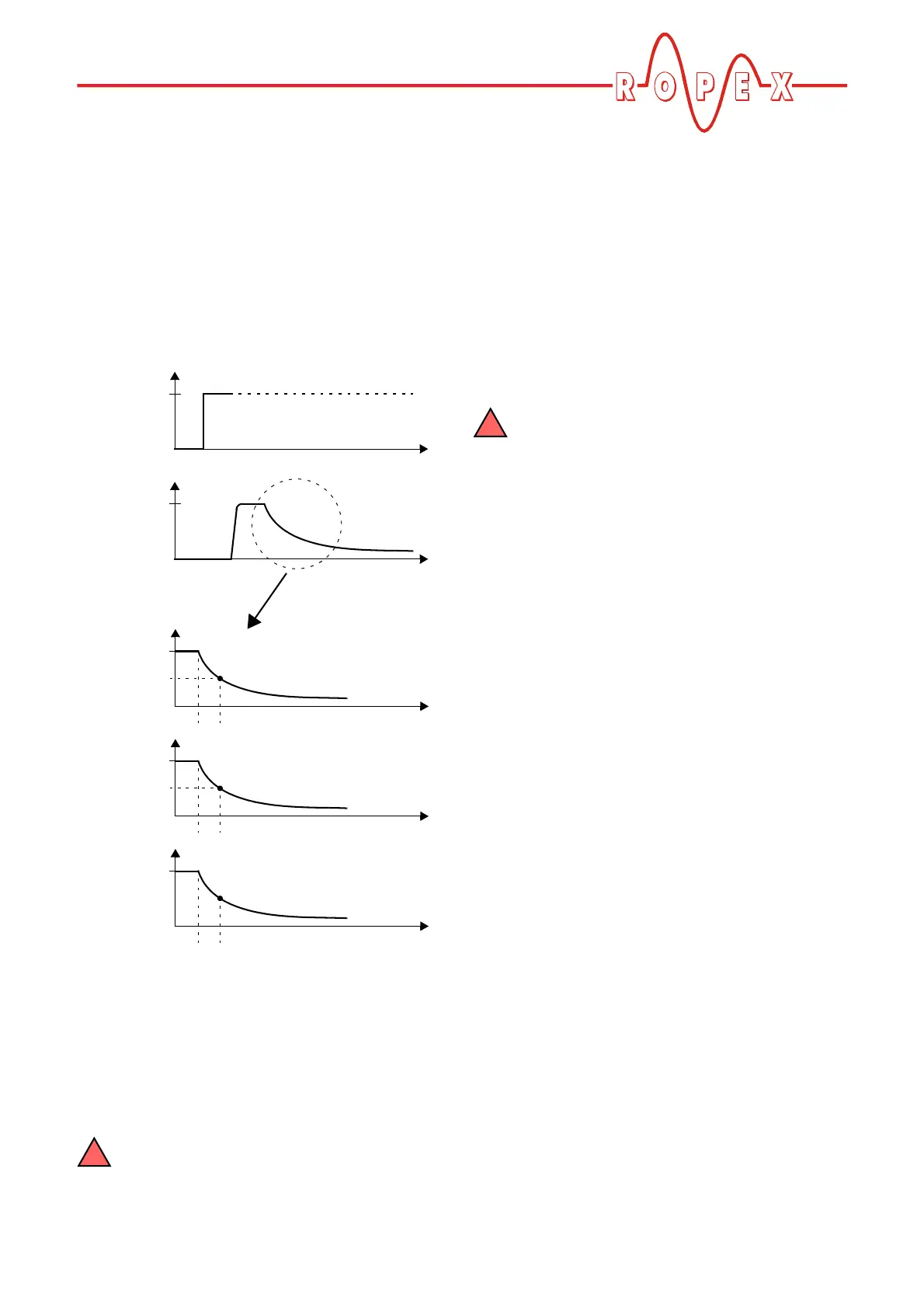
The various cooling modes are shown below:
10.24.5 Setting the cooling value
After the cooling phase has been configured with
step 27 in the Configuration menu ( section 10.24.4
"Setting the cooling mode" on page 54), you can spe-
cify the cooling parameters with step 105 [5] in the Set-
tings menu.
The options available with step 105 [5] in the
Settings menu vary according to the selec-
tion made with step 210 [27] in the Configuration
menu. All settings entered with menu step 105 [5]
are overwritten if step 210 [27] is changed subse-
quently.
The possible settings are as follows:
1. "Cooling temp. in °C"
(if setting with menu step 210 [27] = "Absolute")
The cooling phase of the internal timeout ends when
the ACTUAL temperature of the heatsealing band
falls below the set temperature.
The minimum settable temperature is 50°C. This is
also the factory setting.
The maximum value of the setting range is
limited either by the maximum value speci-
fied with step 206 [23] in the Configuration menu or
by the heatsealing band type/temperature range set
with step 205 [22].
2. "Cooling temp. in %"
(if setting with menu step 210 [27] = "Relative")
The cooling phase of the internal timeout ends when
the ACTUAL temperature falls to the specified per-
centage of the SET temperature. This value can be
set between 40 and 100%.
The factory setting is 40%.
3. "Cooling time in s"
(if setting with menu step 210 [27] = "Time")
The cooling phase ends when the specified time
elapses. This time can be set between 0 and 99.9s.
The factory setting is 10.0s.
10.24.6 Setting the start of the heatsealing
time
The condition for the start of the set heatsealing time
(step 104 [4] in the Settings menu) can be specified
with step 211 [28] in the Configuration menu. The follo-
wing settings are possible:
1. "When heating starts"
The parameterized heatsealing time starts as soon
as the set starting delay elapses ( Settings menu,
step 103 [3]).
If the starting delay = 0s, the heatsealing time
begins as soon as the "START" signal is activated.
2. "When temperature reached" (Factory setting)
Once again, the heating process starts as soon as
the set starting delay elapses ( Settings menu,
step 103 [3]). The specified heatsealing time does
not start, however, until the ACTUAL temperature of
the heatsealing band reaches 95% of the SET tem-
perature.
ACTUAL
temp.
START
signal
24VDC
T
t
t
0
0
Cooling mode
T
t
0
T
t
0
T
t
0
Absolute
Relative
Time
T
2
X%
t
3
t
3
t
3
t
3
= Cooling phase in °C
t
3
= Cooling phase as
% of set point
t
3
= Cooling phase in s.


 To Next Page