A4US
US
A4
US A4
US
A4
A4 US
US
A4
US
A4
A4 US
44 IQ3 Full Configuration Manual – Section: Data Log
Data logs, which are able to store vast amounts of operational
and environmental information, are provided as standard on the
IQ. Due to the nature of the graphical display, information can
be displayed locally at the actuator using the supplied Rotork
Bluetooth
®
Setting Tool Pro.
The stored information can be used to view, diagnose and trend
any type of operational condition that may affect the valve,
actuator or process. With asset management becoming preferred,
the data log helps to achieve goals set out by process conditions.
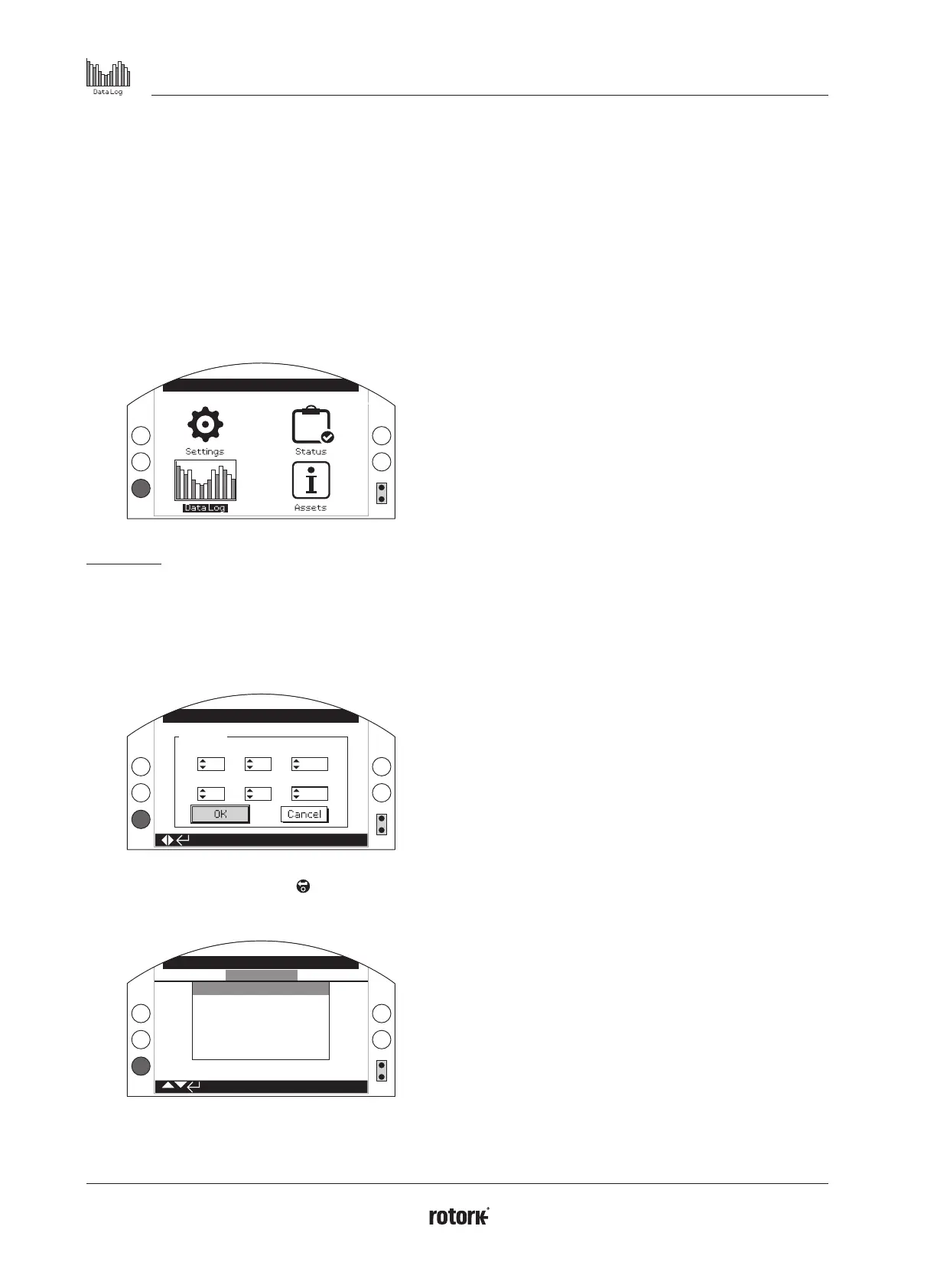
Refer to section 1.2 for connecting to the actuator. Once
connected, use the four directional arrows to navigate to the
main icon menu. From here you can highlight and select the Data
log icon:
Open Limit
Main Menu
The first time you enter the data log menu, you will be given the
opportunity to set the current time and date. This time and date
is ONLY for the local display and does not affect the dates when
you download the data log for viewing in Insight2. If you want
to set the current time and date, please refer to section 4.6 for
details.
Set Date
Open Limit
Hour
9
23
14
5
44
2013
Day
Minute
Month
Second
Year
Check the current time and press enter . You will now be
shown the main Data log menu below:
Stopped
Data log Menu
Torque Logs
Event Logs
Trend Logs
Operation Logs
Partial Stroke
Set Log Date
4. Data Log
4 Data Log menu structure Page
4.1 Torque Logs 45
4.1.1 Valve Torque Live 45
4.1.2 Valve Torque Profile 46
4.1.3 Valve Torque Reference 46
4.2 Event Logs 47
4.2.1 Control Event Log 47
4.2.1-1 Event Log Filter 48
4.2.1-2 Control Event Log 50
4.2.2 Error Event Log 51
4.3 Trend Logs 51
4.3.1 Temperature 52
4.3.2 Battery 52
4.3.3 Vibration Average 53
4.3.4 Vibration Peak 53
4.4 Operation Logs 54
4.4.1 Starts Profile 54
4.4.2 Statistics 55
4.4.3 Service Log 56
4.4.4 Bluetooth Log 57
4.5 Partial Stroke 58
4.5.1 Partial Stroke Results 58
4.5.2 Partial Stroke Torque 59
4.6 Set Log Date 59



 To Next Page