23/05/2019Roundshot VR Drive Instruction Manual – Firmware Version 2.023 38
P1
quality
Nikon D3
focal length : 24 mm
A: 0mm B: 0mm
angle X:360° °
rows : 1
R1 °
Duration : 2min 5s
x/y
2.4 Navigation
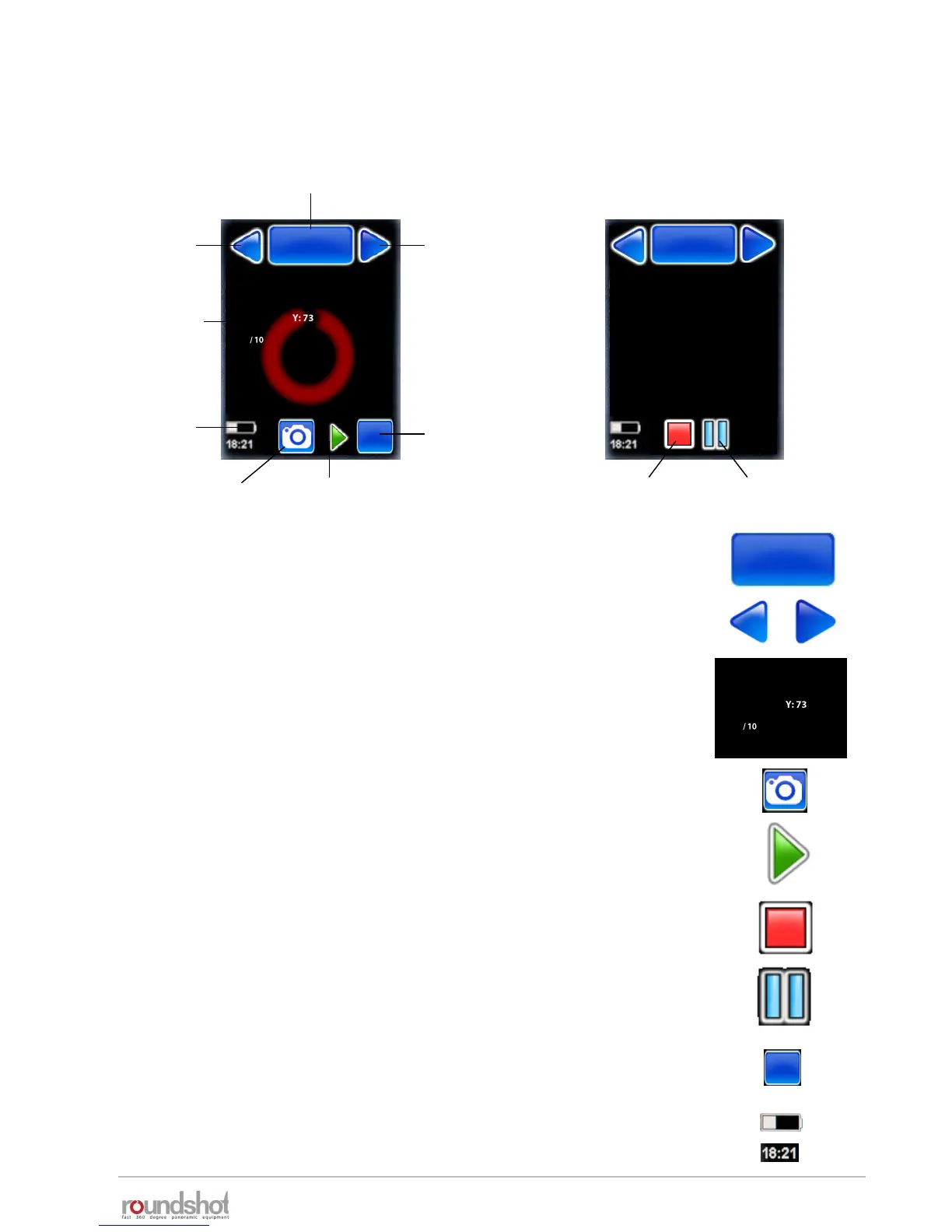
The VR Drive starts up with the “home menu”:
The “home menu” shows the currently active program. Clicking
on this button will load the program management menu.
active program +
program management
program
down
program
up
program
info / edit
battery
charge +
time
X/Y position,
release, align,
repeat, resume
start program
The arrow buttons “program down” + “program up” allow easy
navigation between existing programs.
In the centre of the screen the main program info parameters
are displayed. Clicking in this section will load the program edit
menu.
The “start” button enables to launch the active program.
The x/y button allows to reposition the starting point, release images in the
x/y space, realign the nodal rail with the y-motor, repeat any image or resume
the program for any x/y position
The battery charge and the current time are displayed with their
respective icons.
When the program sequence is ongoing, this icon will switch to a
red “stop” button.
VR Drive idle VR Drive running
Nikon D3
row : 2/2
position X : 60°
position Y : 45°
image/row : 2/10
Image/total : 12/20
Repeat : 0
Timer : 0
Remaining time : 0min 36s
stop program pause program
The “pause” button will momentarily interrupt the process;
further options are possible (stop, resume)
P1
quality
P1
quality
P1
quality
x/y
Nikon D3
focal length : 24 mm
A: 0mm B: 0mm
angle X:360° °
rows : 1
R1 °
Duration : 2min 5s
white balance
Access the “white balance” USB options with the shortcut symbol.



 To Next Page