19
Alpha5000ML owner’s manual
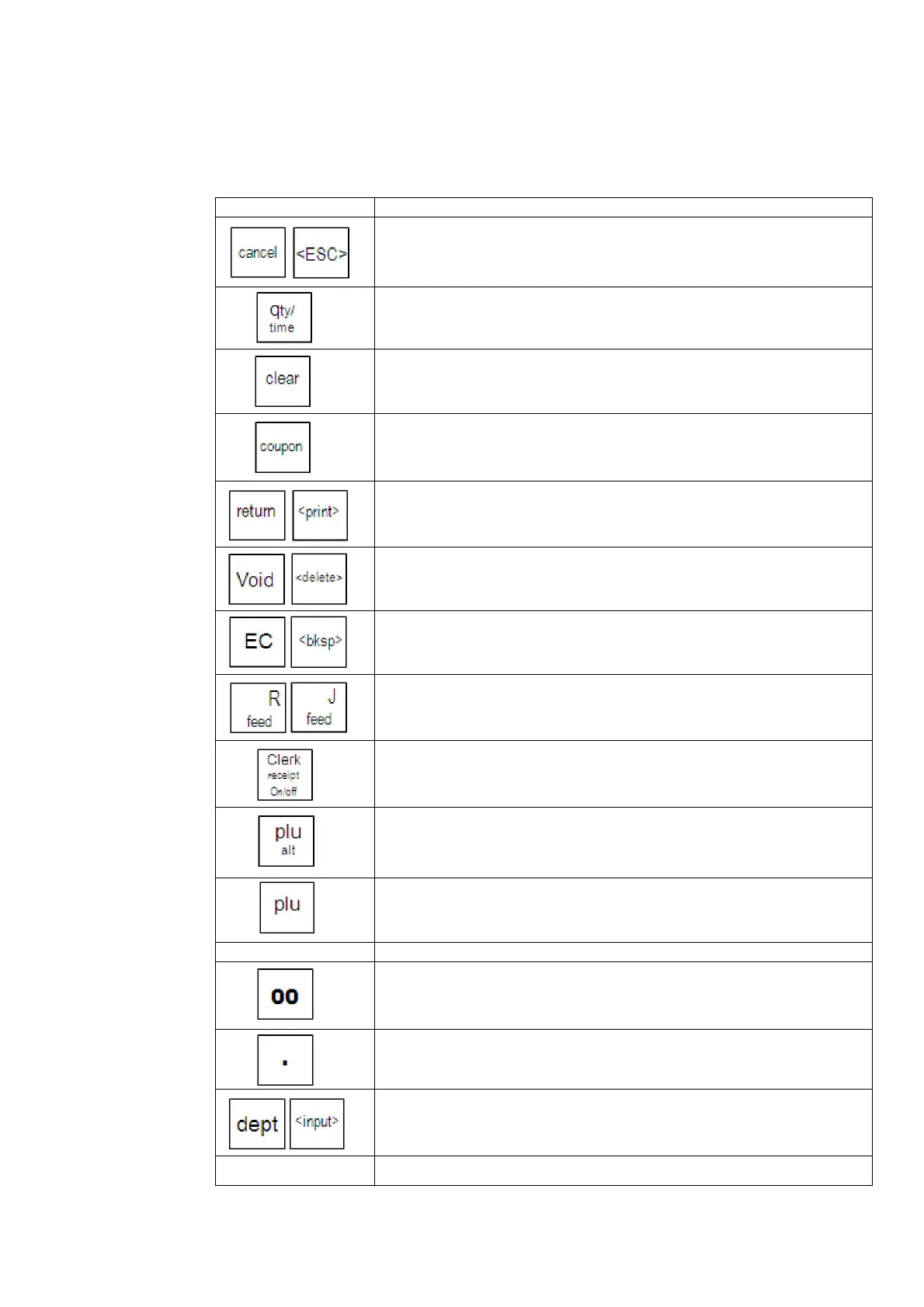
The keyboard on your 5000ML is used to enter sales transactions, program the
register and many other functions. Many of the keyboard keys have dual functions.
These functions are different depending on the mode currently active (programming,
sales registration, etc.) The following table explains many of the key board functions.
--to cancel the current transaction
--to go back to previous menu or setting
--enter multiple quantities of a PLU or Department during a sale
--show the time/ date display on the clerk and customer display
between transactions
--clear an entry or error
--enter single entry coupon discounts
--process a returned item
--print a Department/ PLU/ programming dump report
--to void an item or transaction
--to delete the highlighted character
--correct the last entry during a sales transactions
--backspace and delete one character while programming
--feed the receipt or journal paper
--log in a clerk for a sales transaction
--turn the receipt printer ON/OFF between transactions
--temporarily adjust the price of a preset PLU or access a specific
department
--register a plu entry by using the PLU number or a barcode
Numeric keys 0-9 --enter a numerical value for a sale, programming option, etc.
--enter a “00” or shift between double width character
--enter a decimal point
--enter a space when programming a description
--manually register a specific department
--jump to a specific flag, department, PLU, etc. when programming



 To Next Page