5 - Information / Configuration
F@st™ 2804v2 Reference Manual - 253329475-A
Page 5-70 Sagemcom document. Reproduction and disclosure prohibited
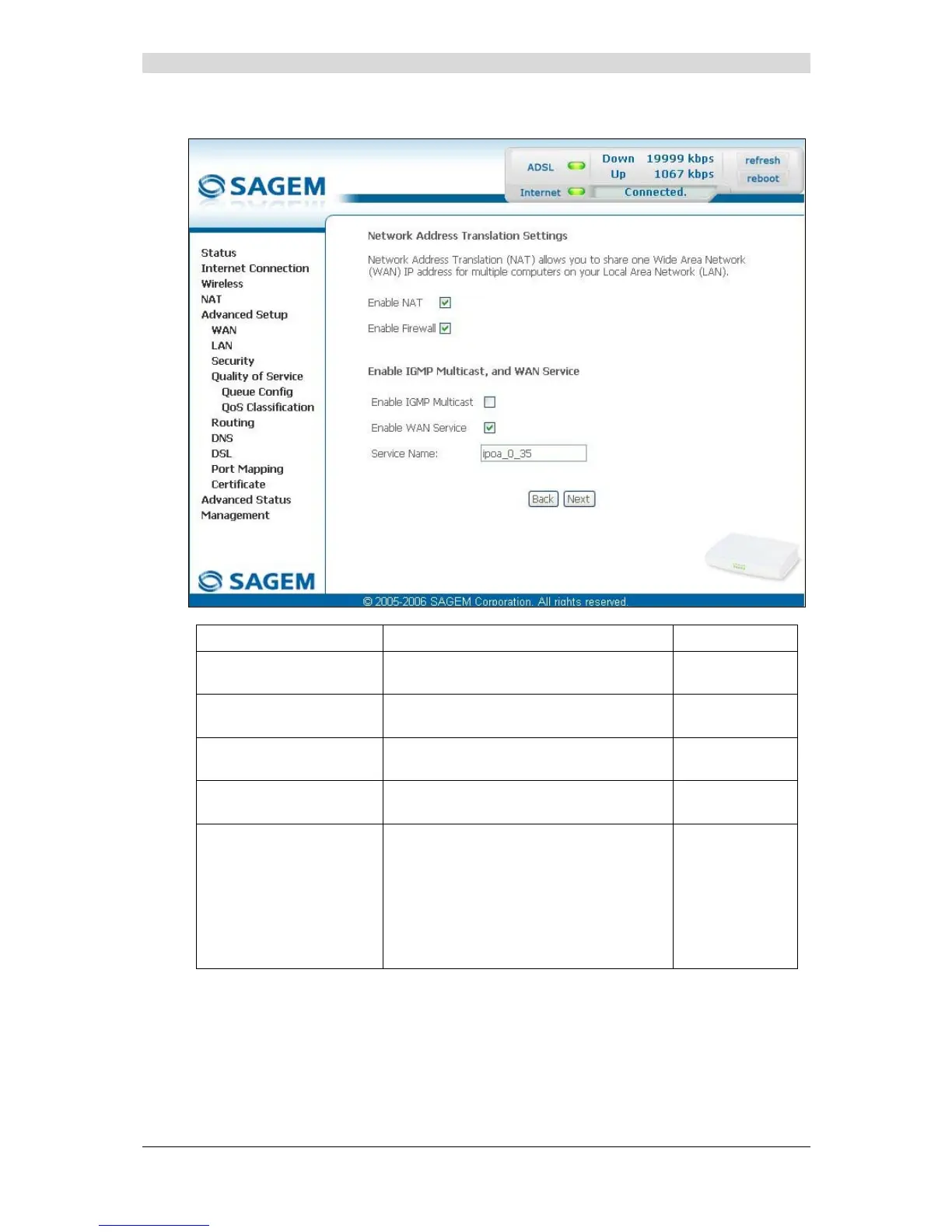
• Click on the Next button to continue configuring the remote network (WAN) in IPoA mode.
Field Action Default
Enable NAT
Check the box to activate the NAT
function.
Box checked
Enable Firewall
Check the box to activate the firewall
service.
Box checked
Enable IGMP Multicast
Check the box to activate the IGMP
function.
Box not
checked
Enable WAN Service
Check the box to activate the WAN
service.
Box checked
Service Name
Displays the name of the service being
configured. This name, which is allocated
automatically, is made up as follows:
Protocol_VPI_VCI_Index
For example: ipoa _0_35_1.
Note: You may enter another service
name.
ipoa_0_35_1
• Click on the Next button to continue configuring the remote network (WAN) in IPoA mode.



 To Next Page