5 - Information / Configuration
F@st™ 2804v2 Reference Manual - 253329475-A
Sagemcom document. Reproduction and disclosure prohibited Page 5-21
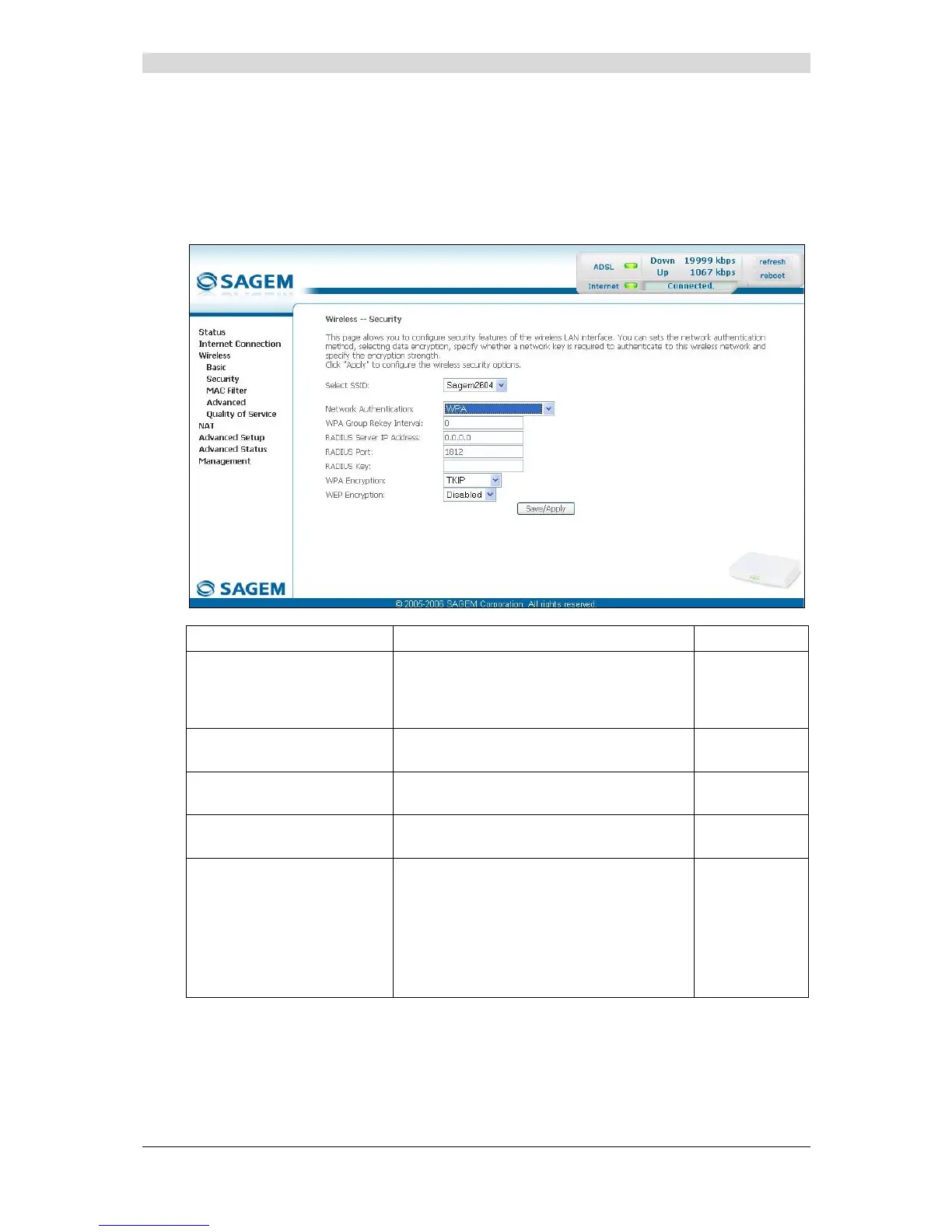
WPA
Object: This encryption mode applies the functionalities of the WPA protocol and requires the
use of a "RADIUS" authentication server.
• Select the "WPA" security from the scroll down list; the following screen appears:
Field Action Default
WPA Group Rekey Interval
Enter a value (in seconds) which determines
the period after which the WPA key will be
regenerated (Renewing) in broadcast /
multicast (LAN broadcast).
0
RADIUS Server IP Address
Enter the IP address of the "RADIUS"
authentication server.
0.0.0.0
RADIUS Port
Enter the port used by the "RADIUS"
authentication server.
1812
RADIUS Key
Enter the secret key shared between the
authentication server and its clients
_
WPA encryption
Select the WPA encryption required from the
scroll down list:
• TKIP (Temporal Key Integration
Protocol),
• AES (Advanced Encryption Standard),
• TKIP+ AES.
TKIP



 To Next Page