Installer reference guide / Mono tank integrated type 168
AE050RXYDEG, AE080RXYD**, AE120RXYD**, AE160RXYD**
1 Check the power supply between the outdoor unit and the auxiliary circuit breaker.
– 1 phase power supply : L, N
– 3 phases power supply : R,S,T,N
2 Check the control panel
– Check that you have connected the power and communication cables correctly. (If the power cable and
communication cables one mixed up or connected incorrectly, the PCB will be damaged.)
– Check the temp. sensor, drain pump/hose, and display are connected correctly.
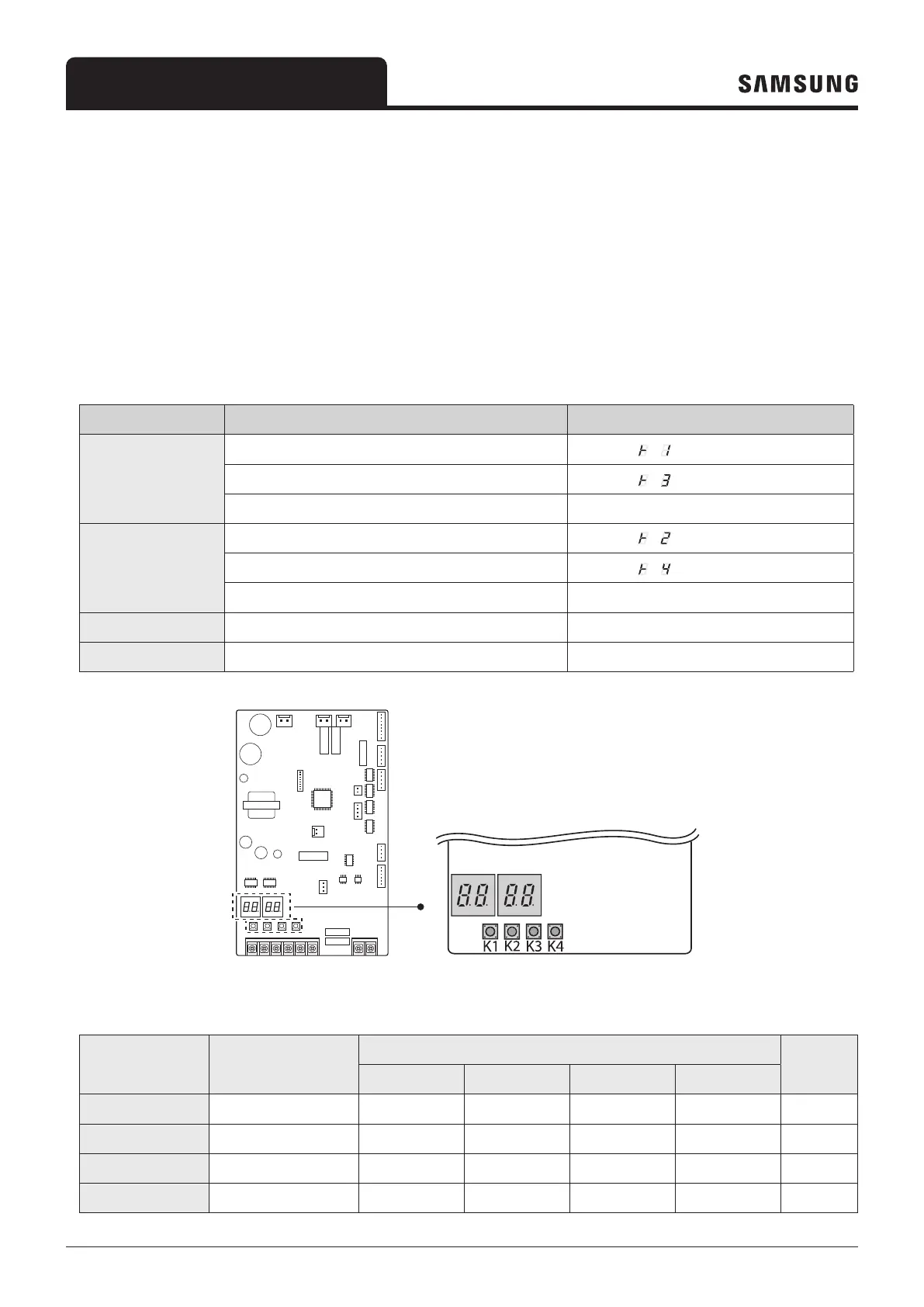
3 Press K1 or K2 on the outdoor unit PCB to run the test mode and stop.
KEY KEY operation 7-segment display
K1
Press once : Heating test run " " " " "BLANK" "BLANK"
Press twice : Defrost test run "
" " " "BLANK" "BLANK"
Press 3times : Finishing test mode -
K2
Press once : Cooling test run (Heating Only : skip) " " " " "BLANK" "BLANK"
Press twice : Output signal test run "
" " " "BLANK" "BLANK"
Press 3 times : Finishing test mode -
K3
Reset -
K4
View mode Refer to View mode display
7-segment display
KEY (K1~K4)
4 View Mode: When the K4 switch is pressed, you can see information about our system state as below.
Number of press Display contents
Display
Units
Segment 1 Segment 2 Segment 3 Segment 4
0 time
Communication State 10s digit of Tx 1s digit of Tx 10s digit of Rx 1s digit of Rx -
1 time
Order frequency 1 100s digit 10s digit 1s digit Hz
2 times
Current frequency 2 100s digit 10s digit 1s digit Hz
3 times
Pump output 3 100s digit 10s digit 1s digit %



 To Next Page