4.Troubleshooting
4.Troubleshooting
4.1.AlignmentandAdjustments
Thischapterdescribesthemainfunctionsforservice,suchastheproductmaintenancemethod,thetestoutputrelatedto
maintenanceandrepair,Jamremovingmethod,andsoon.
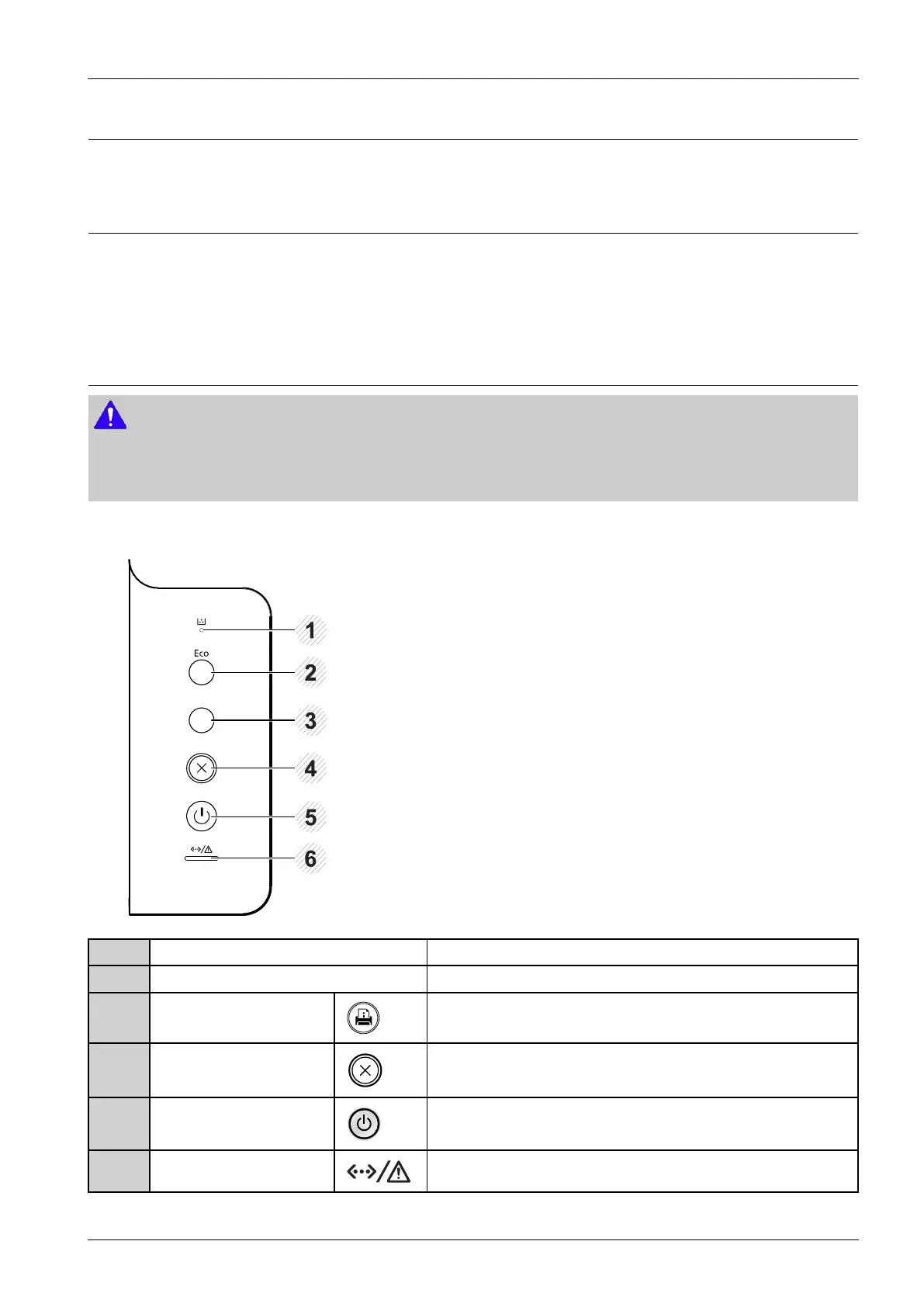
4.1.1.ControlPanel
NOTE
•Thiscontrolpanelmaydifferfromyourmachinedependingonitsmodel.Therearevarioustypesofcontrolpanels.
•Somefeaturesandoptionalgoodsmaynotbeavailabledependingonmodelorcountry
M332xND/M382xD
1TonerLEDShowsthestatusofthetoner.
2EcoEntersecomodetoreducetonerconsumptionandpaperusage.
3CongurationsheetPrintsademopagebypressingthisbutton.
4CancelStopscurrentoperation.
5PowerYoucanturnthepoweronandoffwiththisbutton.Orwakeupfrom
thepowersavemode.
6StatusLEDIndicatesthestatusofyourmachine.
Copyright©1995-2016SAMSUNG.Allrightsreserved.4-1



 To Next Page
 Loading...






