4.Troubleshooting
M382xND/M382xDW/M402xND
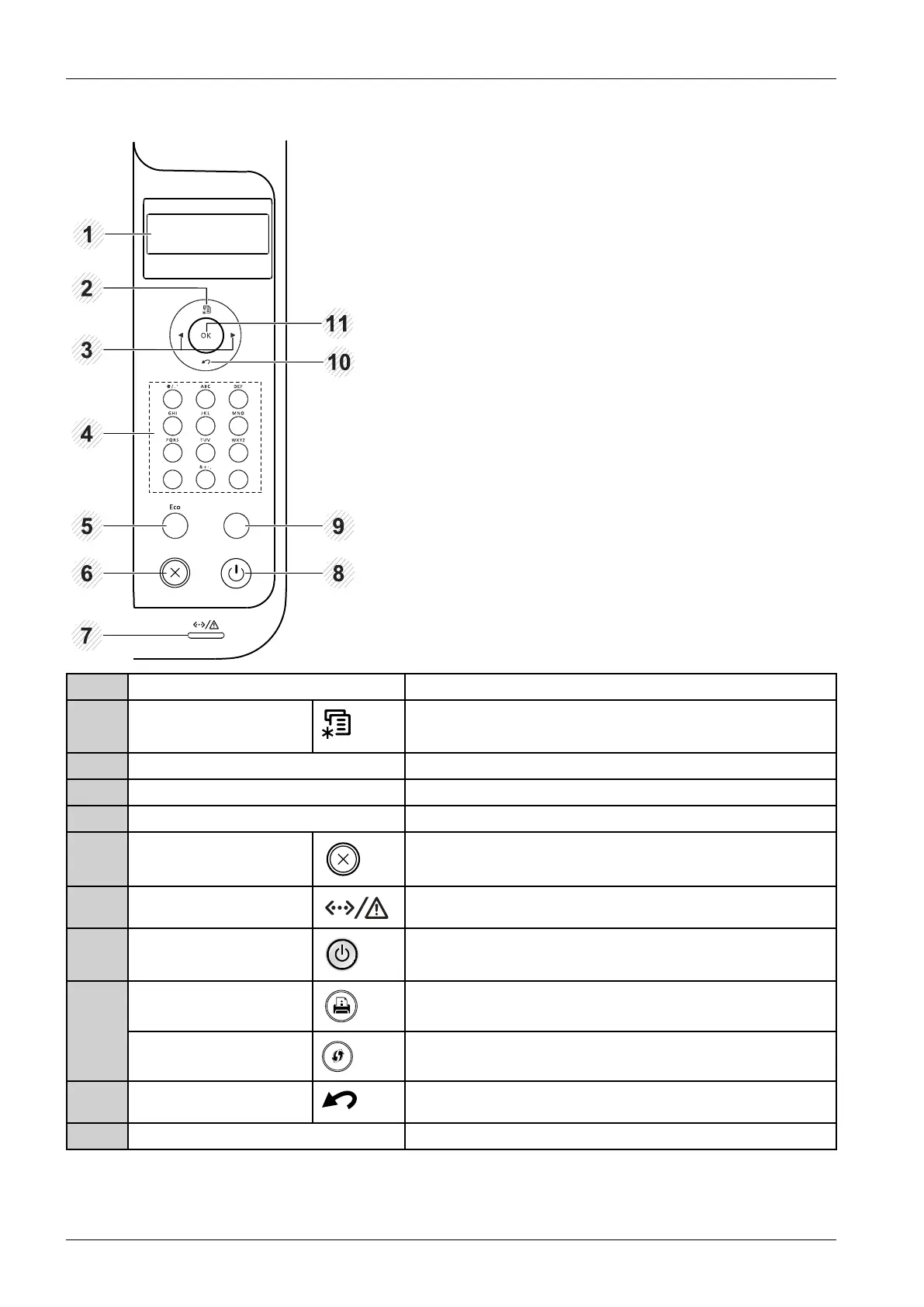
1DisplayscreenShowsthecurrentstatusandpromptsduringanoperation.
2Menu
Entersmenumodeandscrollsthroughtheavailablemenus.
3ArrowNavigatesavailablevaluesbymovingtothenextorpreviousoptions.
4NumerickeypadUsethekeypadtoenternumbersandcharacters.
5EcoEntersecomodetoreducetonerconsumptionandpaperusage.
6CancelStopscurrentoperation.
7StatusLEDIndicatesthestatusofyourmachine.
8PowerYoucanturnthepoweronandoffwiththisbutton.Orwakeupfrom
thepowersavemode.
CongurationsheetPrintsademopagebypressingthisbutton. 9
WPSConguresthewirelessnetworkconnectioneasilywithoutacomputer.
10Back
Sendsyoubacktotheuppermenulevel.
11OKConrmstheselectiononthescreen.
4-2Copyright©1995-2016SAMSUNG.Allrightsreserved.



 To Next Page
 Loading...






