Page 13
Introduction 2
AT-10 plus Service Handbook LCD screen 2.2
Art.-no.: 2.540043 Rev.: a
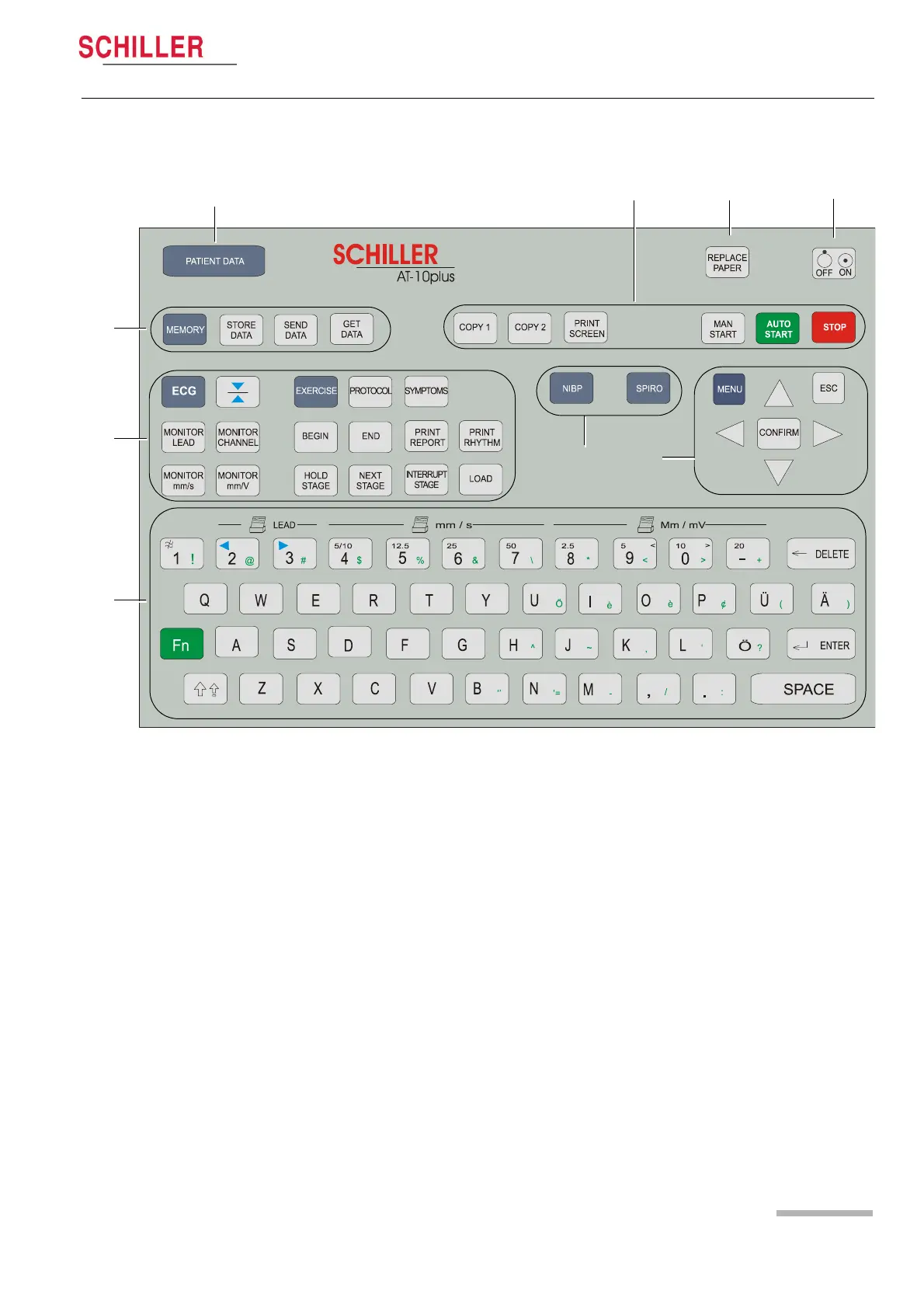
2.2.1 Keypad
The keyboard is divided into the following functional areas:
(1) Alphanumeric and Dual Purpose Keys. The numerical keys are dual purpose as
follows:
–Key 1 - switch myogram filter on or off
– The following keys change the speed, amplitude and lead group during manu-
al printing:
–Key 2 and 3 - changes to next / previous lead group
–Key 4 to 7 - printout speed
–Keys 8 to ‘-‘ - printout Amplitude (sensitivity)
(2) Resting and Stress ECG Function Keys:
• ECG Keys
– ECG key - select ECG menu settings
– Monitor Lead key - display next lead group
– Monitor Channel key - change the number of leads displayed
– Monitor mm/s key - toggle display speed
– Monitor mmV key - toggle display sensitivity
– Cal key - reset ECG signal to baseline and insert calibration signal on the
screen or on the printout
7
6
4
9
2
3
1
5
8














 To Next Page