UserManualofIRNetworkSpeedDome
14
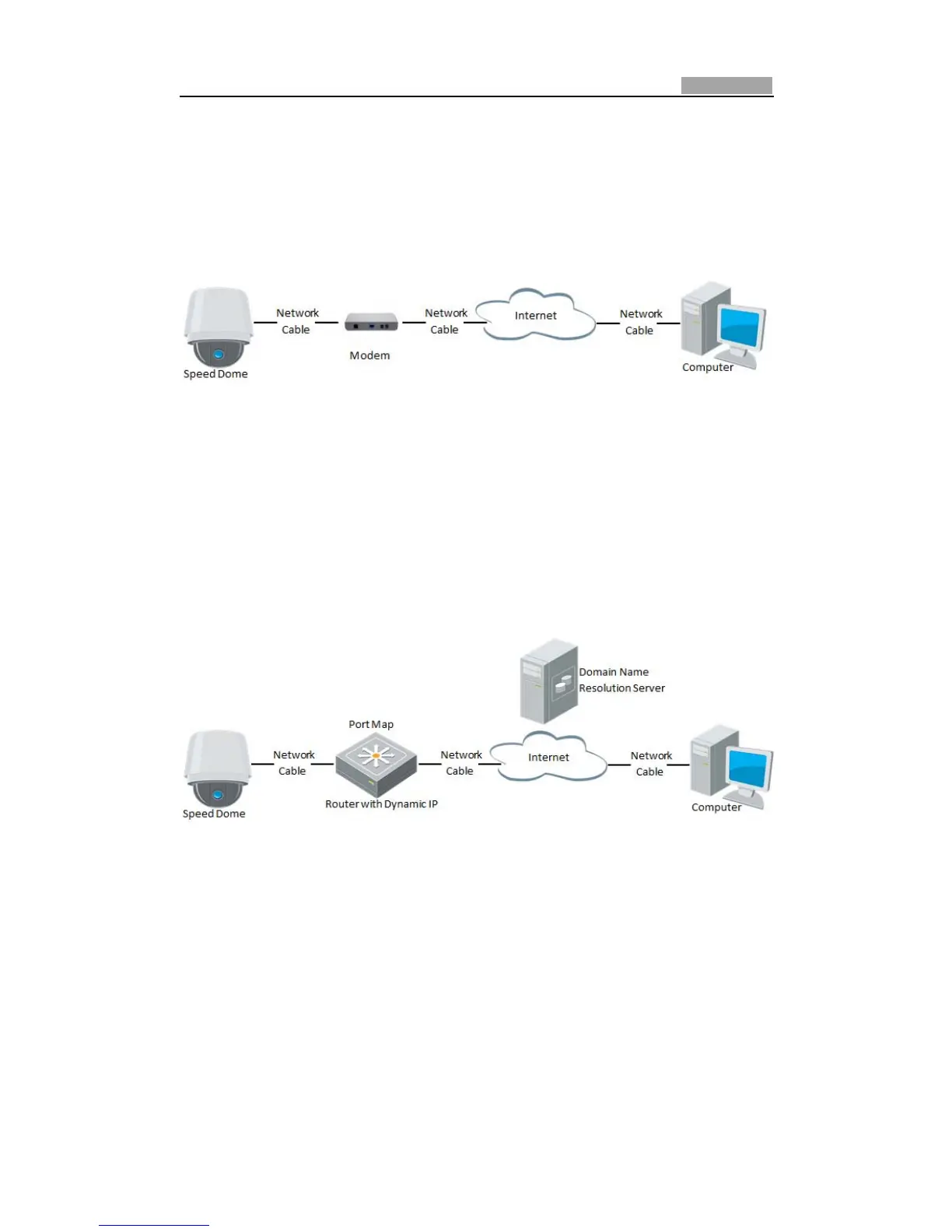
z Connectingthenetworkspeeddomeviaamodem
Purpose:
ThisspeeddomesupportsthePPPoEauto dialͲupfunction. The speeddome gets a
public IP address by ADSL dialͲup after the speed dome is connected to a modem.
You need to configure the PPPoE parameters of the network speed dome. Refer to
Section6.3.3ConfiguringPPPoESettingsfordetailedconfiguration.
Figure2Ͳ6 AccessingtheSpeedDomewithDynamicIP
Note: The obtained IP addressis dynamically assigned via PPPoE, so the IP address
always changes after rebootingthe speeddome.To solve the inconvenience of the
dynamic IP, you need to get a domain name from the DDNS provider (E.g.
DynDns.com). Please follow below steps for normal domain name resolution and
privatedomainnameresolutiontosolvetheproblem.
NormalDomainNameResolution
Figure2Ͳ7 NormalDomainNameResolution
Steps:
1. Applyadomainnamefromadomainnameprovider.
2. ConfiguretheDDNSsettingsintheDDNS Settingsinterfaceofthenetworkspeed
dome. Refer to Section 6.3.4 Configuring DDNS Settings for detailed
configuration.
3. Visitthespeeddomeviatheapplieddomainname.
PrivateDomainNameResolution



 To Next Page