UserManualofIRNetworkSpeedDome
20
Chapter4 LiveView
4.1 LiveViewPage
Beforeyoustart:
After the power is applied, the speed dome will performselfͲtest actions. It begins
withlensactionsandthenpanandtiltmovement.
Purpose:
Thelivevideopageallowsyoutoviewlivevideo,captureimages,realizePTZcontrol,
set/callpresetsandconfigurevideoparameters.
Log in the network speed dome to enter the live view page, or you can click
onthemenubarofthemainpagetoentertheliveviewpage.
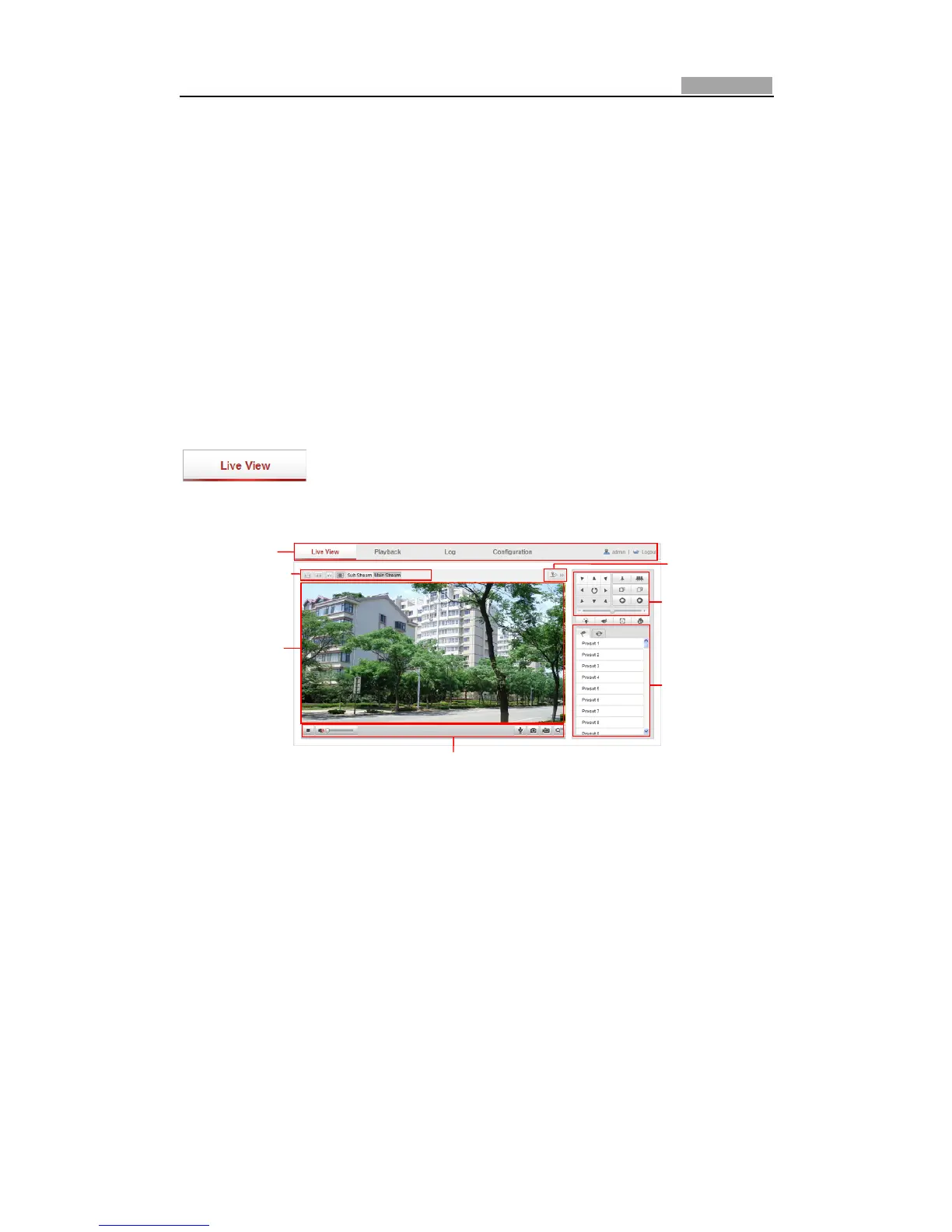
Descriptionsoftheliveviewpage:
Figure4Ͳ1 LiveViewPage
MenuBar:
ClickeachtabtoenterLiveView,Playback,LogandConfigurationpagerespectively.
LiveViewWindow:
Displaythelivevideo.
Toolbar:
Operations on the live view page, e.g., live view, capture, record, audio on/off,
twoͲwayaudio,etc.
PTZControl:
Panning,tilting,focusingandzoomingactionsofthespeeddome.
Preset/patrol:
Setandcallthepreset/patrolforthespeeddome.
LiveViewParameters:
MenuBar
Liveviewwindow
Toolb ar
PTZcontrol
Preset/patrol
LiveViewParameters
Clicktoshoworhide
PTZcontrolpanel



 To Next Page