UserManualofIRNetworkSpeedDome
32
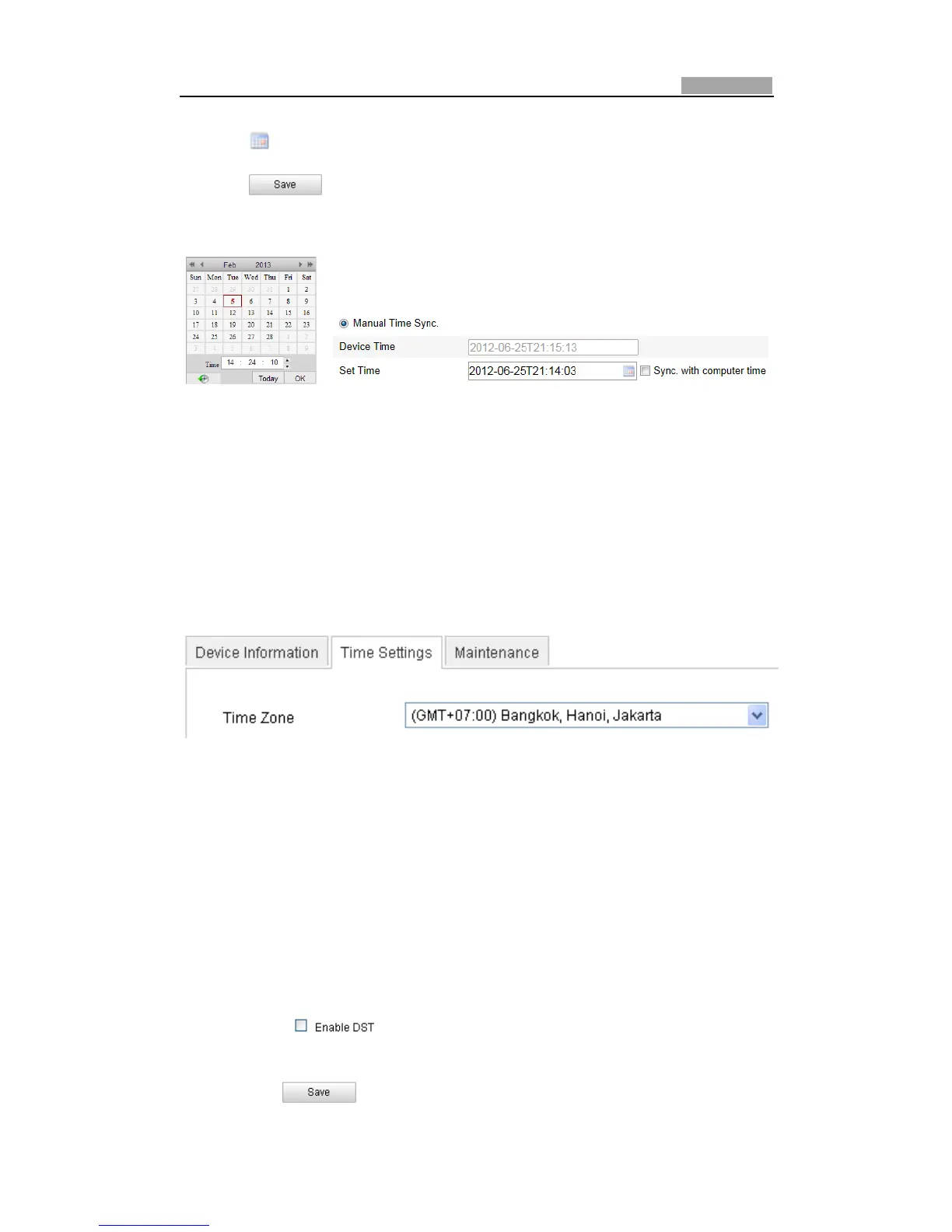
(2) Click tosetthesystemtimefromthepopͲupcalendar.
(3) Click tosavethesettings.
Note:YoucanalsochecktheSync.withcomputertimecheckboxtosynchronizethe
timeofthespeeddomewiththetimeofyourcomputer.
Figure6Ͳ4 TimeSyncManually
z SelecttheTimeZone
Purpose:
Whenthespeeddomeistakentoanothertimezone,youcanusetheTimeZone
function to adjust the time. The time will be adjusted according to the original
timeandthetimedifferencebetweenthetwotimezones.
From the Time Zone dropͲdown menu as shown in Figure 6Ͳ5, select the Time
Zoneinwhichthespeeddomelocates.
Figure6Ͳ5 TimeZoneSettings
z ConfiguringDaylightSavingTime(summertime)
Purpose:
If there is the habit of adjusting clocks forward in your country in certain time
period of a year, you can turn this function on. The time will be adjusted
automaticallywhentheDaylightSavingTime(DST)
comes.
Steps:
(1) Enter the DST interface by Configuration > Advanced Configuration >
System>DST
(2) Check toenable the DSTfunction.
(3) Setthe dateoftheDSTperiod.
(4) Click tosavethesettings.



 To Next Page