UserManualofIRNetworkSpeedDome
64
YoucanfollowbelowconfigurationinstructionstouploadthesnapshotstoFTP.
z UploadcontinuoussnapshotstoFTP
Steps:
1) Configure the FTP settings and check checkbox in FTP
Settingsinterface.PleaserefertoSection6.3.8ConfiguringFTPSettingsformore
detailstoconfigureFTPparameters.
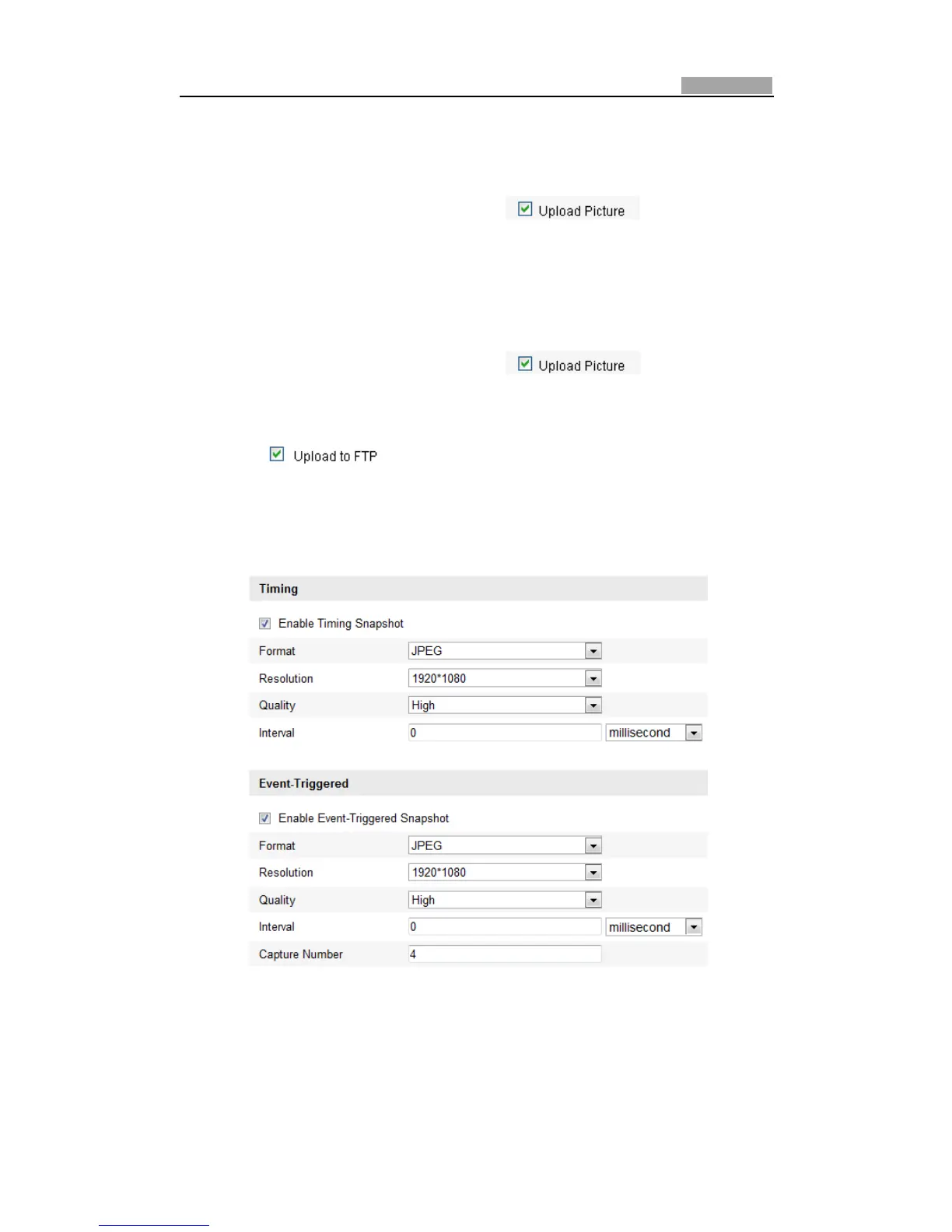
2) ChecktheEnableTimingSnapshotcheckbox.
z UploadeventͲtriggeredsnapshotstoFTP
Steps:
1) Configure the FTP settings and check
checkbox in FTP
Settingsinterface.PleaserefertoSection6.3.8ConfiguringFTPSettingsformore
detailstoconfigureFTPparameters.
2) Check
checkboxin Motion Detection SettingsorAlarmInput
interface. Please refer to Step 3 Set the Alarm Actions Taken for Motion
Detectionin Section 6.6.1 Configuring Motion Detection,orStep 4 Configuring
ExternalAlarmInputinSection6.6.1ConfiguringMotionDetection.
3) ChecktheEnableEventͲtriggeredSnapshotcheckbox.
Figure6Ͳ47 SnapshotSettings



 To Next Page