UserManualofIRNetworkSpeedDome
67
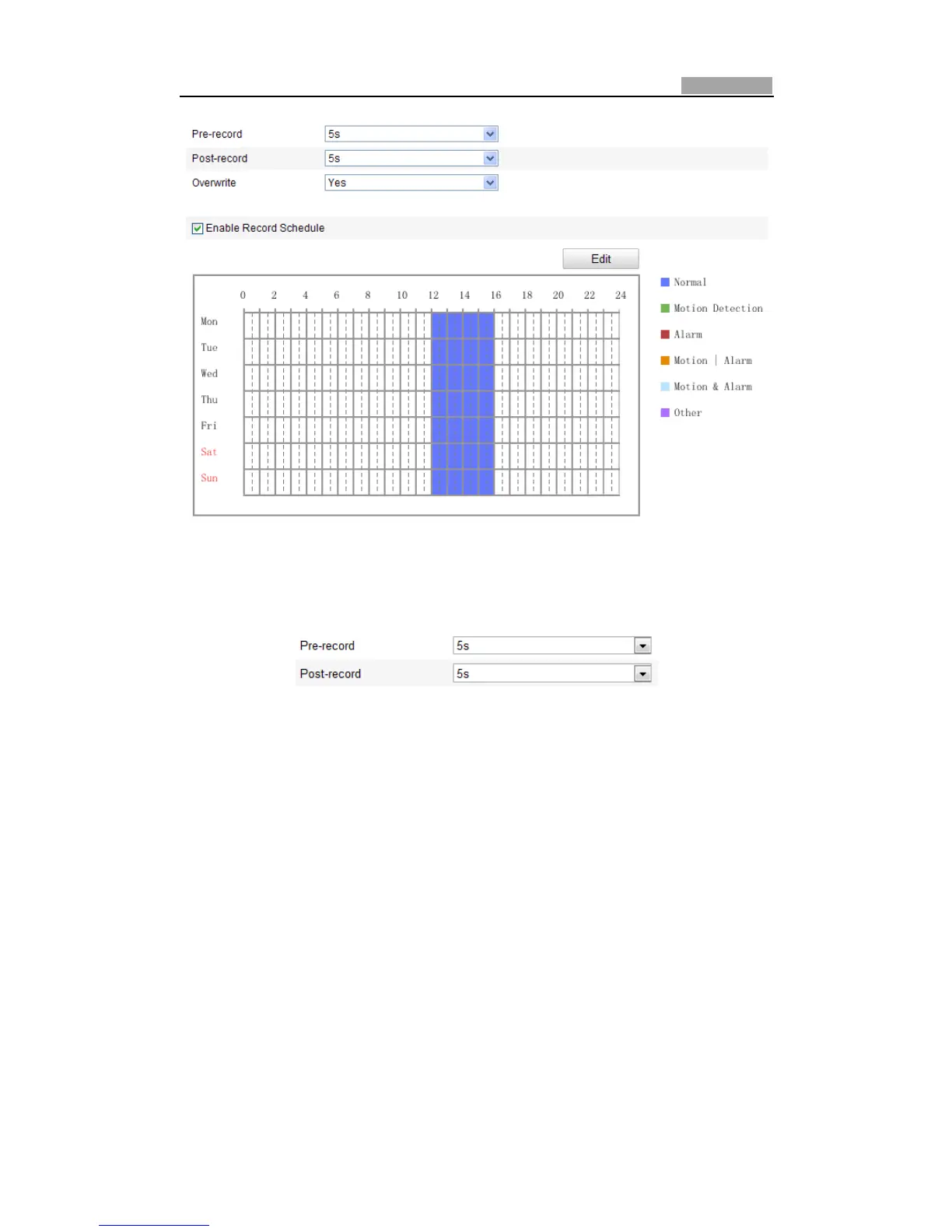
Figure7Ͳ5 RecordingScheduleInterface
2. CheckthecheckboxofEnableRecordScheduletoenablescheduledrecording.
3. Settherecordparametersofthespeeddome.
Figure7Ͳ6 RecordParameters
z PreͲrecord:Thetimeyousettostartrecordingbeforethescheduledtimeor
the event. For ex ample, if an alarm triggers recording at 10:00, and the
preͲrecord time is set as 5 seconds, the speed dome starts to record at
9:59:55.
ThePreͲrecordtimecanbeconfiguredasNoPreͲrecord,5s,10s,15s,20s,
25s,30sornotlimited.
Note:ThepreͲrecordtimechangesaccordingtothe videobitrate.
z PostͲrecord: The time you set to stop recording after the scheduled time or
theevent.Forexample,ifanalarmtriggeredrecordingendsat11:00,andthe
postͲrecordtimeissetas5seconds,thespeeddomerecordsuntil11:00:05.
ThePostͲrecordtimecanbeconfiguredas5s,10s,30s,1min,2min,5min
or10min.
z Overwrite:IfyouenablehisfunctionandtheHDDisfull,thenewrecordfiles
overwritetheoldestrecordfilesautomatically.
Note: The PreͲrecord and PostͲrecord parameters vary depending on the speed



 To Next Page