UserManualofIRNetworkSpeedDome
72
3. Click toplaythevideofilesfoundonthisdate.
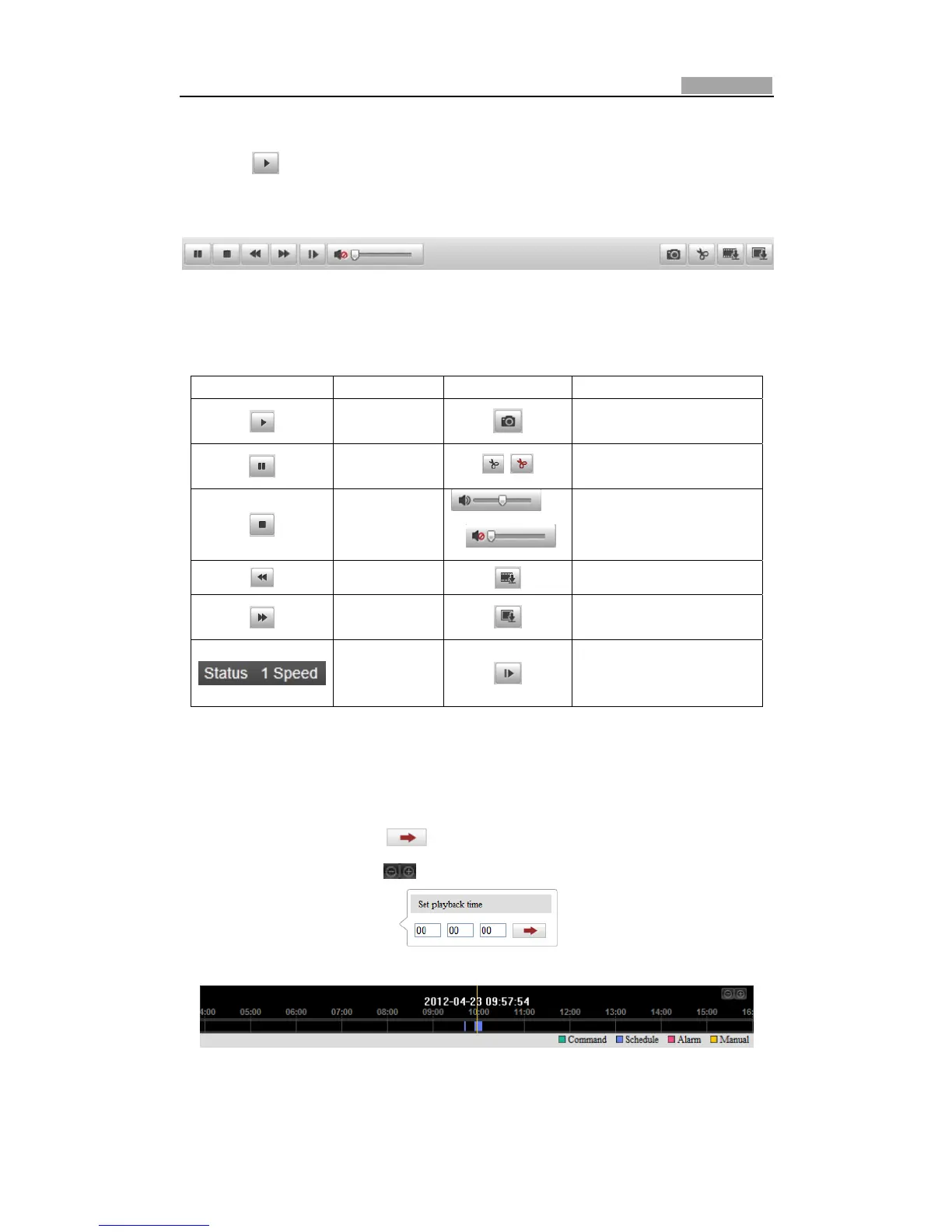
ThetoolbaronthebottomofPlaybackinterfacecanbeusedtocontrolplaying
process.
Figure8Ͳ3 PlaybackToolbar
Table8Ͳ1 Descriptionofthebuttons
Button Operation Button Operation
Play
Captureapicture
Pause
/
Start/Stopclippingvideo
files
Stop
/
Audioonandadjust
volume/Mute
Speeddown
Downloadvideofiles
Speedup
Downloadcaptured
pictures
Display
playback
status
Playbackbyframe
Note:Youcanchoosethefile pathslocallyfordownloadedplaybackvideofilesand
picturesinLocalConfigurationinterface.PleaserefertoSection6.1ConfiguringLocal
Parametersfordetails.
Dragtheprogressbarwiththemousetolocatetheexactplaybackpoint.Youcan
alsoinputthetimeandclick
tolocatetheplaybackpointintheSetplayback
timefield.Youcanalsoclick tozoomout/intheprogressbar.
Figure8Ͳ4 SetPlaybackTime
Figure8Ͳ5 ProgressBar
Thedifferentcolorsofthevideoontheprogressbarstandforthe differentvideo



 To Next Page