Navigation (NAV)* 121
Operating RADIO, MEDIA (audiovisual
systems)
NAME, TEL NAV, INFO CAR, SETUP
Stopovers already entered can be deleted, changed or moved. You can also
drive to them immediately ⇒ page 119.
Route without stopover
Select this option to navigate directly to your destination.
Note
If you switch to the navigation function and you are shown the menu for Route
planning ⇒ page 120, fig. 143, you are in Route guidance with stopover. If
you would like to navigate directly to a final destination, select and confirm
Route without stopover in the Route function menu.
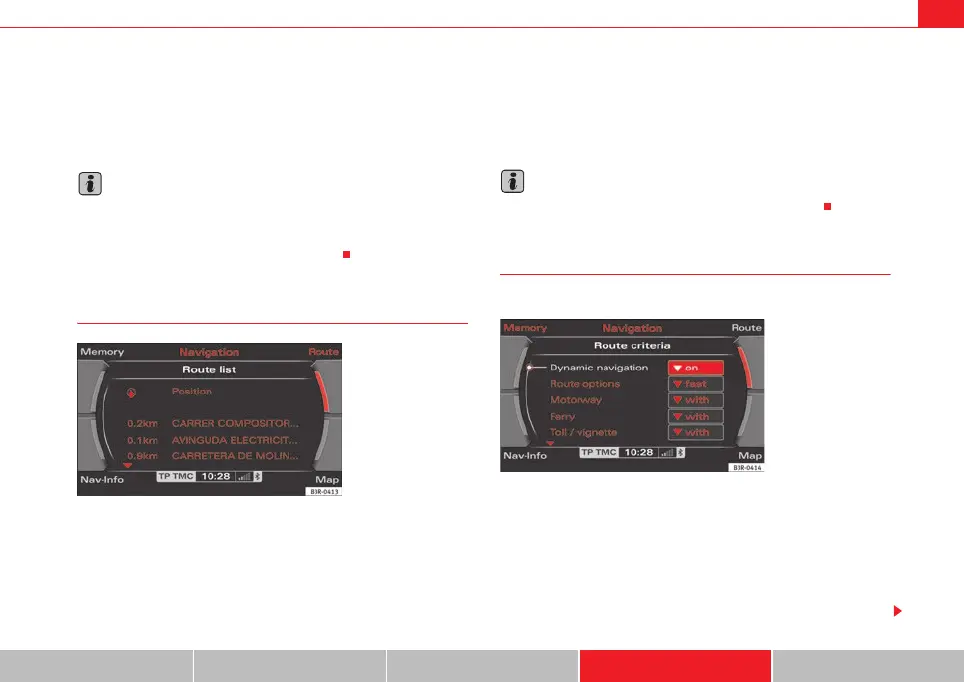
Route list
– Press the Route control button in the navigation menu.
–Select Route list ⇒ page 120, fig. 142. The route will be shown
in detail ⇒ fig. 144.
The route list contains the following information:
• Notes on the route
• Distances
• Street names
• City names
Note
If route guidance is not activated, Route list will be greyed out.
Route criteria
Route calculation depends on the route criteria selected.
–Press the Route control button in the navigation menu.
– Select Route criteria ⇒ page 120, fig. 142.
– Select the desired route criteria ⇒ fig. 145.
During route guidance, route criteria can be changed as desired and the route
will be recalculated.
Fig. 144 Navigation
system: route
Fig. 145 Navigation
system: Listing of the
possible route criteria
media_systemE_EN.book Seite 121 Montag, 21. September 2009 1:48 13



 To Next Page