Drives 29
Operating RADIO, MEDIA (audiovisual
systems)
NAME, TEL NAV, INFO CAR, SETUP
Choosing the adapter
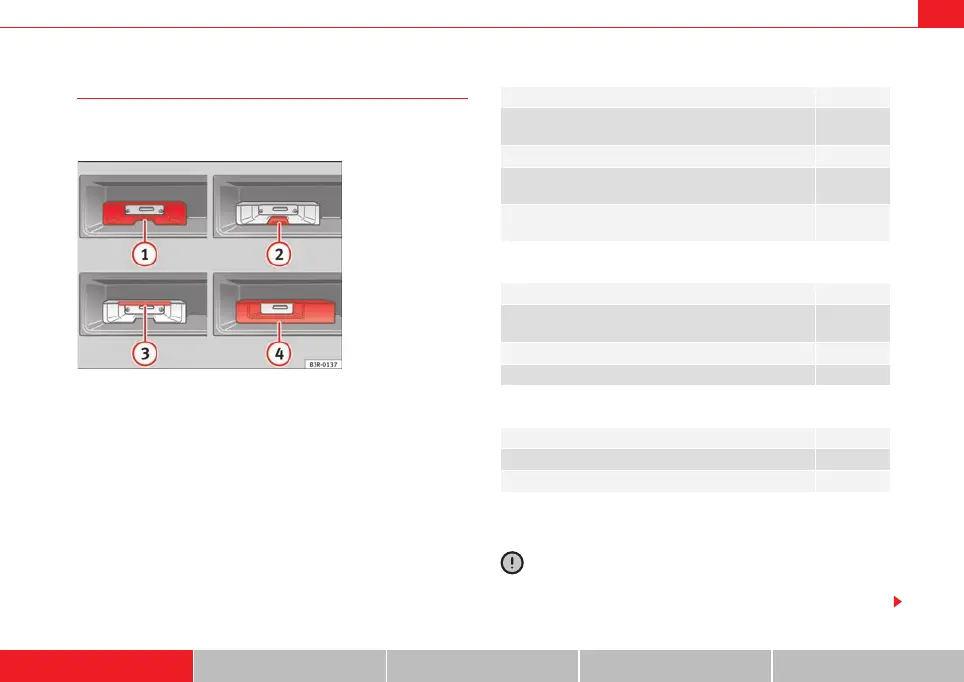
The iPod interface is supplied with a choice of adapters for
connecting your iPod.
iPods come in different sizes. Therefore, you will need to match the iPod inter-
face ⇒ fig. 32 to your iPod using one of the adapters supplied. You will
need two adapters for certain iPod models (touch, 5G (video), classic).
The iPod interface is supplied with the following adapters:
1. Narrow adapters of different heights for inserting into the central slot
below the bay .
2. Flat adapter plates for inserting into the slot above the bay .
3. Wide adapter casing for inserting into the bay .
There are also some iPods that do not require an adapter (e.g. iPod Photo 60
GB)
Caution
The iPod must be firmly seated in the iPod interface. The iPod may be
damaged if it is not installed correctly.
Fig. 32 iPod interface
with slots for adapters
1
2
iPod Nº adapter
classic 80 GB,
4G 20 GB
1
5G (video) 30 GB, touch 3
5G (video) 60/80 GB,
Photo 30 GB
4
classic 160 GB,
3G 10-20 GB
5
iPod Nº adapter
classic 160 GB,
5G (video) 30/60/80 GB
8
classic 80 GB 12
touch 13
iPod Nº adapter
nano 2G 10
nano 3G 11
A
3
4
media_systemE_EN.book Seite 29 Montag, 21. September 2009 1:48 13



 To Next Page