Instructions for Use
Resting & Stress ECG with seca
ct330/331 and seca diagnostic 5.9
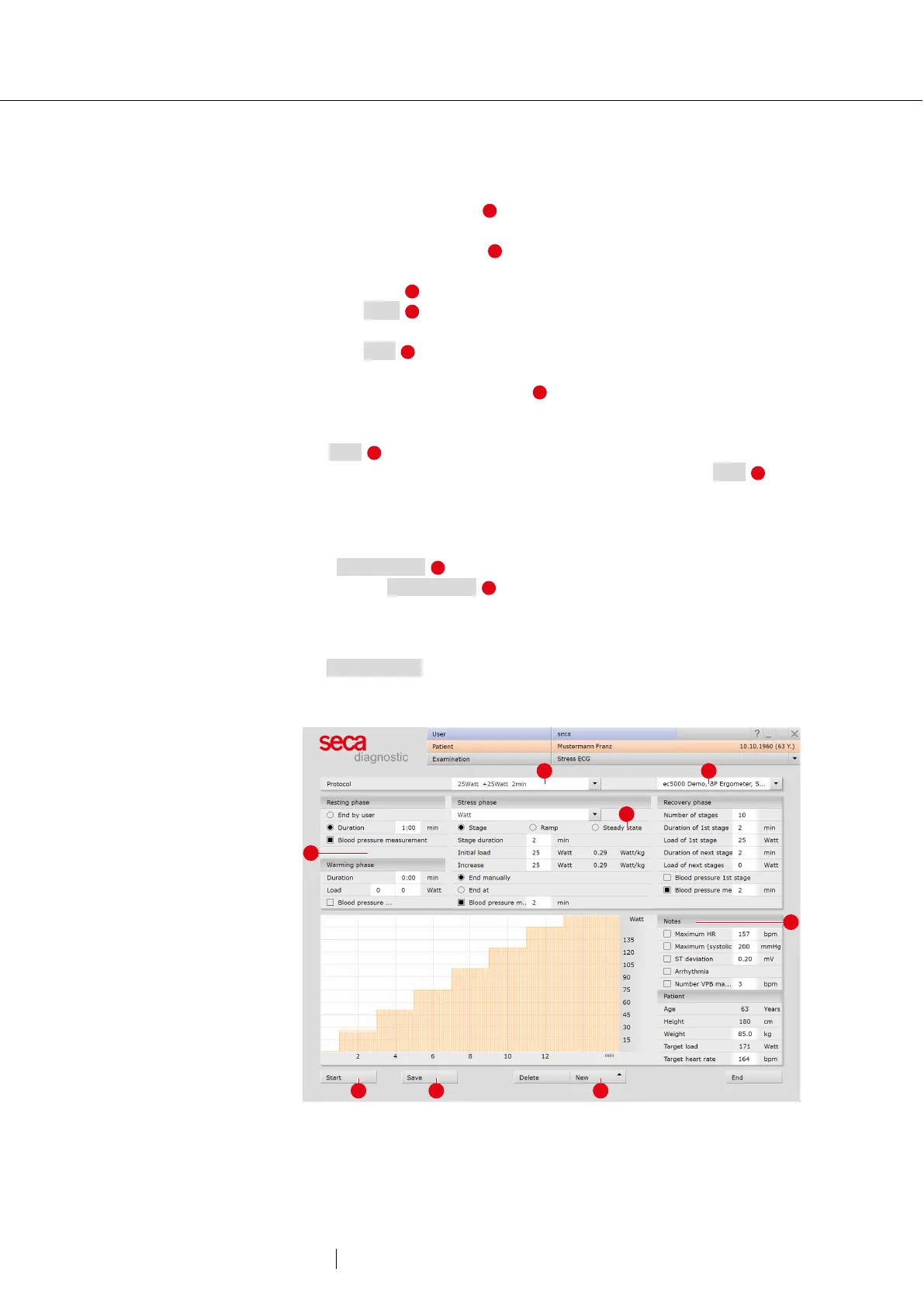
Profile selection
→ The profile selection opens.
→ Select a stress profile . The list contains predefined profiles for
ergometer (with watt specifications) and treadmill.
→ Set the training device for the recording.
→ The predefined load profiles can be changed and adjusted if
necessary .
→ With Save , the modified load profile can be saved under a new
name.
→ With New new profiles can be created (types: ergometer, free,
treadmill).
→ The values in the Notes area are freely adjustable and can be
activated if required. If you want to use the Notes function, the Notes
values must be set correctly during profile selection before clicking
Start . The Notes values cannot be activated and changed later.
→ After selecting and configuring the load profile, click the Start
button to access the recording screen.
Additional information: Steady State option for ergometer profiles
With Steady State the load profile can be controlled manually during
recording. If Steady State is selected, entries can no longer be made
for the stage duration, increase and end in the input mask. The profile
continues to run unchanged during the recording until a manual change
is made. To define the end of a load level during the recording, click on
the Measurement button. The last ten seconds will be measured. Then
set the load for the new load level.
Fig. 23: Profile selection stress ECG



 To Next Page