MRD 5800 – User Manual
Page 41 (116)
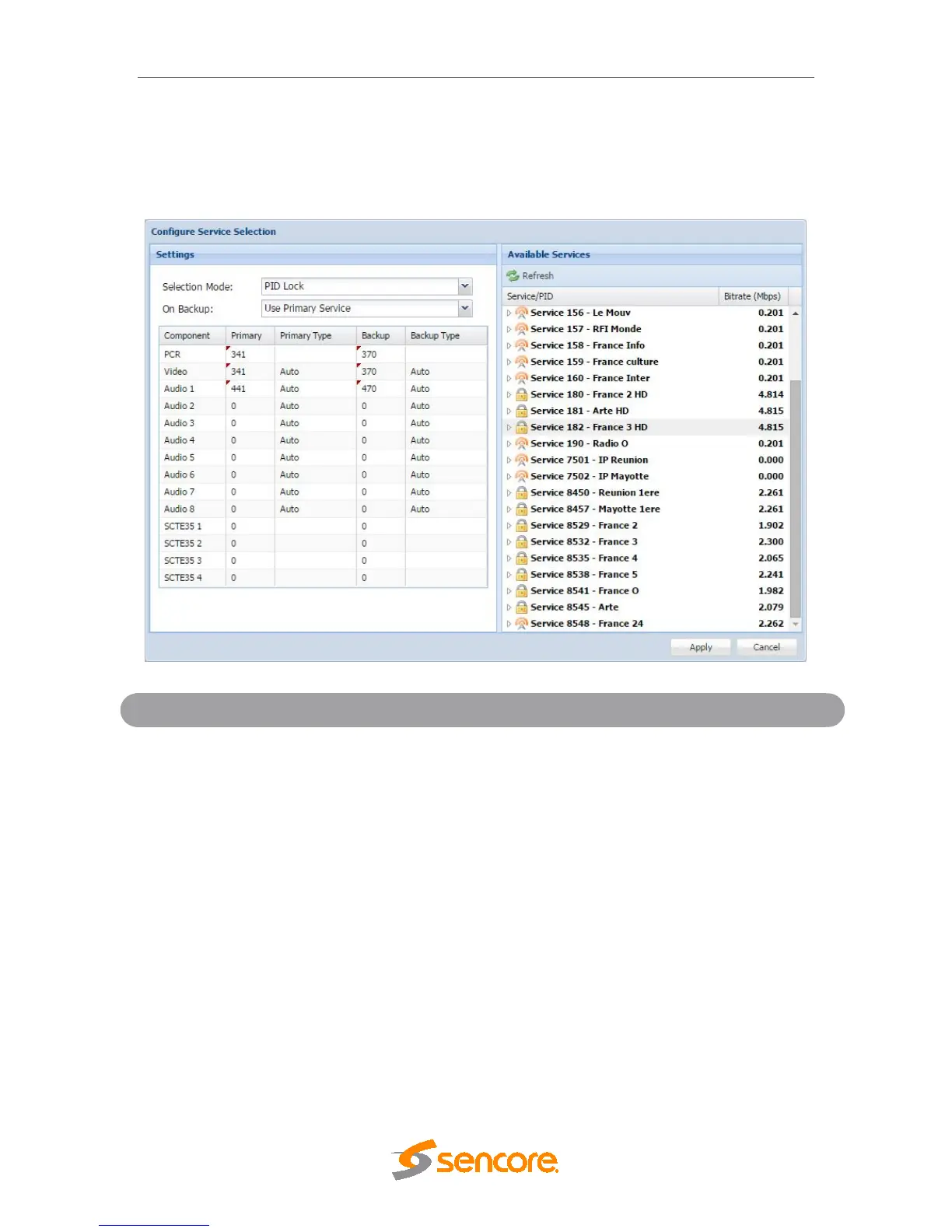
In PID Lock mode the MRD will only decode the PIDs specified by the user in the PID
Lock Configuration matrix. The drag and drop method can be used to auto-populate the
cells in the matrix. Stream types can be manually defined under the Primary Type and
Backup Type columns. Individual cells under Primary and Backup columns can be
selected and PIDs can be typed in manually.
PID Lock Selection Menu
Use Backup PIDs
Sets the PIDs the MRD 5800 will tune to in
case of an input failover. If Use Primary PIDs
is selected the MRD 5800 will tune to the
PIDs specified in the Primary PID column. If
Use Backup PIDs is selected the service
name specified in the Backup PID column
will be tuned. How the MRD 5800 fails over
inputs is configured in
Section 4.2.1.
Auto Seek Mode
In Auto Seek mode the MRD will decode first service listed in the PAT. All PIDs will
automatically be assigned and decoded. No other configurations are available in this
mode. This mode should only be used to verify the MRD is receiving a valid signal and it
able to decode. This mode is not recommended for a professional environment.



 To Next Page