OmniHub 6/6D– User Manual
Page 158 of 182
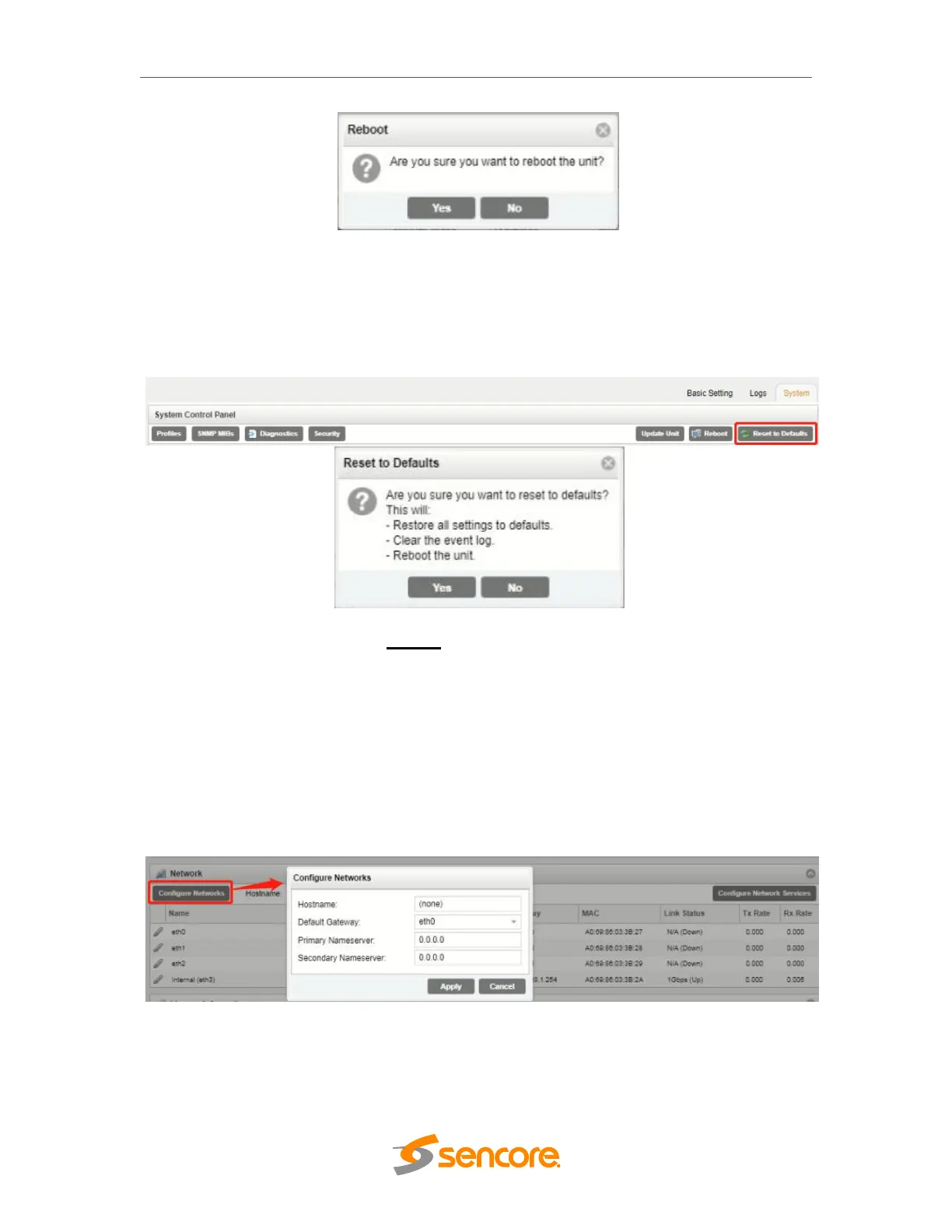
The OHP-IP-00 module can be rebooted from the web interface System page. The
‘Reboot’ button is located in the top right corner of the System Control Panel.
To perform a reboot, click the reboot button. The system will prompt the user to confirm
the reboot request. Once confirmed, a status window with a progress bar will open be
visible until the reboot is complete and the login window displayed.
Reset to Defaults
The OHP-IP-00 module settings can be reset to factory defaults. All settings will be
returned to the factory defaults except the network management ports TCP/IP settings.
All event logs will be cleared. To reset all settings to default, click the Reset to Defaults
button on the System page. The module will prompt the user to confirm the reset.
Configuring the Unit Networks and VLANs
The OHP-IP-00 module can be assigned a Hostname and DNS servers. To access this
menu, click on the Configure Networks gear icon. Within the window that opens, the
user can assign a Hostname to the module, define which physical port (Eth0, Eth1,
Eth2, Internal) the Default Gateway will use [The web-interface is accessible from the IP
address of either Ethernet port; however, be sure to configure the two ports for separate
subnets.], and provide addresses for Primary and Secondary Nameservers.



 To Next Page