SL Rack Receiver DW
82
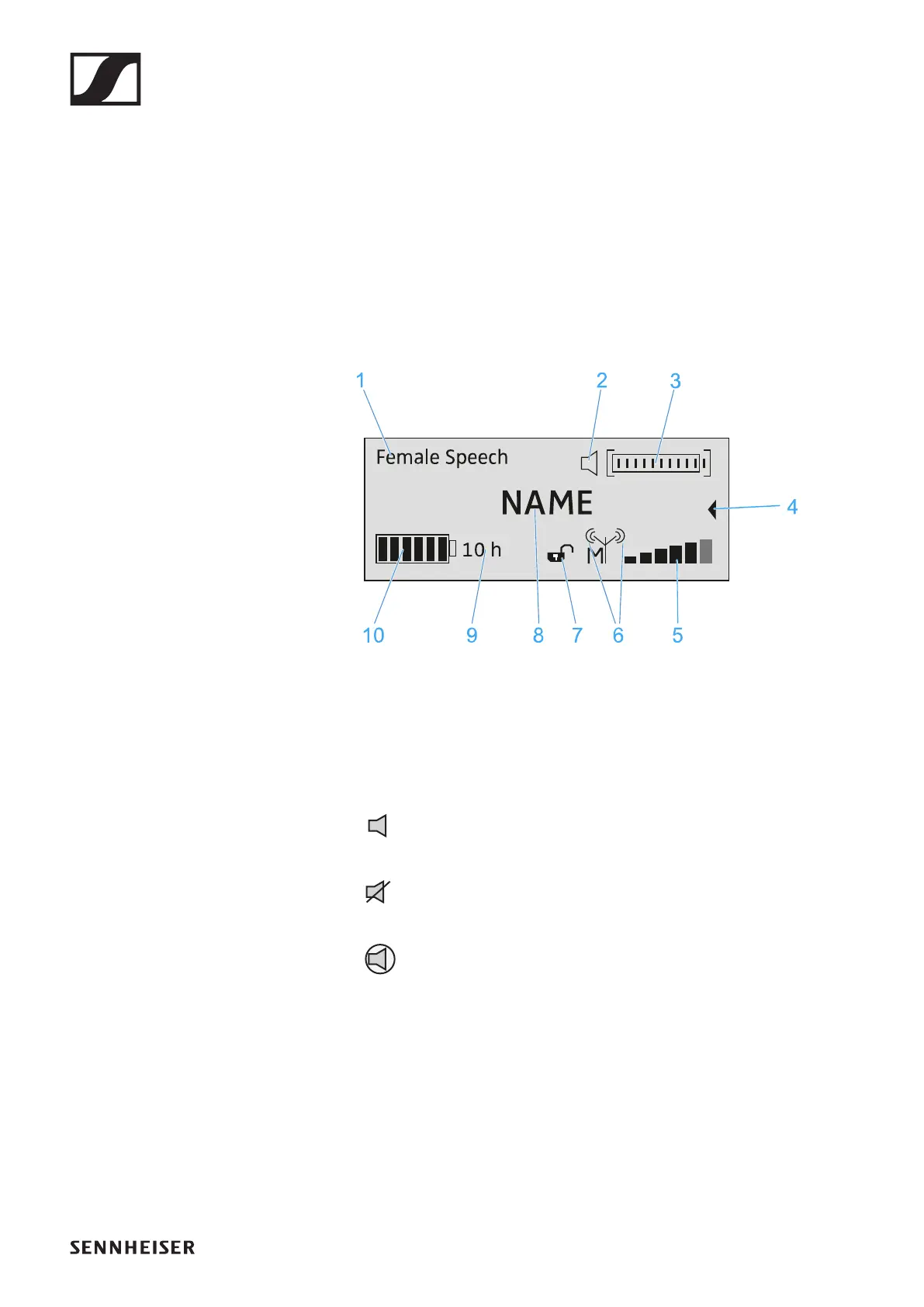
Displays on the receiver’s display panel
Home screen
The home screen appears automatically after switch-on or
when no button has been pressed on the receiver for a long pe-
riod of time.
If there is no radio link between the receiver and a transmitter,
No Link appears on the display panel and the display bright-
ness is automatically dimmed.
►
1 Selected sound profile
• Displays the name of the selected sound profile. If no
sound profile is selected, nothing is displayed here.
2 MUTE status display
The received transmitter is not muted, but can be
muted at any time.
The received transmitter is muted. In addition, the
status LED lights up yellow.
The received transmitter cannot be muted because
its MUTE switch is deactivated. See „The System Set-
tings menu“.
3 Audio level display
• The audio level is automatically adjusted.
4 Secondary home screen
• The secondary home screen appears when you turn the
jog dial to the left.
• The above shown home screen appears again after 10
seconds or when you turn the jog dial to the right.




 To Next Page