150
Manual – IPOSplus®
13
First steps
Compiler – Editor
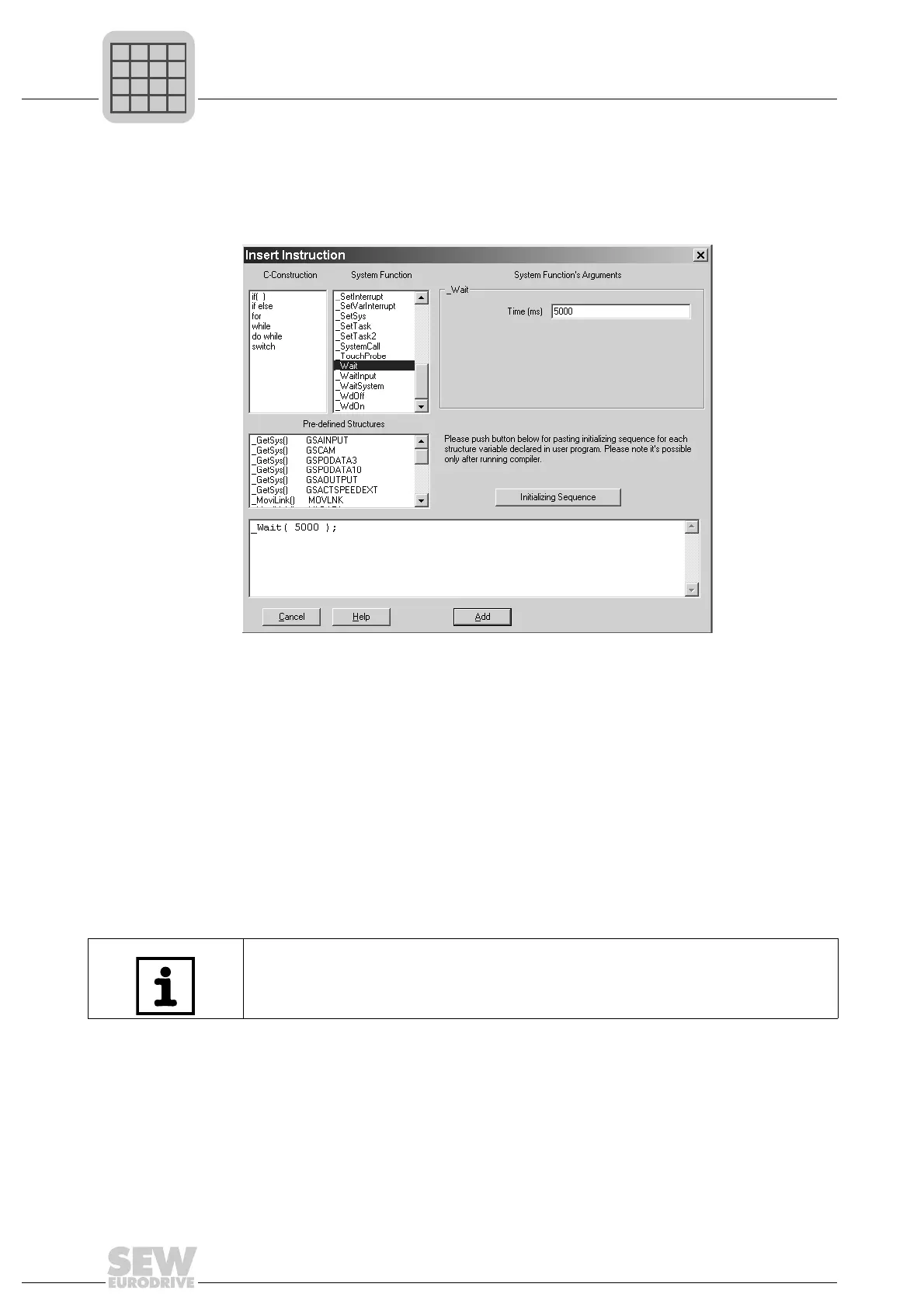
You can use the insert tool while you are editing the program. Click the right mouse but-
ton to open the context menu containing the [Insert Instruction...] menu item. This menu
item allows you to call up the insert tool.
Calls insert tool
You can use the insert tool to select various C-constructions, system functions and pre-
defined structures. When you select a system function, you have to enter the arguments
of this function in the group box to the right of the window. Use [Add] to insert the rele-
vant command to the position where you have placed the cursor in the source text.
To insert the _Wait function, you must first select the _Wait function in the list of system
functions. The right-hand side of the window displays the arguments relating to the cor-
responding function. For our example, enter the value 5000 (stands for 5000 ms).
If you require additional information on a C construction or a system function, simply se-
lect the term in question in one of the two lists and press the <F1 key> or the [Help] but-
ton.
You can activate the help function from the source text by placing the cursor on the key
word _Wait and pressing the <F1> key.
483423627
INFORMATION
The Compiler is case sensitive, which means that there could be 2 different variables
for MYVAR and myvar.



 To Next Page