Manual – IPOSplus®
287
21
Loading the program from the inverter
Assembler – Editor
21.7 Loading the program from the inverter
In the IPOS
plus®
Assembler you have the option of uploading a program stored in the
inverter. To do so, choose [Program]/[Upload] or click on the icon in the toolbar. The
upload process deletes the previous Assembler program that you had open.
Remark lines are not saved in the inverter and as a result are lost during the upload pro-
cess.
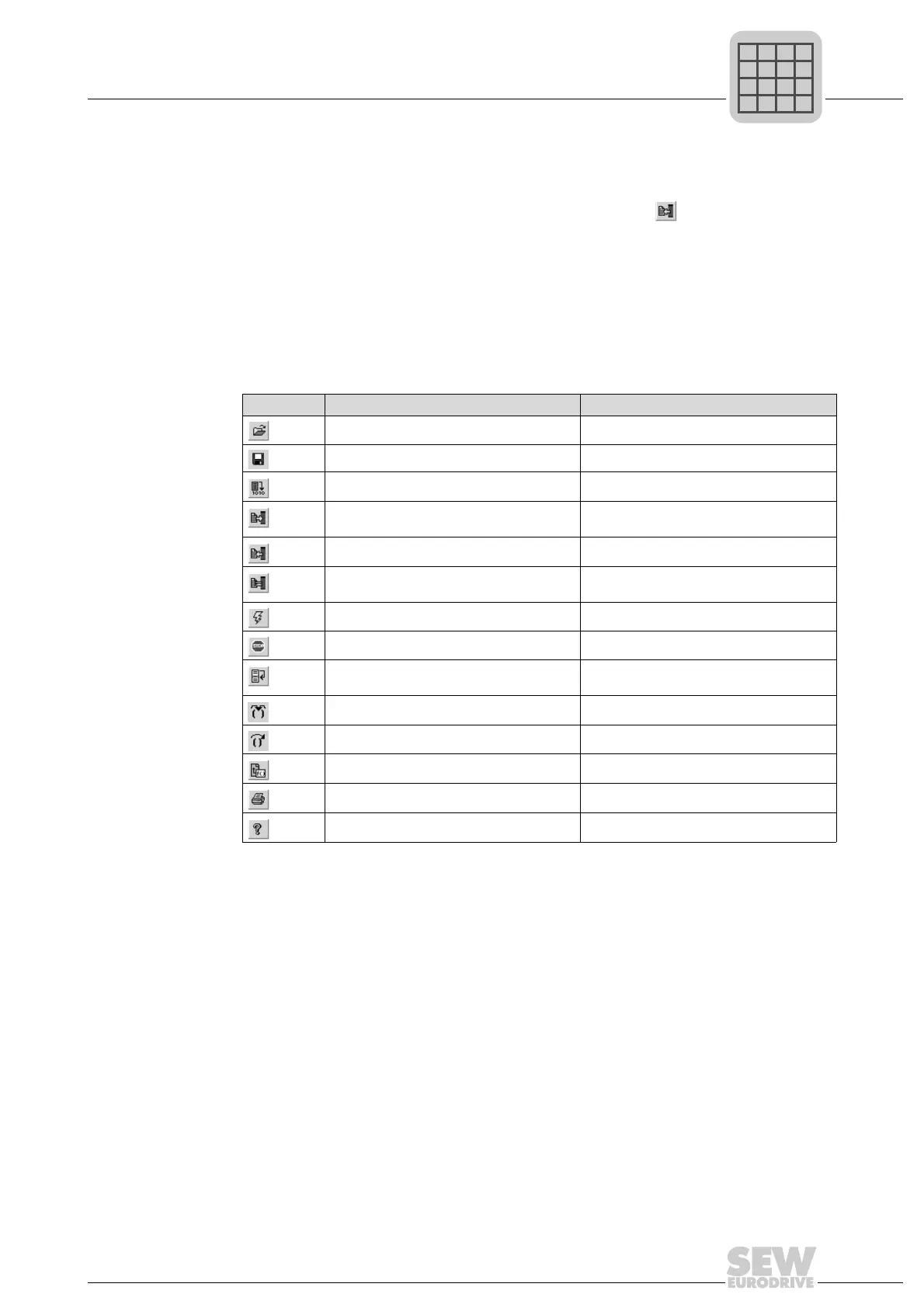
21.8 Overview of the icons
The functions that can be called up from the tool bar are listed below:
Symbol Menu item Description
File -> open Opens a program
File -> save Saves a program
Program -> compile Compiles a Program
Program -> Compile + download Compiles a program and downloads it into
the inverter
Program -> Upload Uploads a program from the inverter
Program -> compare with unit Compares program in the editor with the
program in the inverter
Run -> Start Starts the IPOS
plus®
program
Run -> stop Stops the IPOS
plus®
program
Run -> run to cursor Runs program to where the cursor is posi-
tioned
Run -> single step Runs single step
Run -> skip Skips an instruction (statement)
Edit -> Insert command Calls insert tool
File -> Print Prints a program
Help -> user manual Open online help



 To Next Page