y
x
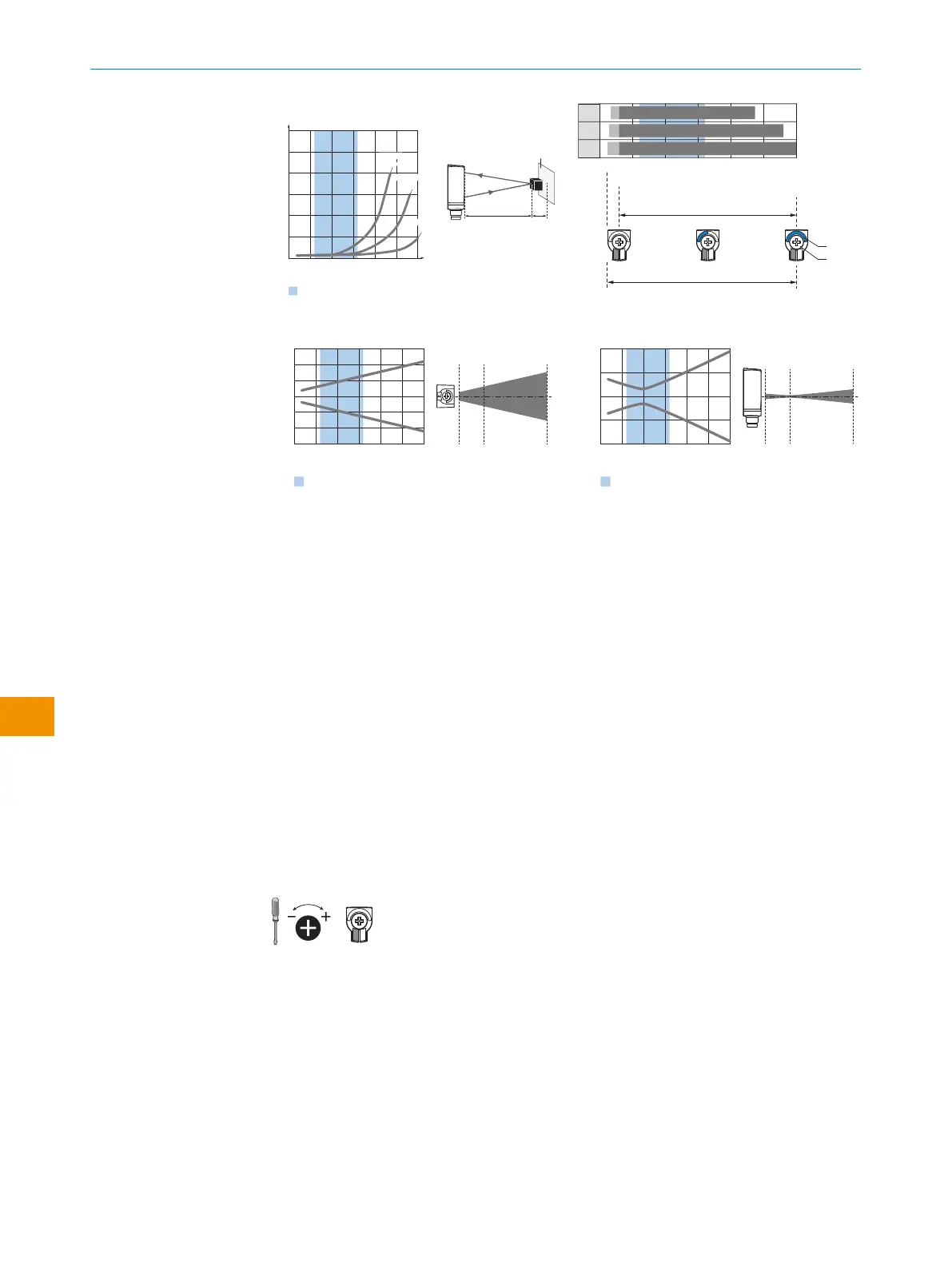
Example:
Safe suppression of the background
White background (90 %)
Black object (6 % remission)
Set sensing range x = 100 mm
Needed minimum distance to white
background y = 8 mm
0
10
(0.39)
5
(0.20)
20
(0.79)
15
(0.59)
25
(0.98)
50
(1.97)
25
(0.98)
75
(2.95)
100
(3.94)
125
(4.92)
0
Minimum distance in mm (y) between the set sensing
range and white background (90 % remission)
Distance in mm (inch)
Recommended sensing range for
the best performance
30
(1.18)
y
x
18%/90%
2
90%/90%
33
1
6%/90%
150
(5.91)
그림
98:
특성곡선
0
15
15
150
Distance in mm (inch)
118
140
1
2
3
15
D
C
A B
BluePilot
E
F
8
7
6
50
(1.97)
25
(0.98)
75
(2.95)
100
(3.94)
125
(4.92)
150
(5.91)
그림
99:
막대그래프
0
Distance in mm (inch)
Dimensions in mm (inch)
0
10
(0.39)
–10
(–0.39)
20
(0.79)
–20
(–0.79)
10
(0.39)
150
(5.91)
50
(1.97)
Recommended sensing range for
the best performance
50
(1.97)
25
(0.98)
75
(2.95)
100
(3.94)
125
(4.92)
30
(1.18)
–30
(–1.18)
150
(5.91)
그림
100:
수평
광점
크기
0
Distance in mm (inch)
Dimensions in mm (inch)
0
2
(0.08)
–2
(–0.08)
10
(0.39)
150
(5.91)
50
(1.97)
Recommended sensing range for
the best performance
50
(1.97)
25
(0.98)
75
(2.95)
100
(3.94)
125
(4.92)
150
(5.91)
4
(0.16)
–4
(–0.16)
그림
101:
수직
광점
크기
A 최소 스위칭 거리(mm)
B 최대 스위칭 거리(mm)
C 시야 범위
D 배경 억제를 위한 범위 스위칭 임계값 설정
E 스위칭 거리 표시
F 누르고 돌리는 조작 요소
파란
색
최고의 성능을 위한 권장 스위칭 거리 범위
6.3 설정
스위칭 거리 설정
WTB4FT/WTB4FA-xxxxxx1xAxx
전위차계를 이용한 설정:
오른쪽으로 돌리기: 스위칭 거리 증가.
왼쪽으로 돌리기: 스위칭 거리 감소.
WTB4FT/WTB4FA-xxxxxx2xAxx
티치인 버튼을 누르면(약 1~3초) 스위칭 거리가 설정됩니다. 요건에 따라 전위차계를
이용하여(티치인 버튼을 누르지 않고) 미세 조정을 수행할 수 있습니다.
오른쪽으로 돌리기: 스위칭 거리 증가.
왼쪽으로 돌리기: 스위칭 거리 감소.
전위차계만으로도 스위칭 거리를 설정할 수 있습니다.
6 작동 개시
102
작 동 지 침 서 | WTB4F SingleLine / DoubleLine 8025300.1FCK/2022-02-14 | SICK
예고 없이 변경 가능
ko











 To Next Page