Web-based configuration
5.4 Web pages
CIM
70 Operating Manual, 11/2022, A5E51250518-AC
5.4.7.4 Modbus RTU
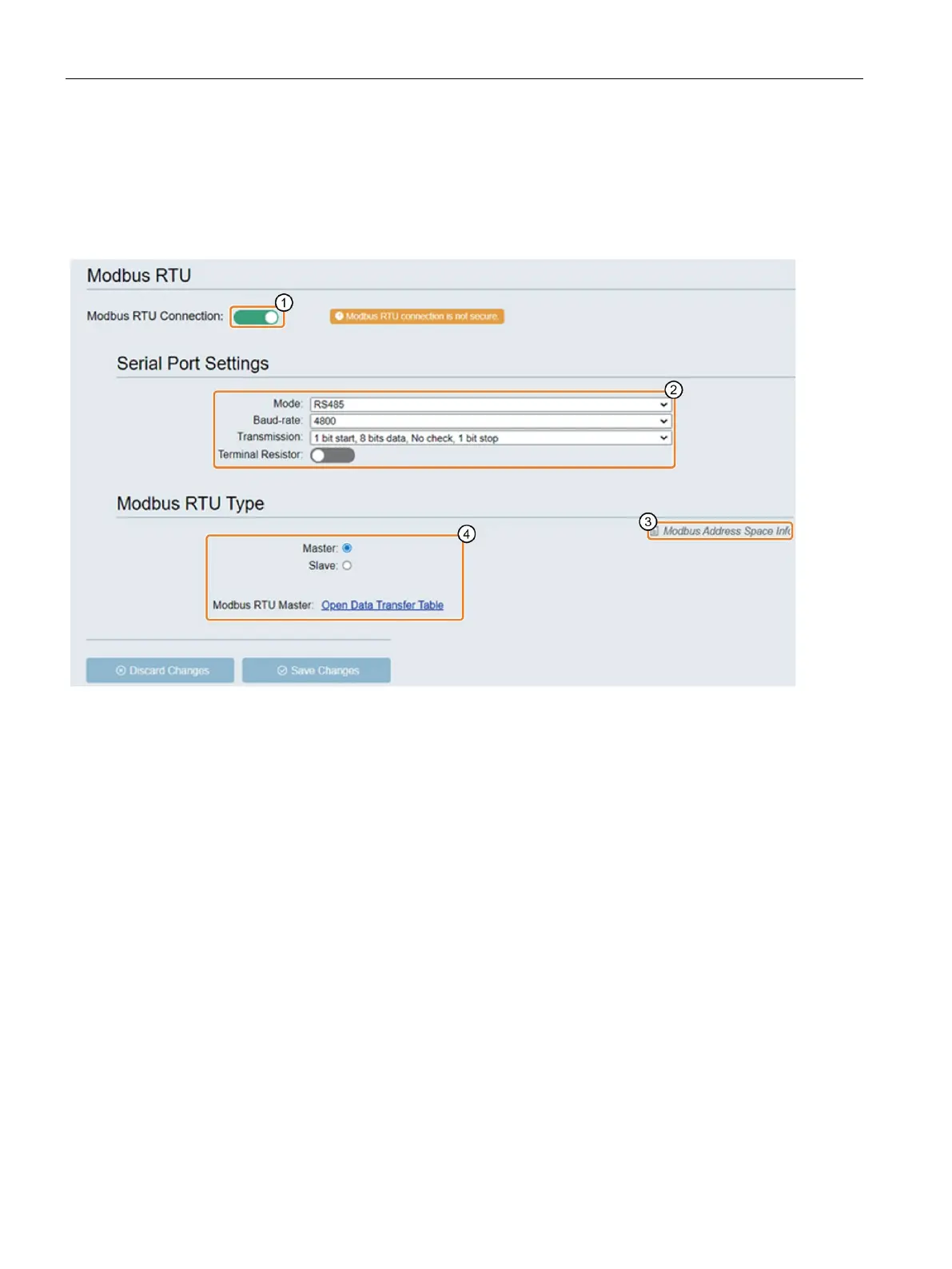
This page allows you enable, disable and set the Modbus RTU connection.
CIM supports only one Modbus RTU connection, either as Modbus RTU master or Modbus RTU
slave.
Enable or disable the Modbus RTU connection
Note: Modbus RTU connection is not secure.
Here you configure the properties of the connections of serial port.
• Mode: RS485, RS422 or RS232
• Baud-rate: set the transfer speed
• Transmission: serial port setup
• Terminal Resistor: enable or disable the embedded terminal resistor
Link to Modbus address space information page
Here you configure the Modbus RTU Type
• If you select "Master", you need to set the "Data transfer table".
• If you select "Slave", you need to set the "Modbus RTU Slave ID".
Range for the "Modbus RTU Slave ID": 1 to 255.



 To Next Page