Programming
150966 6-7
6.2.2.8 Selecting Characters for Profile Names
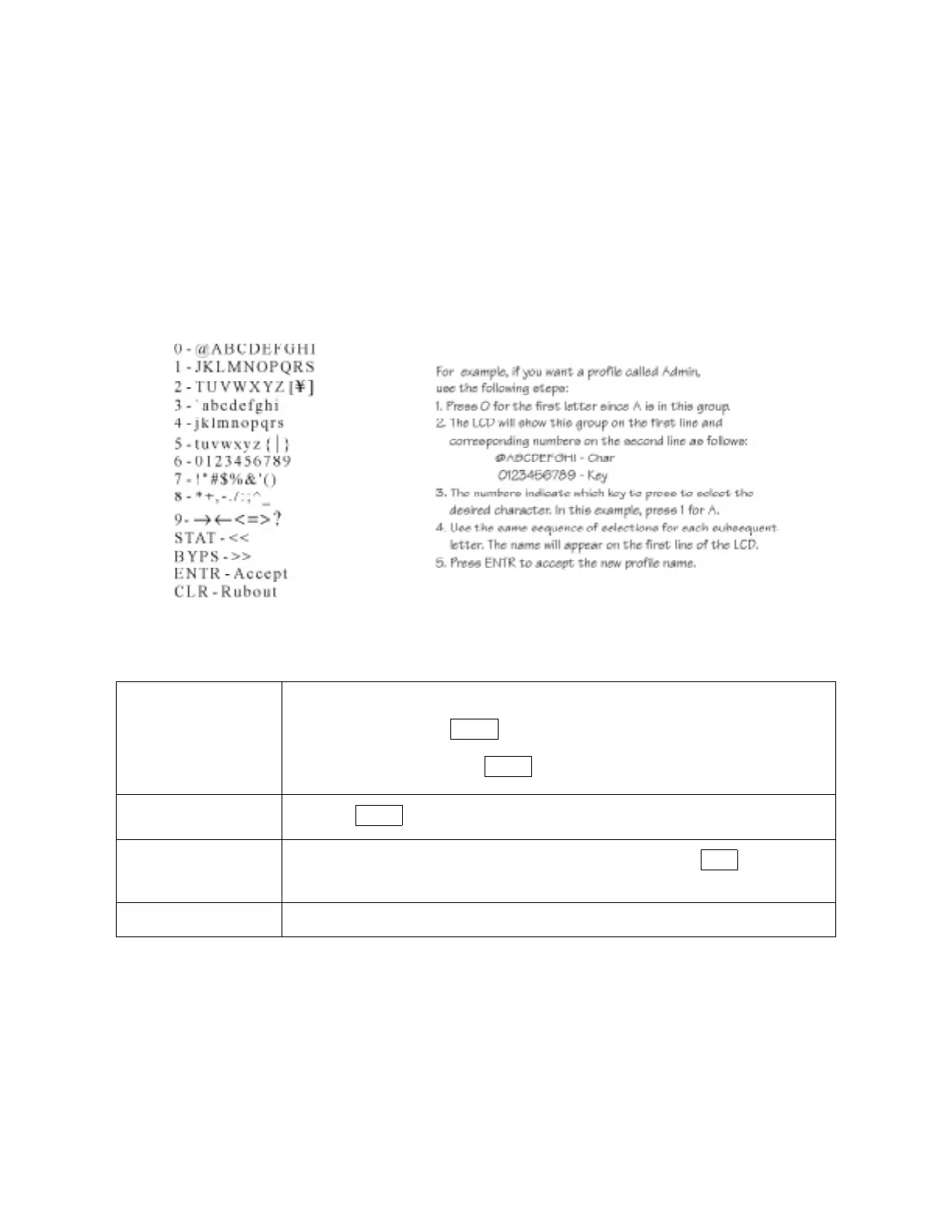
Entering characters (letters, symbols, or numbers) is a two-step process in touchpad program-
ming. You must first select a set of characters, then select the actual character. To do this, you
can follow the menu prompts on the LCD or use Table 6-2 shown in this document. This sec-
tion explains both methods.
Using the LCD Prompts
When you have selected the option for changing a profile name, the following scrolling menu
of available characters displays:
The following keys are available to let you move around and change characters within the
profile name you are editing.
STAT-<<
Move backward through the line that you want to edit.
The first time you press , your cursor will be under the right-most character
in the line. Continue pressing until you reach the character you want to edit.
BYPS->>
Press the key to move forward through the line you are editing.
CLR-Rubout
(Erase)
When your cursor is under the character you want to erase, press to delete the
character.
ENTR-Accept
Saves the profile name and returns to the menu.
STAT
STAT
BYPS
CLR



 To Next Page