NOTE
Reading in macOS/Android
The programming interface opens directly in the application itself instead
of a programming app. There is no
READ DEVICE button. Click on the
wireless icon button.
4. Select the component that you wish to read.
9 Feedback message shows, for example, the name of the key (John
Smith) or whether a non-programme MobileKey component is in stor-
age mode.
Alternatively, you can also read out the component list (see
Exporting the
component list [}30]
).
9.5 SmartBridge does not work
Go through the following check list if the automatic configuration was not
successful due to a problem with SmartBridge:
Check the power supply.
Is the SmartBridge LED flashing?
Check the LAN connection.
Check the Internet access.
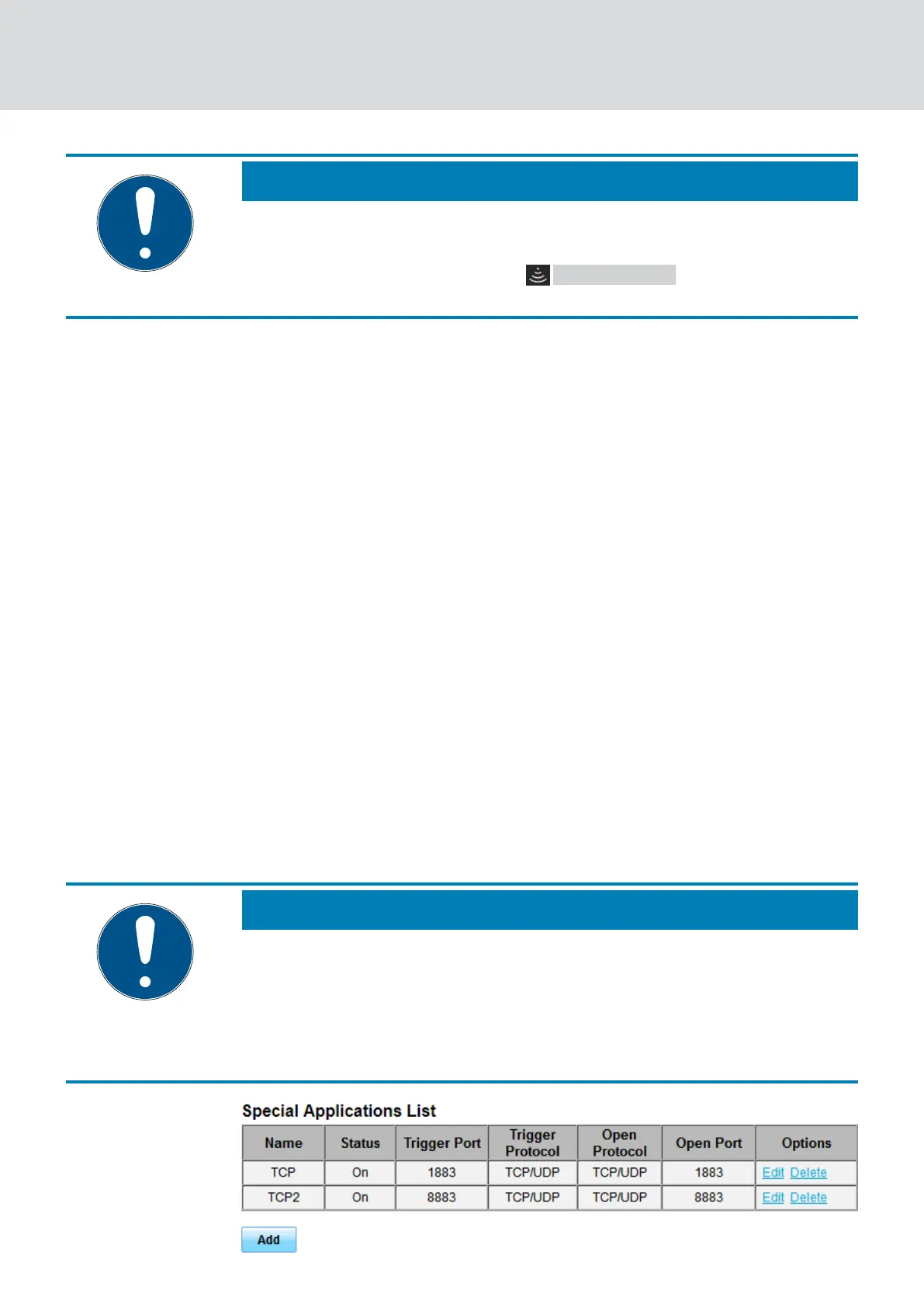
Are the ports 1883 and 8883 (TCP/IP) of the firewall open?
If necessary, add appropriate exceptions or forwarding in your router
to allow the SmartBridge to communicate externally on ports 1883
and 8883. Look for
port sharing
,
port forwarding
,
special
applications
, or the like.
NOTE
Port sharing device dependent
Usually routers automatically recognise that the SmartBridge wants to
communicate via port 8883 and releases the port.
In exceptional cases or in higher-security networks, you must release
the port manually (see the following examples).
MobileKey (Manual)
9. Fault rectification
65 / 75



 To Next Page