FMON10JEN 07.04.2017 Rev. 10J
28 (28)
10.4.2 Alarm limits
Flow meter alarm limits are set as follows:
1 Press SET-key to select a flow meter. Flow meter LED blinks to indicate that the flow meter has been se-
lected.
2 Use MODE-key to select the parameter to be set. LOW indicates the low limit value and HIGH indicates
the high limit value.
3 Use arrow keys to set the desired alarm limit values.
4 Exit setting mode or adjust other settings.
10.4.3 Alarm filtering
The parameter Alarm filtering (FIL) means alarm delay in seconds. If the flow rate of a flow meter goes back to
normal level from alarm level within the set delay, the alarm relay output is not activated. The filtering parame-
ter can be set within the range 000…999 s.
1 Use SET-key to select flow meter. Flow meter LED blinks to indicate that the flow meter has been select-
ed.
2 Press MODE-key, until text FIL is displayed, toggling with the current set value.
3 Use arrow keys to set the desired filtering value.
4 Exit setting mode or adjust other settings.
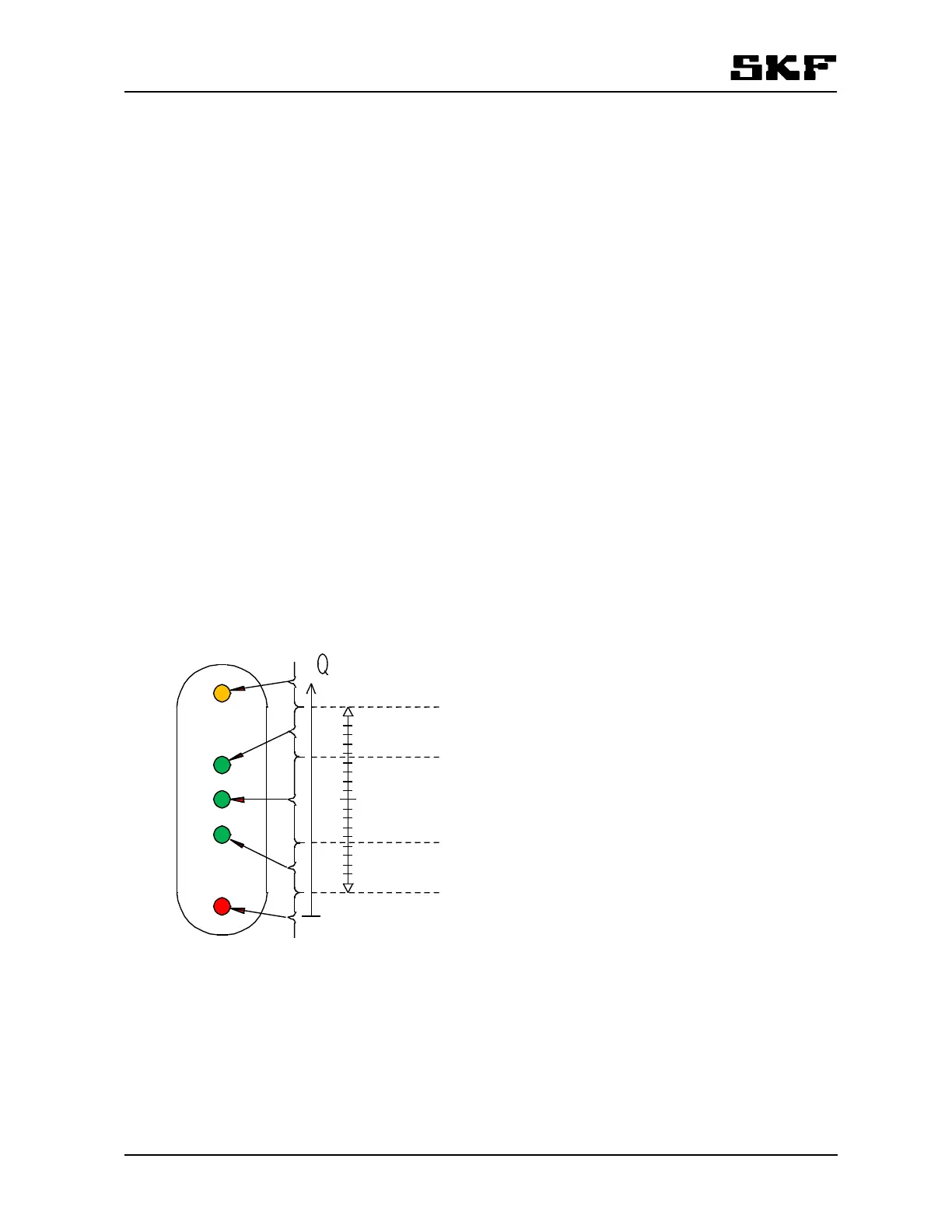
Pre-alarm limit i.e. the limit when outermost green LEDs are lit can be set with the keyboard. The value of the
parameter PrS is set as percentage from the subtraction of nominal value and alarm limit. The default value
for the pre-alarm limit is 40%. The percentage is common to all flowmeters in the Monitor.
100%
0%
0%
100%
flow
high alarm limit
pre-alarm limit,
high [PrS] 0…100%
pre-alarm limit,
low [PrS] 0…100%
low alarm limit
Figure 6 Pre-alarm limit
Example 1:
- Flowmeter’s high alarm limit is set to 3 l/min.
- Nominal value is set to 1 l/min.
- Low alarm limit is set to 0,5 l/min.
- The percentage is set to 80%.


 To Next Page