4 Product overview
SMA Solar Technology AG
Operating manualEVC22-3AC-20-BE-en-1024
Position Designation
F A label with a QR code to be scanned using the SMA apps
G Type label
The type label clearly identifies the product. The type label must remain per-
manently attached to the product. You will find the following information on
the type label:
• Device type (Model)
• Serial number (Serial No. or S/N)
• Date of manufacture
• Device-specific characteristics
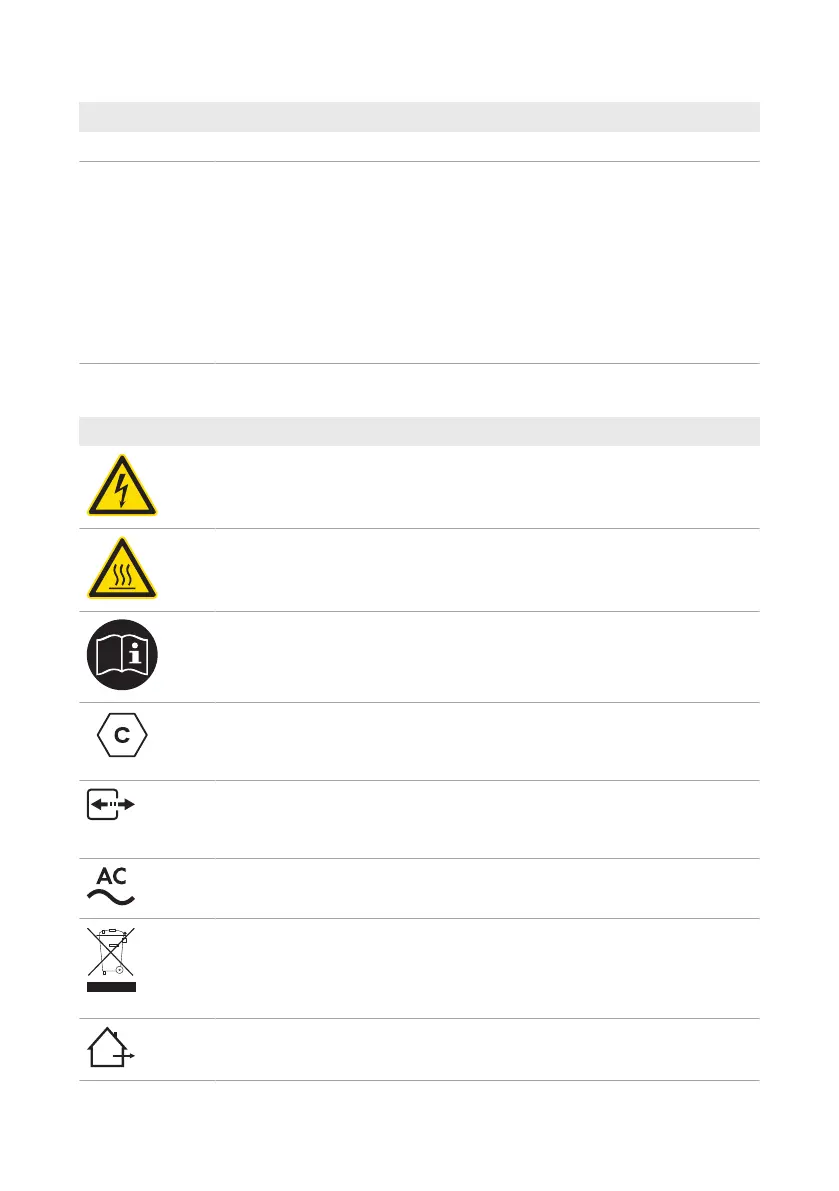
4.4 Symbols on the Product
Symbol Explanation
Beware of electrical voltage
The product operates at high voltages.
Beware of hot surface
The product can get hot during operation.
Observe the documentations
Observe all documentations supplied with the product.
Charge point designation
Drivers of electric vehicles can ensure whether their electric is usable with the
charging unit and the connector.
Data transmission
Together with the blue LED, this symbol indicates the status of the network con-
nection.
Alternating current
WEEE designation
Do not dispose of the product together with the household waste but in accor-
dance with the disposal regulations for electronic waste applicable at the in-
stallation site.
The product is suitable for outdoor installation.



 To Next Page