6 Electrical Connection
SMA Solar Technology AG
Operating manual EVC22-3AC-20-BE-en-10 47
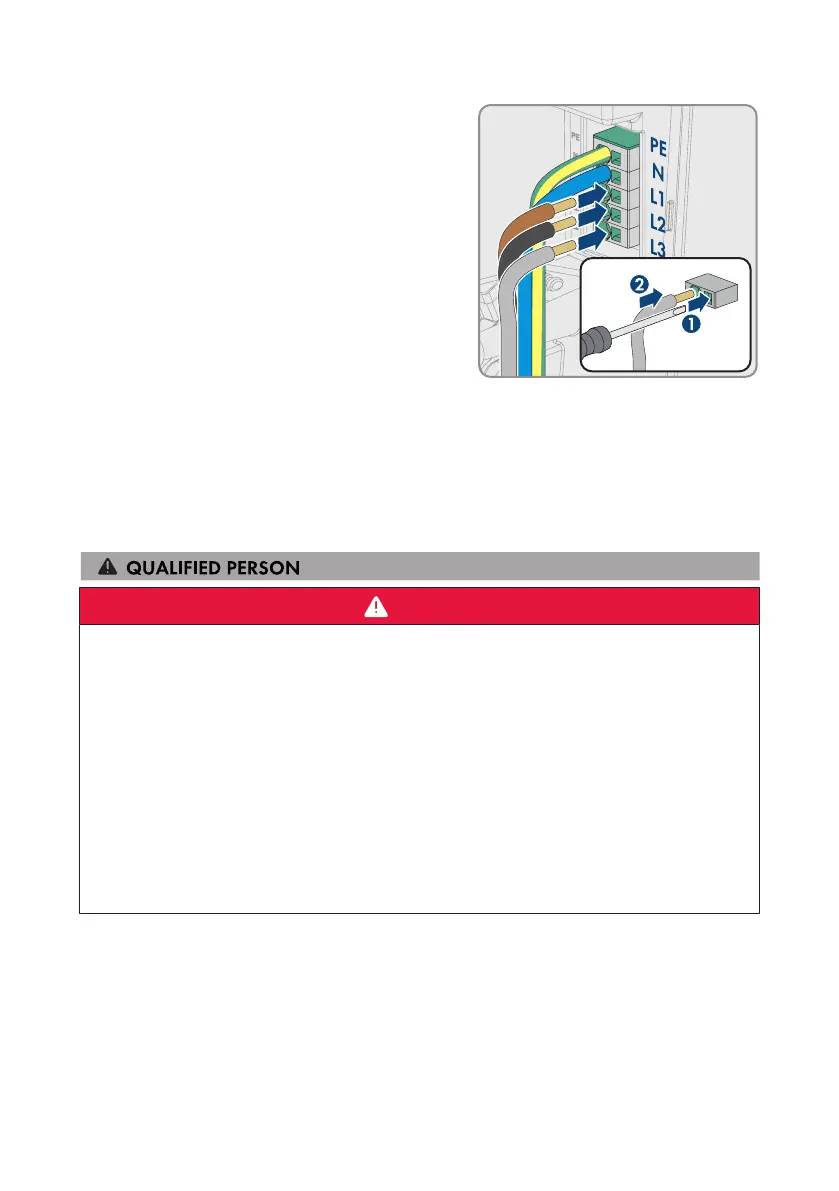
8. Depending on the requirements, connect the
conductors L1, L2, and L3 according to the
labeling.
9. Ensure that the correct conductors are assigned to all the terminals.
10. Ensure that all conductors are securely in place.
Also see:
• Overview of the Connection Area⇒page44
6.5 Connecting the Network Cables
DANGER
Danger to life due to electric shock in case of overvoltages and if surge
protection is missing
Overvoltages (e.g., in the event of a flash of lightning) can be further conducted into the building
and to other connected devices in the same network via the network cables or other data cables
if there is no surge protection. Touching live parts and cables results in death or lethal injuries due
to electric shock.
• Ensure that all devices in the same network are integrated in the existing overvoltage
protection.
• When laying the network cable outdoors, ensure that there is suitable surge protection at
the network cable transition from the product outdoors to the network inside the building.
• The Ethernet interface of the product is classified as "TNV-1" and offers protection against
overvoltages of up to 1.5kV.
Additionally required material (not included in the scope of delivery):
☐ Network cables(see Section6.1.7, page42)
☐ Where required: Field-assembly RJ45 connector.
Procedure:
1. Disconnect the charging station from voltage sources (see Section9, page81).



 To Next Page