6 Electrical Connection
SMA Solar Technology AG
Operating manualEVC22-3AC-20-BE-en-1054
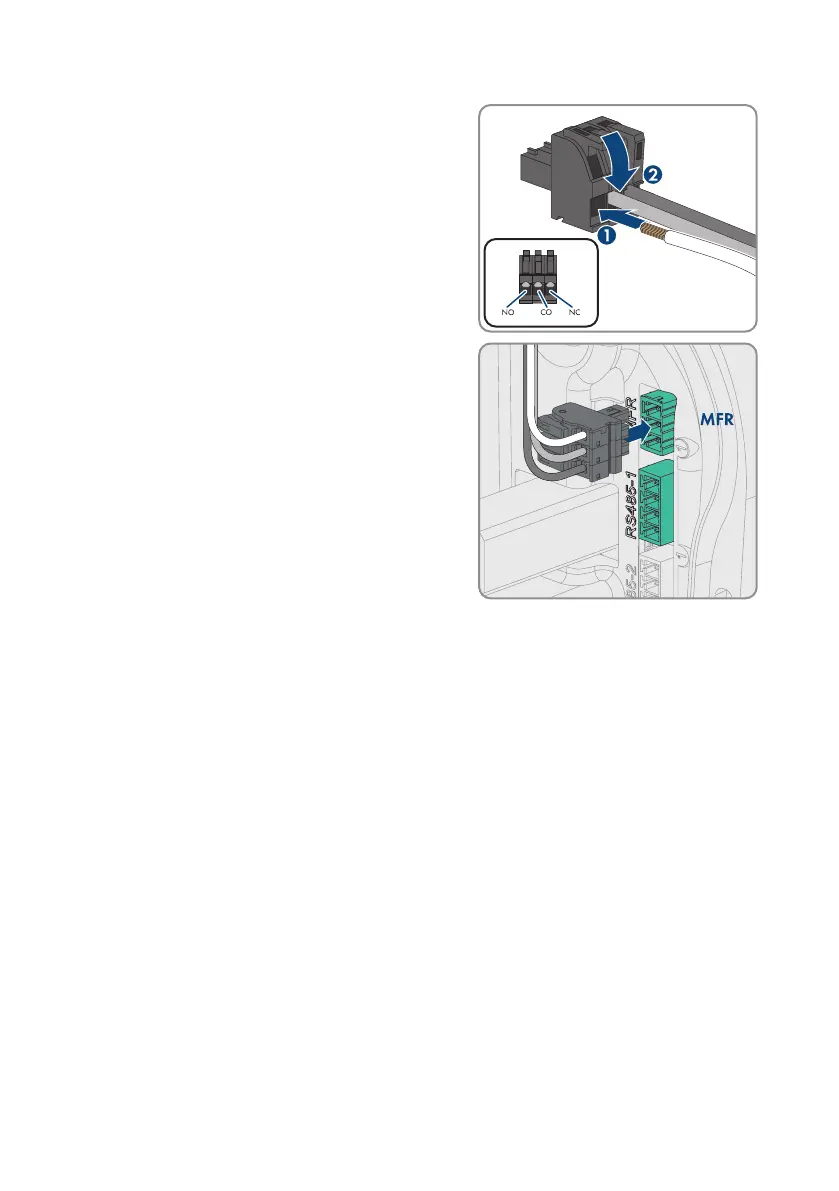
5. Connect the cable to the 3-pole terminal block
according to the operating mode. Ensure that the
conductors are plugged completely into the terminal
points up to their insulation.
6. Insert the three-pole terminal block with the
connected conductors into the MFR slot.
7. Secure the cable to a strut using a cable tie, and cut off the protruding end of the cable tie
with a suitable tool.
8. Ensure that the terminal block is securely in place.
9. Ensure that all conductors are correctly connected.
10. Ensure that the conductors sit securely in the terminal points. Tip: To release the conductors,
open the terminal points using a suitable tool.
6.9 Connecting to the RS485 interface
6.9.1 RS485 input
The charging station can communicate with wired SMA communication products or approved
meters via the RS485 interface. The function is determined by the software functionality.



 To Next Page