8 Operation
SMA Solar Technology AG
Operating manualEVC22-3AC-20-BE-en-1070
Procedure:
1. Choose the product in the focus navigation.
2. Select the menu Configuration.
3. Select the Parameters menu item.
4. Call up the parameter via the search function or navigate to the parameter.
5. Change the parameter value.
6. Click on [Save].
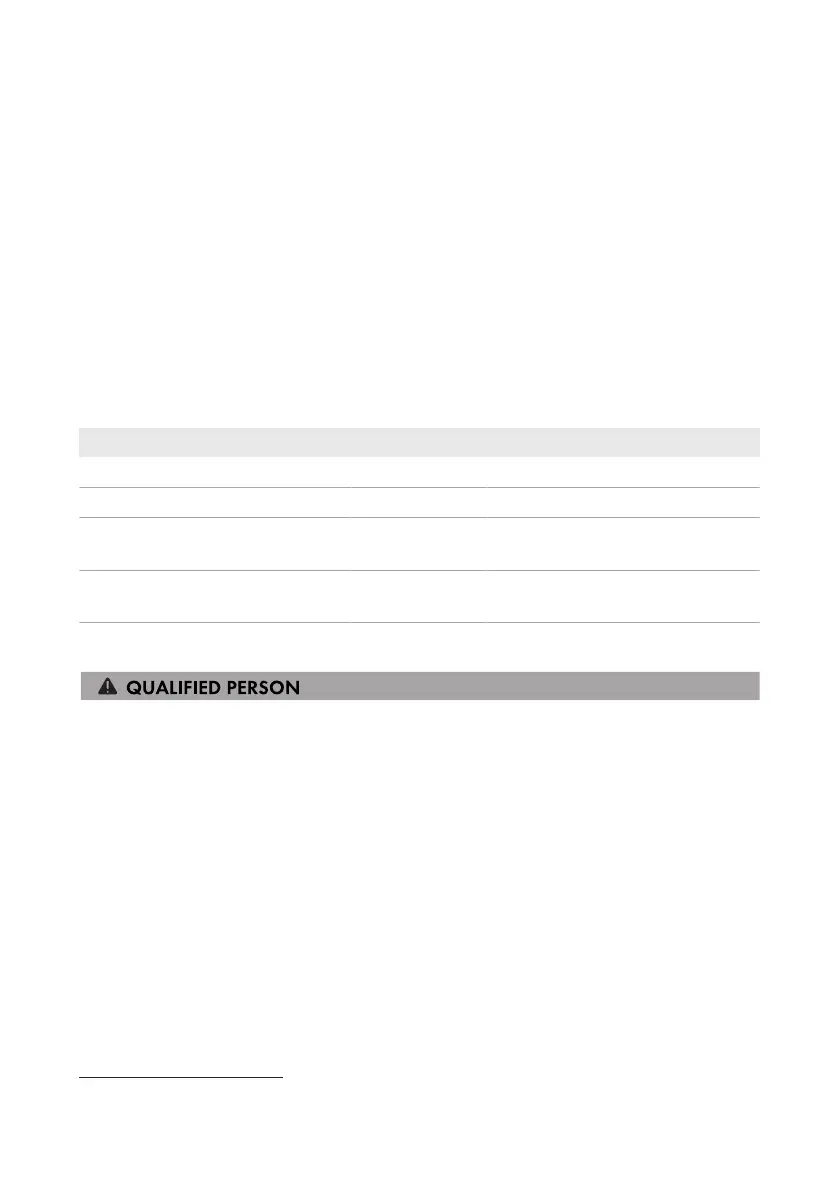
8.5 Digital output (MFR)
8.5.1 Use of the digital output (MFR)
The digital output (MFR) can be switched depending on measured values or states.
You have several options to use the digital output.
Possible use Category Explanation
Notification in the event of an error System state System is in warning or error state.
Alarm in case of warning or error System state System is in error state.
Setpoint of active power limitation
1)
Setpoints The active power value currently to be
set
System active power (grid-supplied
power)
1)
Grid connection
point
Currently drawn active power.
8.5.2 Configure the digital output (MFR)
Requirements:
☐ A signal source must be connected to the digital output (MFR).
☐ The charging station to which the signal source is connected must be configured as System
Manager.
☐ The user interface must be open and you must be logged in as Installer or Administrator.
Procedure:
1. Select the product in the focus navigation.
2. Select the menu Configuration.
3. Select the menu item I/O configurations.
4. Select the type of the I/O channel Digital output.
5. Select the use for the digital output.
6. If necessary, activate inversion of the signal. Observe the pin assignment of the terminal block.
7. Click on [Save].
1)
Conditions for activating the outlet signal must be specified



 To Next Page