Page 42
501 SE Columbia Shores Boulevard, Suite 500, Vancouver, Washington 98661, USA l +1 360 859 1780
SmartRG Inc. Propriety and Condential. All Rights Reserved. Copyright © 2014 smartrg.com
Field Name Description
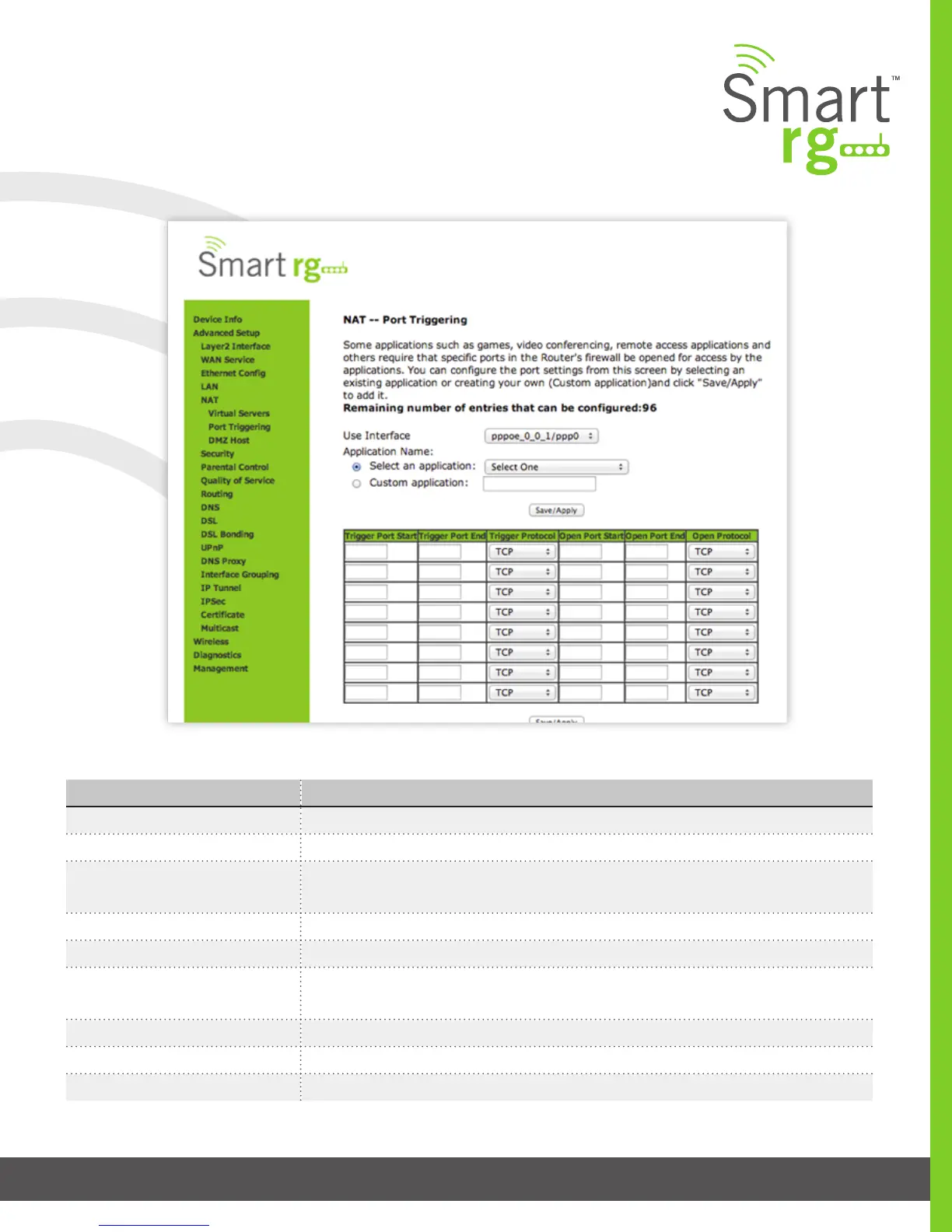
Use Interface Select the interface over which the port triggering rule will apply.
Select an Application Choose from this list of applications which commonly require a Port trigger entry.
Custom Application A free form text eld. Enter a unique name for the application for which you are creating a
Port Trigger entry
Trigger Port Start [1-65535] An outgoing trigger port number. Set the beginning of the range of available ports.
Trigger Port End [1-65535] An outgoing trigger port number. Set the end of the range of available ports.
Trigger Protocol [TCP, UDP, TCP/UDP] Select the protocol required by the application that will be using the
ports in the specied range.
Open Port Start [1-65535] An incoming port number. Set the beginning of the range of available ports.
Open Port End [1-65535] An incoming port number. Set the end of the range of available ports.
Open Protocol [TCP, UDP, TCP/UDP] Select the protocol from the drop down list.
The individual elds on this screen are dened as follows:



 To Next Page