Page 93
501 SE Columbia Shores Boulevard, Suite 500, Vancouver, Washington 98661, USA l +1 360 859 1780
SmartRG Inc. Propriety and Condential. All Rights Reserved. Copyright © 2014 smartrg.com
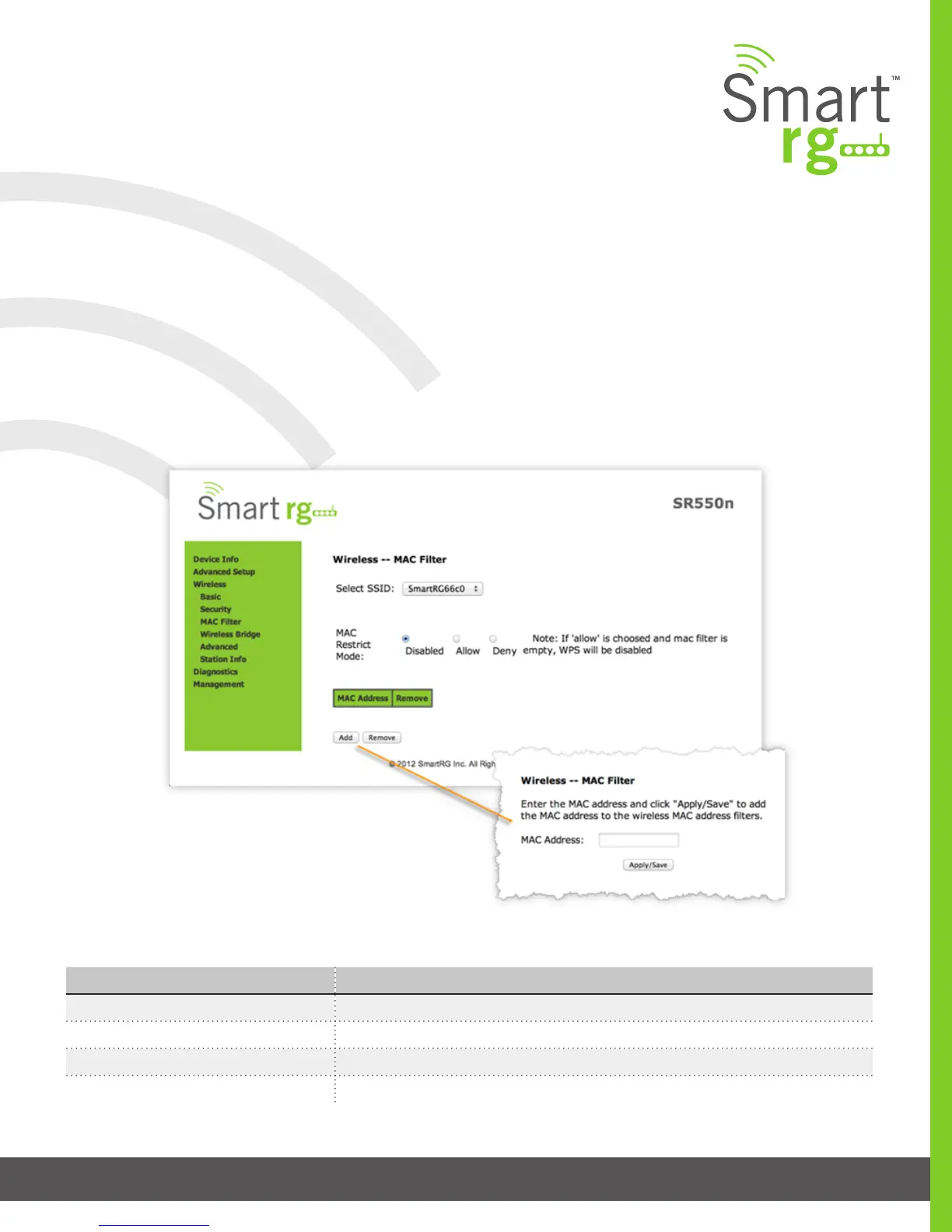
MAC Filter
Also known as Layer 2 address ltering, MAC Filtering refers to an access control methodology whereby the 48-bit address as-
signed to each LAN host NIC is used to determine access to the network.
After selecting Wireless -> MAC Filter from the left navigation bar, select an SSID to lter from the drop-down list.
Next, select the MAC Restrict Mode (Disabled, Allow or Deny).
Use the Add button to add a MAC address to the lter list.
Click Apply/Save to commit the completed entry.
The individual elds on this screen are dened as follows:
Field Name Description
Select SSID Select the SSID to apply this MAC lter rule to.
MAC Restrict Mode Disabled: MAC ltering is off.
Allow: For specied MAC address, access is permitted.
Deny: Access for the specied MAC address is rejected.



 To Next Page